Key Takeaways
- VT Markets is recognised as the Best Gold Trading Platform 2026 by Global Financial Market Review.
- The platform facilitated more than USD 1.5 trillion in gold trading volume during January 2026.
- Traders can access gold as XAUUSD or other quote currencies through the VT Markets app, MT4/MT5, and TradingView with advanced charting and analysis tools.
- Features include watchlists, Copy Trading, multi-timeframe analysis, one-tap trading, and TradingView integration.
- Built-in tools include TradingView charts, economic calendar alerts, Trading Central market analysis, and technical indicators.
- Client funds are held in segregated accounts, and VT Markets operates through regulated entities in multiple jurisdictions (FSCA, FSC, CMA as a Category 5 licence)
Gold remains one of the most actively traded markets in the world, influenced by inflation trends, interest rate expectations, and broader macroeconomic developments. These drivers contribute to constant price movement and ongoing trading interest across global markets.
To participate effectively in gold trading, traders rely on platforms that provide stable execution, reliable pricing, and access to market analysis in a single environment. VT Markets is built to support these needs across different trading styles and time horizons.
This guide explores why VT Markets is considered one of the best gold trading apps. You will learn about its key features, trading tools, account options, and the overall trading experience it offers.
Gold Trading at Your Fingertips
VT Markets provides a streamlined way to trade gold with ease. Traders can track gold price movements across related markets, including cross pairs and alternative instruments linked to gold, open and manage positions, and stay connected to the market without unnecessary complexity.
The platform connects directly to MetaTrader 4 (MT4) and MetaTrader 5 (MT5), allowing access to charting tools, technical indicators, and order management features within a familiar trading environment. This supports both active trading and longer-term position management.
With the VT Markets mobile app, traders can monitor gold markets in real time and execute trades from anywhere, ensuring continuous access to market opportunities throughout different trading sessions.
Benefits of Trading Gold with VT Markets
Before exploring the platform’s features, it is worth understanding the advantages that make VT Markets a popular choice among gold traders.
1. Award-Winning Gold Platform
VT Markets is recognised as the Best Gold Trading Platform 2026 by Global Financial Market Review, reflecting its focus on delivering a reliable and efficient trading environment.
The platform combines competitive trading conditions, advanced tools, and a seamless experience for accessing gold markets with confidence.
2. Strong Gold Trading Activity and Market Participation
In January 2026 alone, VT Markets facilitated more than USD 1.5 trillion in gold trading volume, demonstrating strong participation from traders during a highly active period for precious metals.
This level of trading activity highlights the platform’s ability to support traders during periods of elevated market volatility when execution quality and platform stability matter most.
3. Competitive Trading Conditions for Gold
Trading costs can have a direct impact on performance, especially for active traders. VT Markets offers spreads from 0.0 pips on selected accounts, access to deep liquidity, and leverage of up to 500:1 (depending on entity and instrument), supporting flexible position sizing across changing market conditions.
Combined with fast execution and transparent pricing, this helps traders manage gold positions with greater efficiency and consistency.
4. Wide Range of Gold Products
VT Markets provides access to a broad selection of gold instruments, allowing for flexible trading strategies and exposure across multiple markets. This includes:
- Gold Symbols in Different Currencies – Trade XAUUSD, XAUEUR, XAUJPY, and XAU AUD to gain exposure to gold price movements relative to different fiat currencies.
- Cross-Gold Pairs – Instruments such as BTCXAU and XAGXAU enable traders to explore correlations and alternative gold-linked markets.
- Gold ETFs – Access popular gold ETFs including GDX, GDXJ, GLD, GOEX, NUGT, SGDJ, and SGDM, offering diversified exposure to gold and mining equities.
This variety allows traders to monitor and participate in global gold markets from a single platform, whether they prefer spot trading, ETFs, or cross-asset pairs, helping them diversify strategies and capitalise on market movements.
5. Advanced Charting and Analysis Tools
Gold prices are influenced by inflation data, interest rate decisions, central bank commentary, geopolitical developments, and shifts in market sentiment. Analysing these movements requires access to reliable trading tools.
VT Markets integrates with MetaTrader 4 (MT4) and MetaTrader 5 (MT5), providing advanced charting, technical indicators, drawing tools, and flexible order management to support a wide range of trading strategies.
6. Access the Gold Market Anywhere
The VT Markets mobile app allows traders to monitor gold prices, analyse charts, manage positions, and place trades from almost anywhere.
Whether responding to major economic releases or tracking longer-term trends, traders can stay connected to the gold market throughout the trading day from a single platform.
7. Regulated Trading Environment
Security and trust are important when choosing a trading platform. VT Markets operates through regulated entities in multiple jurisdictions and maintains client funds in segregated accounts, keeping client funds separate from company operational funds in accordance with applicable regulations.
The company also follows compliance procedures such as Anti-Money Laundering (AML) and Know Your Customer (KYC) requirements. Eligible clients may have access to client fund insurance coverage of up to USD 1,000,000 per account, subject to applicable terms, conditions, and exclusions.
Read more details on VT Markets’ regulatory framework: Is VT Markets a Regulated Broker?
Core Features of the VT Markets App
The VT Markets app includes a range of features designed to help traders analyse the gold market, manage positions, and execute trades more efficiently.
Watchlist
Gold does not move in isolation. Many traders also monitor related markets such as silver (XAGUSD), the US dollar, and major indices to gain additional market context. The watchlist feature allows traders to save and monitor their preferred instruments in one place.
By organising frequently viewed markets into a personalised watchlist, traders can track price movements more efficiently without repeatedly searching for the same instruments.
How to use the watchlist on the VT Markets app:
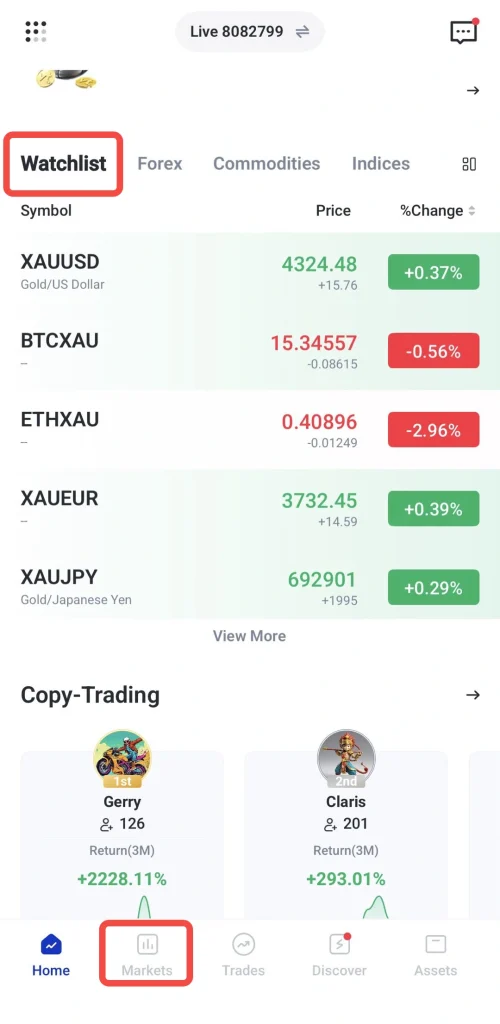
1. Open the VT Markets app and navigate to the Markets.
2. Tap the Watchlist tab to view your existing watchlist or create a new one.
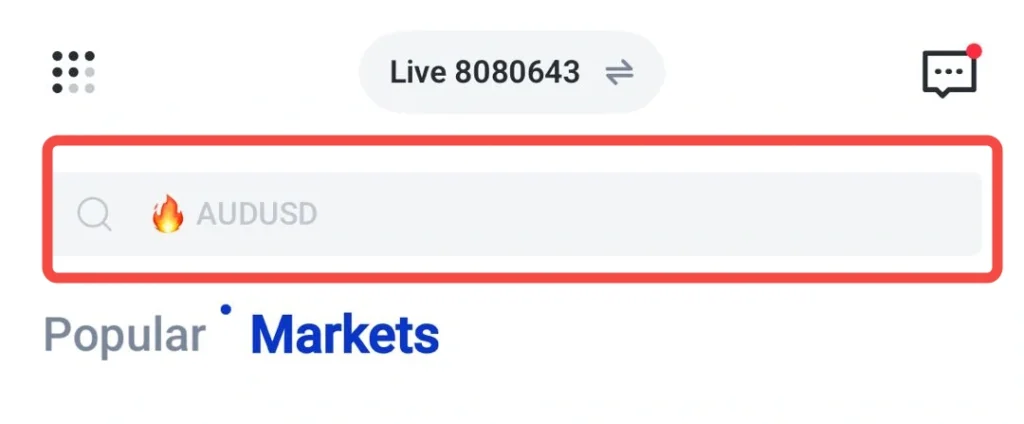
3. Search for XAUUSD or other gold pair you want to follow, then tap the ⭐ icon
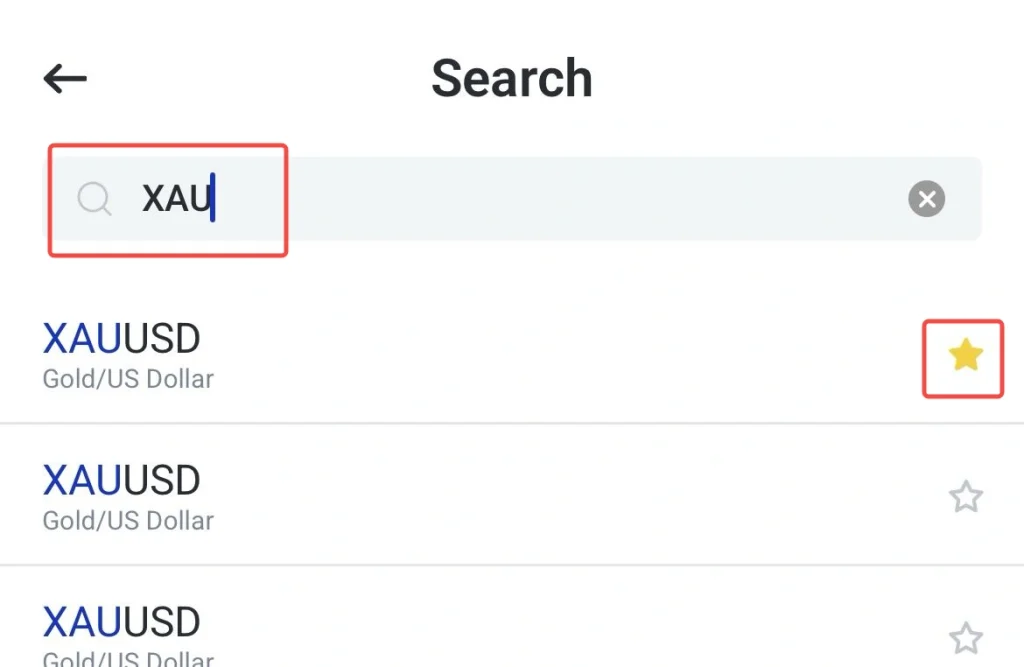
4. Rearrange assets and set price alerts if required.
Copy Trading
Copy Trading allows users to automatically replicate the trades of experienced strategy providers. Rather than making every trading decision independently, users can choose a strategy provider and have eligible trades copied directly into their account while retaining full control over their settings.
How to use Copy Trading on the VT Markets app:
1. Open the VT Markets app, switch your account to copy trading, then navigate to the Copy Trading section.
If you have not set up a Copy Trading account yet, follow our guide: How to Open a Live Trading Account with VT Markets
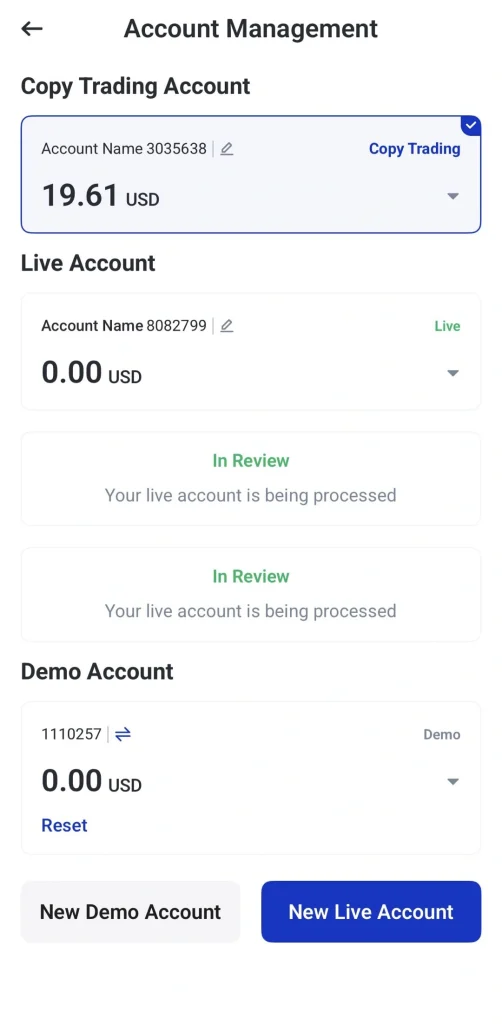
2. Browse available strategy providers or explore the Top 20 best-performing traders of the week.
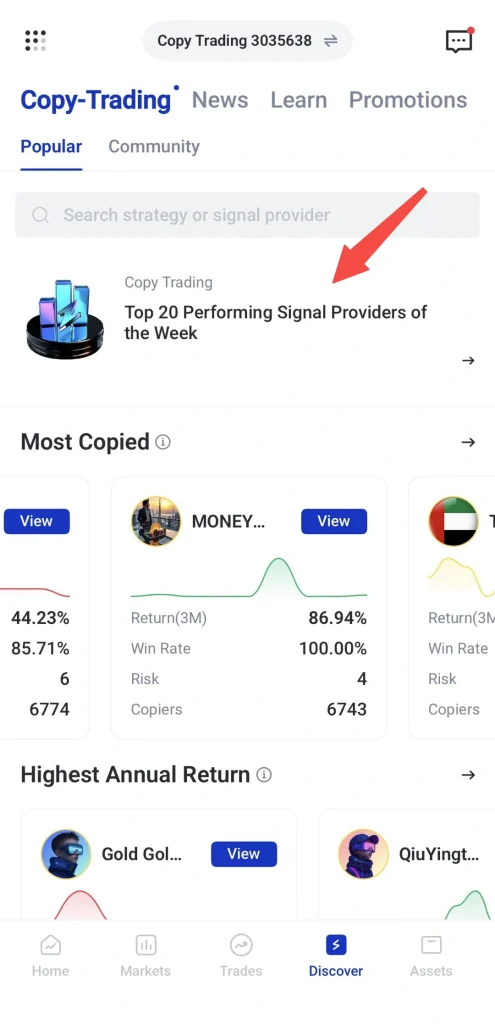
3. Compare different traders by reviewing their performance, trading history, and risk level before selecting one that suits your objectives and risk tolerance. Let’s see the example below:
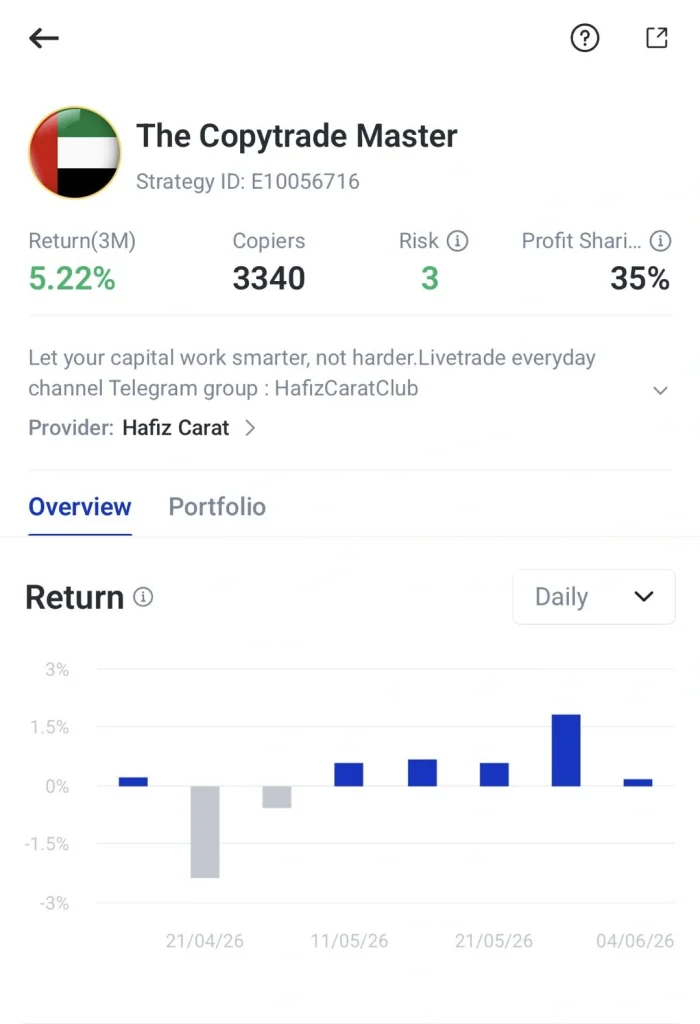
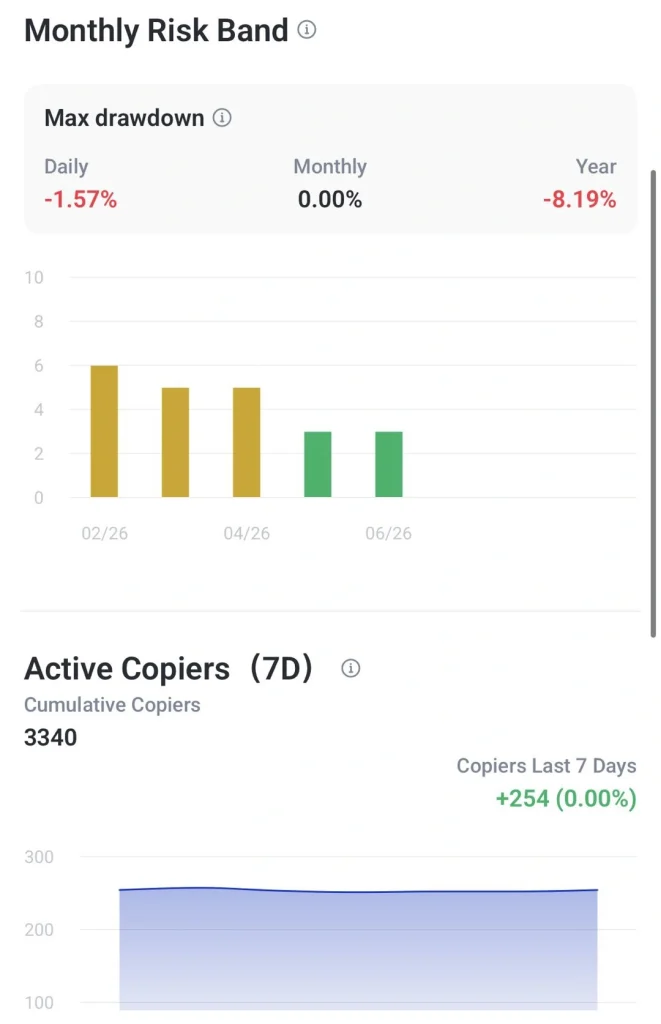
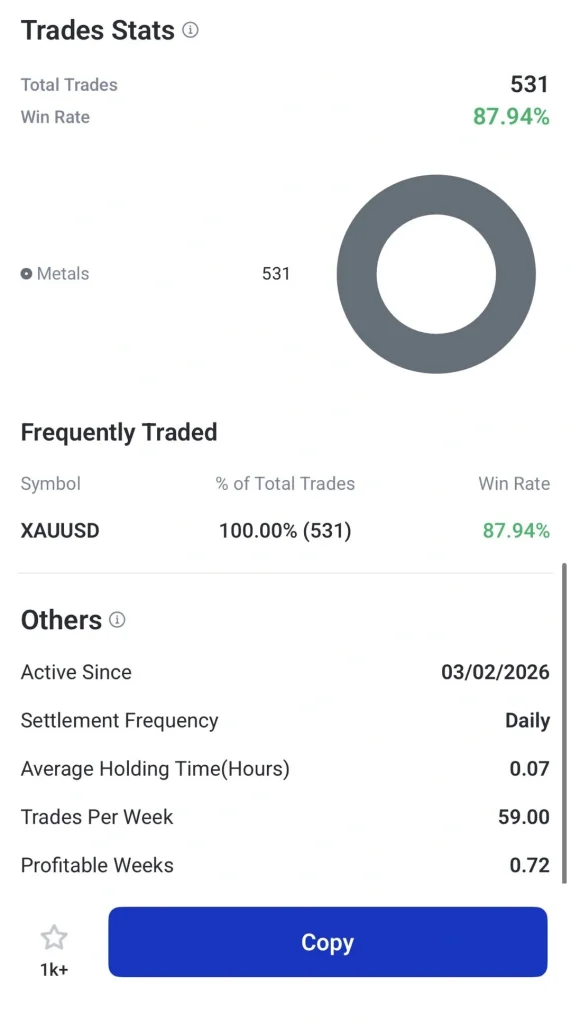
4. Allocate funds and begin copying trades automatically.
5. Monitor performance regularly and adjust your settings when needed.
Want to learn more about copy trading? Read these guides:
- 5 Common Mistakes to Avoid When Copy Trading
- A Complete Beginner’s Guide to Copy Trading in 2026
- How to Choose the Right Strategy Provider
- How to Evaluate Copy Trading Providers: Key Metrics Every Trader Should Know
Multi-Timeframe Analysis
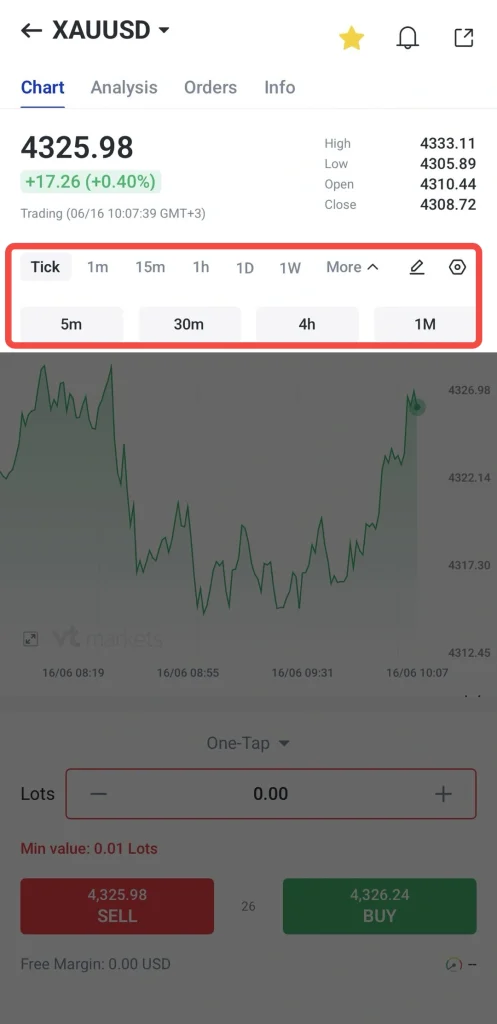
Gold prices can behave very differently depending on the timeframe being viewed. Multi-timeframe analysis allows traders to switch between chart intervals without leaving the chart screen, making it easier to evaluate price movement from different perspectives.
How to use multi-timeframe analysis on the VT Markets app:
1. Open the chart of your selected gold-related instrument.
2. Tap the timeframe menu and select chart intervals.
3. Switch between timeframes to compare short-term and long-term price movement.
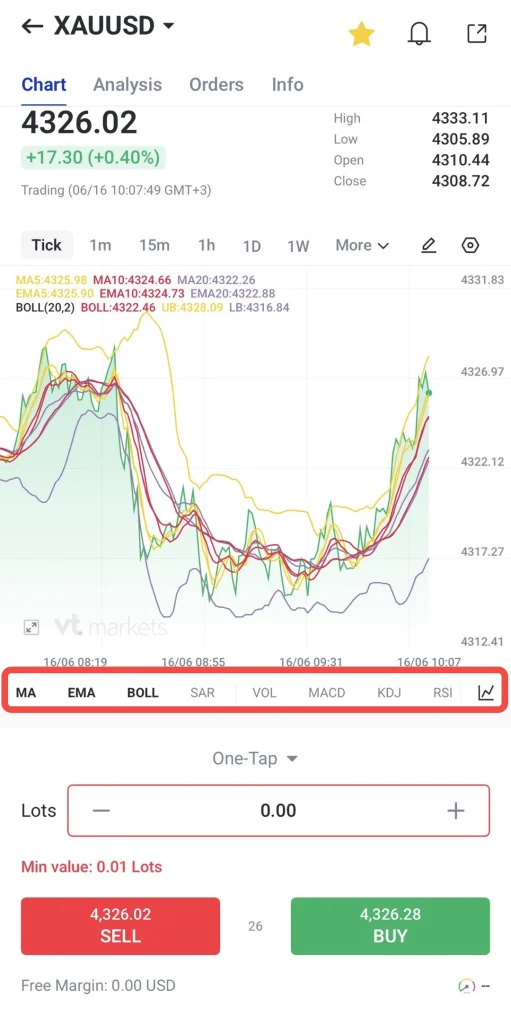
4. Apply indicators if required to support your analysis.
One-Tap Trading
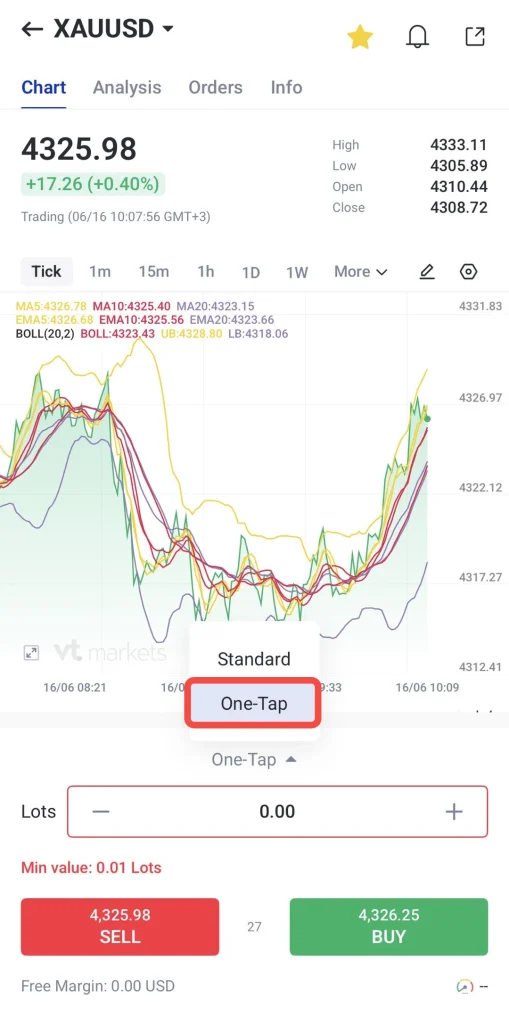
One-Tap Trading allows traders to place orders more efficiently by reducing the number of steps required to enter or exit a position. This feature can be particularly useful during periods of increased volatility when timely execution is important.
How to use one-tap trading on the VT Markets app:
1. Open the chart of your selected gold-related instrument.
2. Navigate to the One-Tap button above the sell and buy options
3. Configure your trading preferences, including open position, stop loss, take profit levels and more.
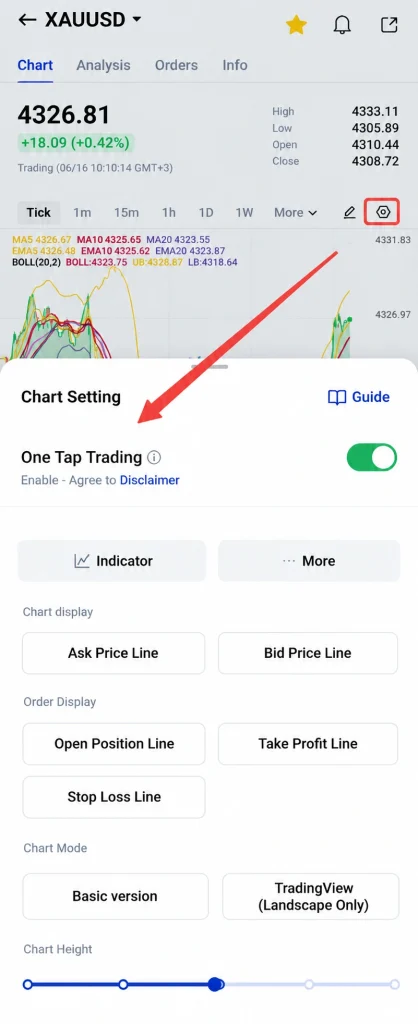
4. Review the settings carefully.
5. You may also check this guide to understand the chart setting better.
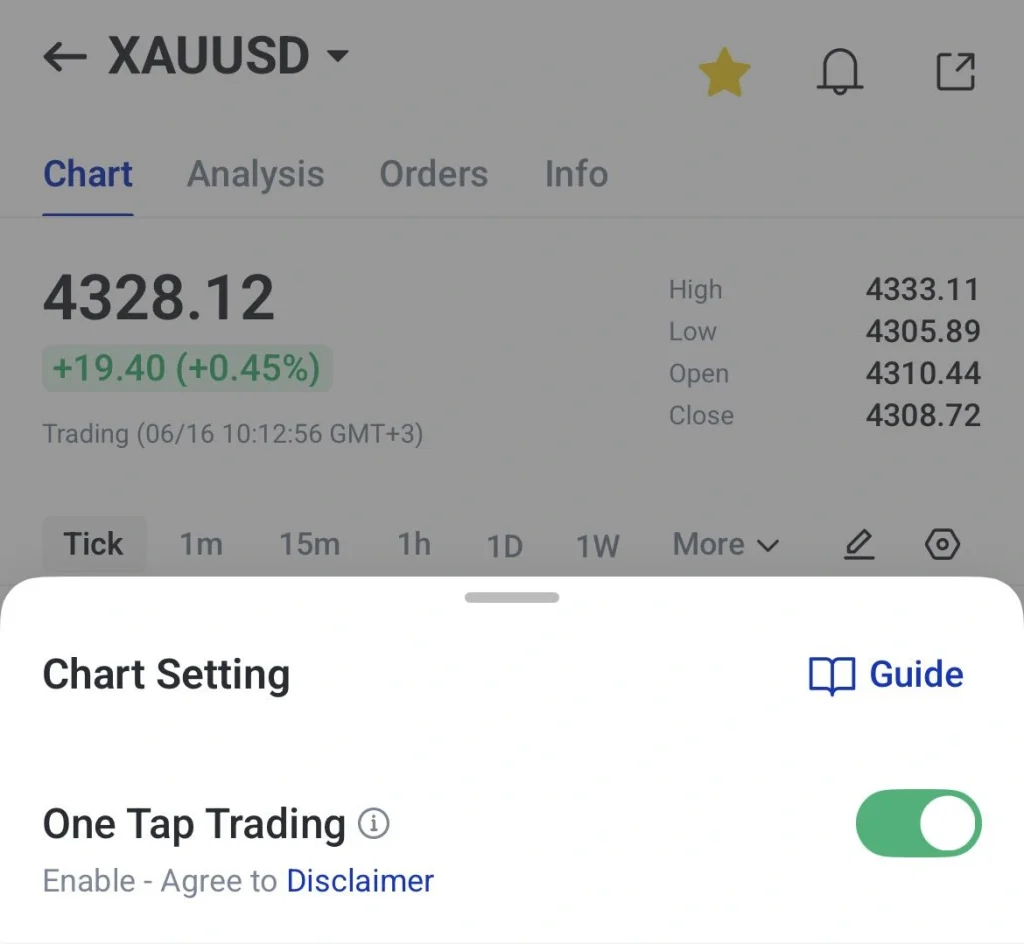
Note: Beginners may keep the One Tap trading options turned off to reduce the chance of accidental orders. More experienced traders may adjust their settings based on their trading preferences.
Two-Factor Authentication
Protecting your trading account is just as important as managing your positions. Two-factor authentication adds an extra layer of security by requiring a verification code in addition to your password.
This helps reduce the risk of unauthorised access, allowing traders to focus on monitoring opportunities in the gold market with greater confidence.
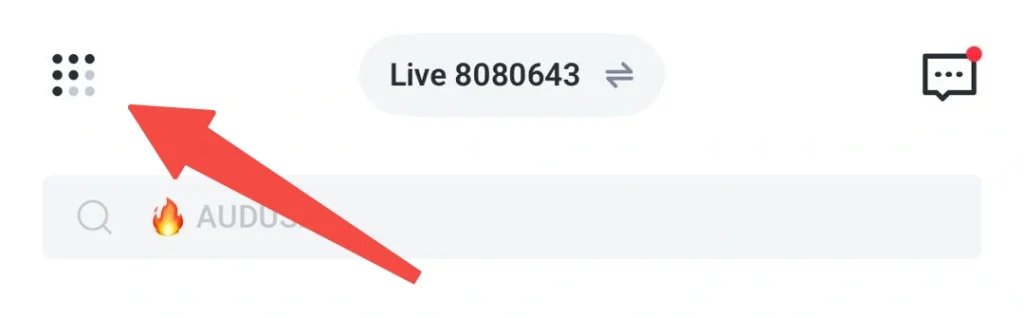
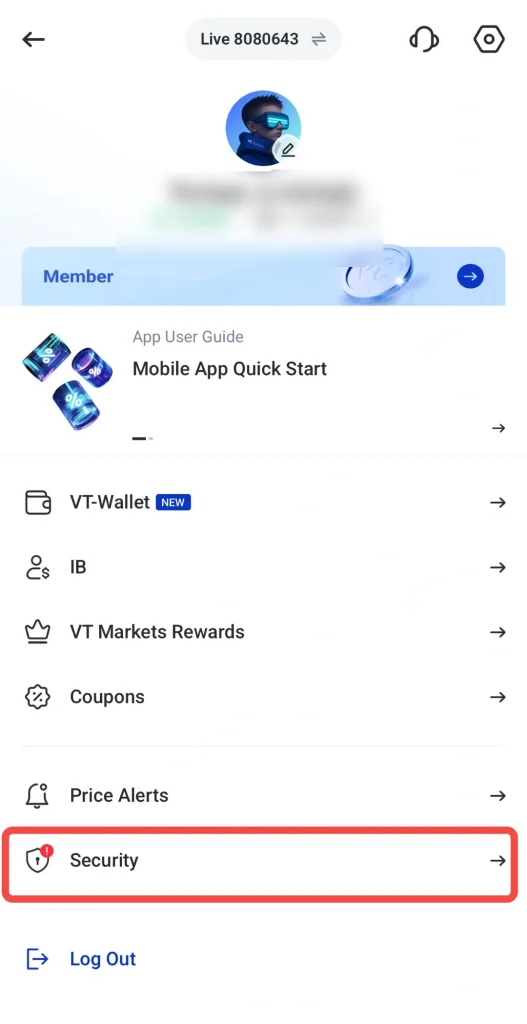
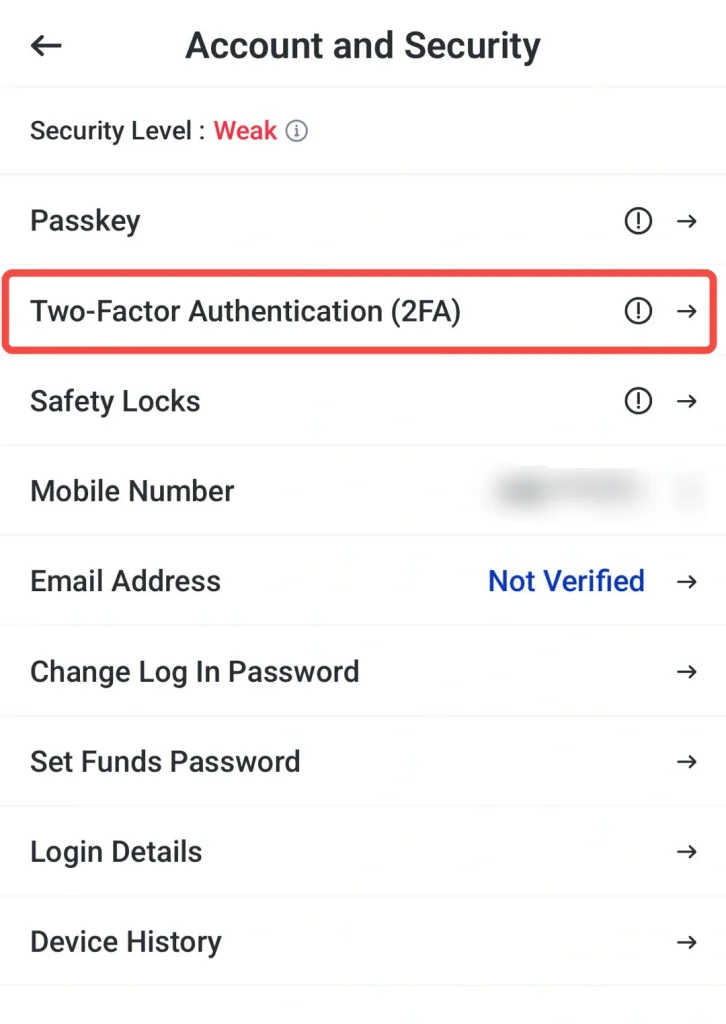
How to set up two-factor authentication on the VT Markets app:
1. Open the dashboard and click this menu button.
2. Select Security options
3. Click Two-Factor Authentication (2FA)
4. Click enable and follow the instructions to link it with Google Authenticator or other authenticator app of your choice.
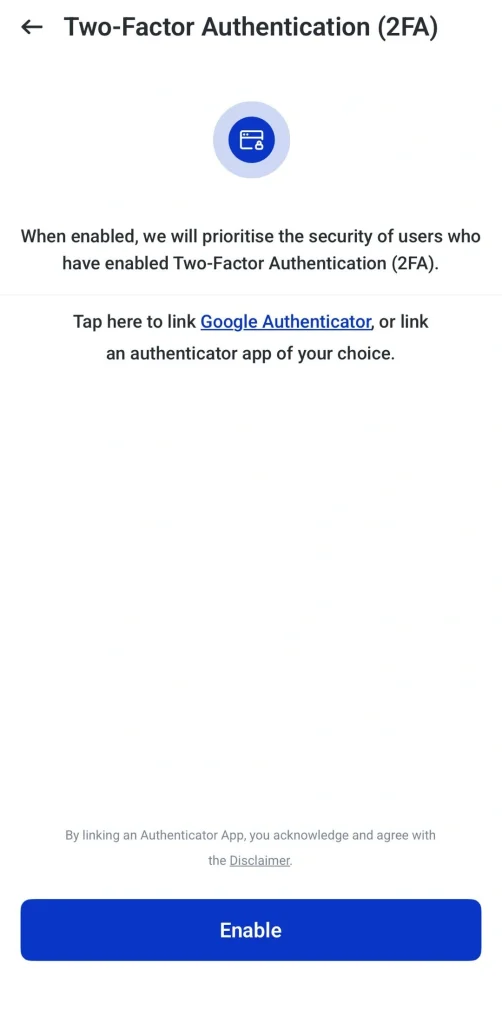
5. Use the verification code provided whenever logging in or confirming sensitive actions.
Learn how to set up 2FA and manage security settings here: VT Markets App Security Settings Guide: 2FA, Passkey, Safety Locks, and Passwords
Advanced Trading Tools in the VT Markets App
In addition to its trading features, the VT Markets app offers a range of tools that can help traders understand market trends, track key events, and refine their trading strategies.
Tradingview Chart Integration
Technical analysis is an important part of gold trading, particularly when identifying trends, support and resistance levels, or potential breakout opportunities. VT Markets integrates TradingView directly into the app, giving traders access to advanced charting features without needing a separate platform.
Traders can view gold price charts, add technical indicators, draw trendlines, and analyse market movements from a single screen. This makes it easier to research the market and place trades within the same environment.
How to use TradingView charts on the VT Markets app:
1. Select a gold-related instrument and open the chart window.
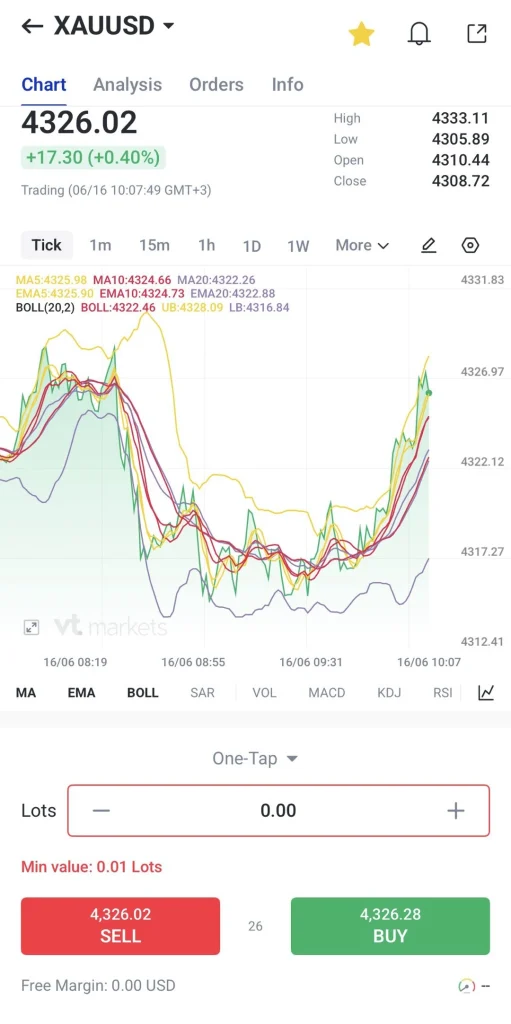
2. Click the button and choose TradingView mode.
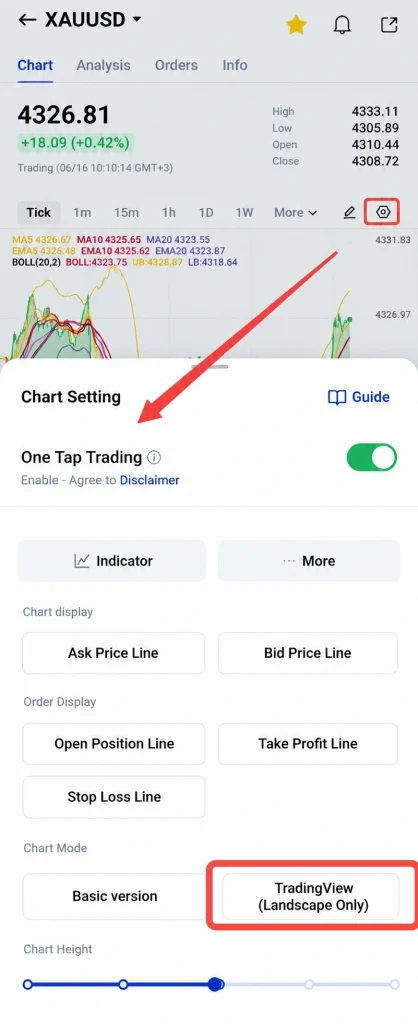
3. The layout will turn to landscape.
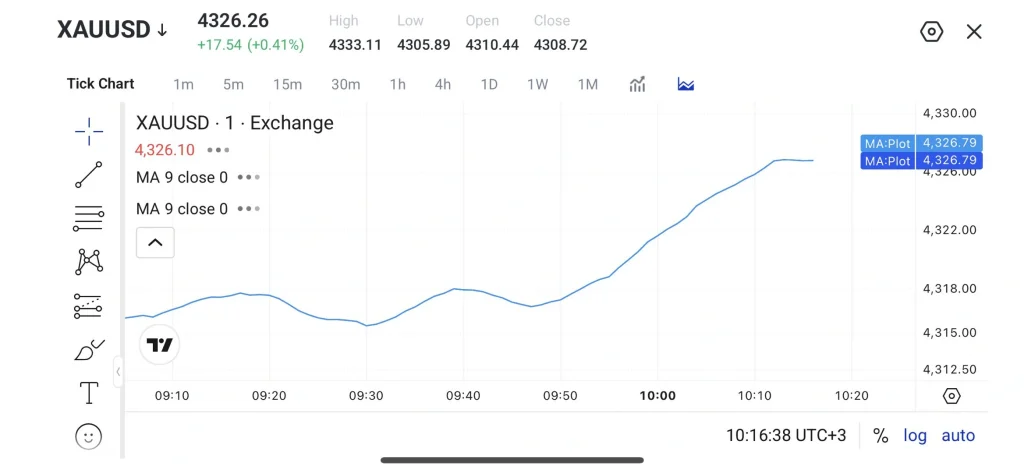
4. Add indicators such as RSI, MACD, Bollinger Bands, moving averages based on your preferences.
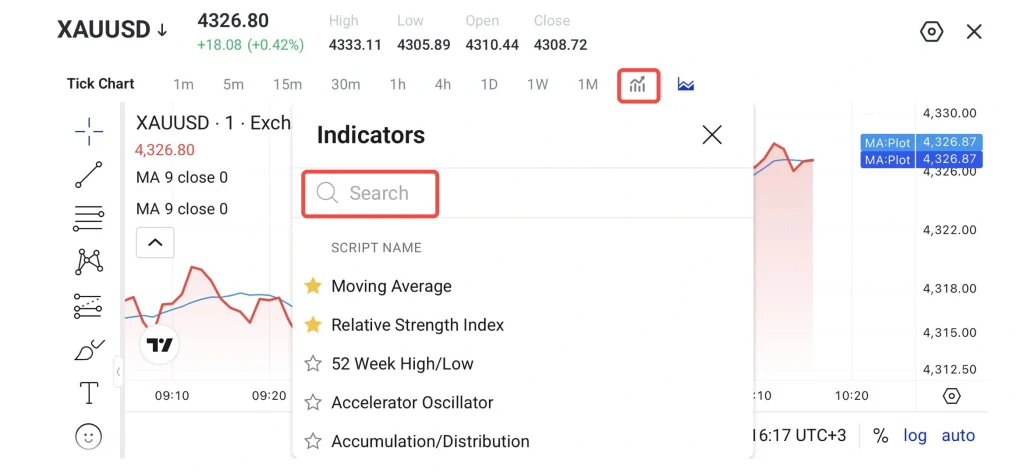
5. Use drawing tools to mark trendlines, support levels, and resistance levels.
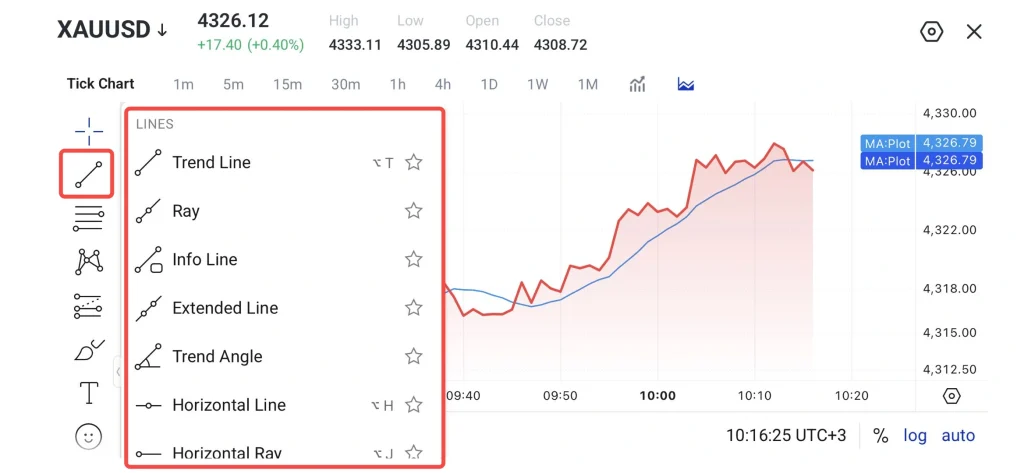
6. Review your analysis and switch back to portrait mode.
Economic Calendar and Alerts
The Economic Calendar helps traders stay informed about upcoming events and understand when markets may become more active. Alerts can also be set to provide reminders before important announcements.
How to use the economic calendar on the VT Markets app:
1. Navigate to Discover → News → Economic Calendar.
2. Review upcoming events, including date, time, and impact level.
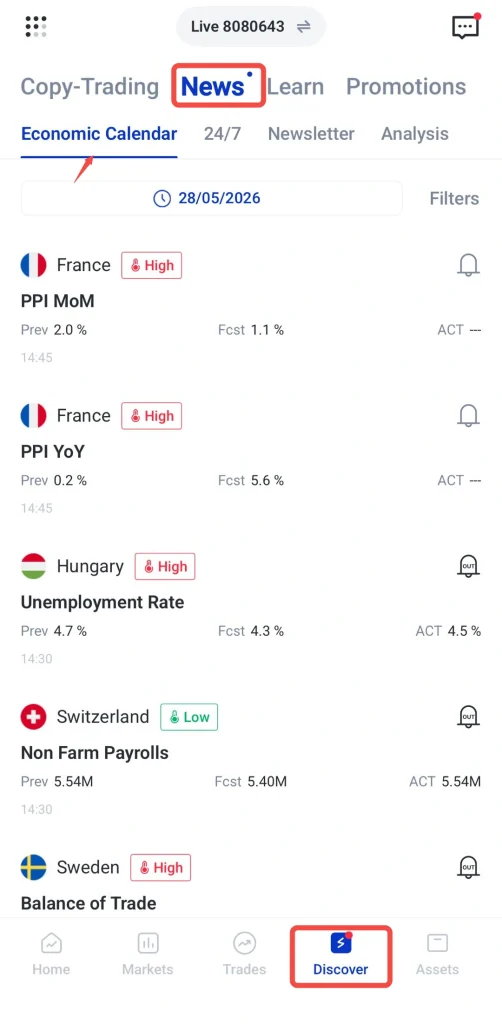
3. Set notifications for high-impact events to receive push alerts.
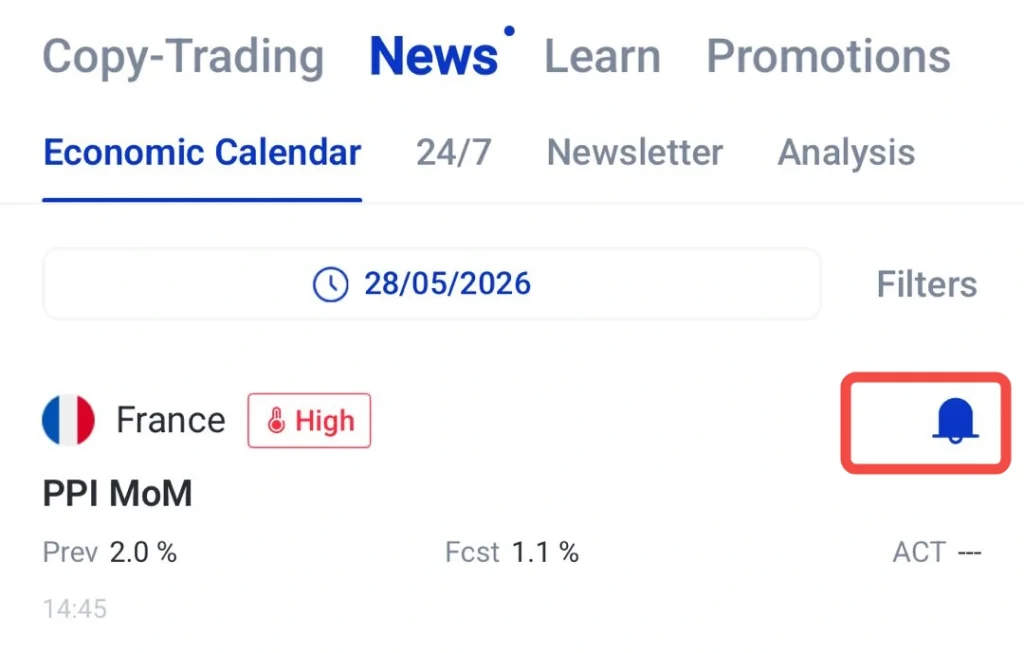
4. Adjust trading positions in advance or avoid the market during high-risk periods.
Market Analysis from Trading Central
Understanding what is driving gold prices can sometimes be challenging, especially when multiple economic and geopolitical factors are influencing the market at the same time. The VT Markets app includes market analysis from Trading Central, a third-party research provider.
Analysis reports may highlight key price levels, market trends, chart patterns, and potential scenarios for XAUUSD and other instruments. These insights can serve as an additional reference when researching trading opportunities.
While these reports can be useful, they should not be treated as financial advice or guaranteed trading signals. Traders should always conduct their own research and apply appropriate risk management.
How to use market analysis on the VT Markets app:
1. Select a gold-related instrument and open the chart window.
2. Click analysis
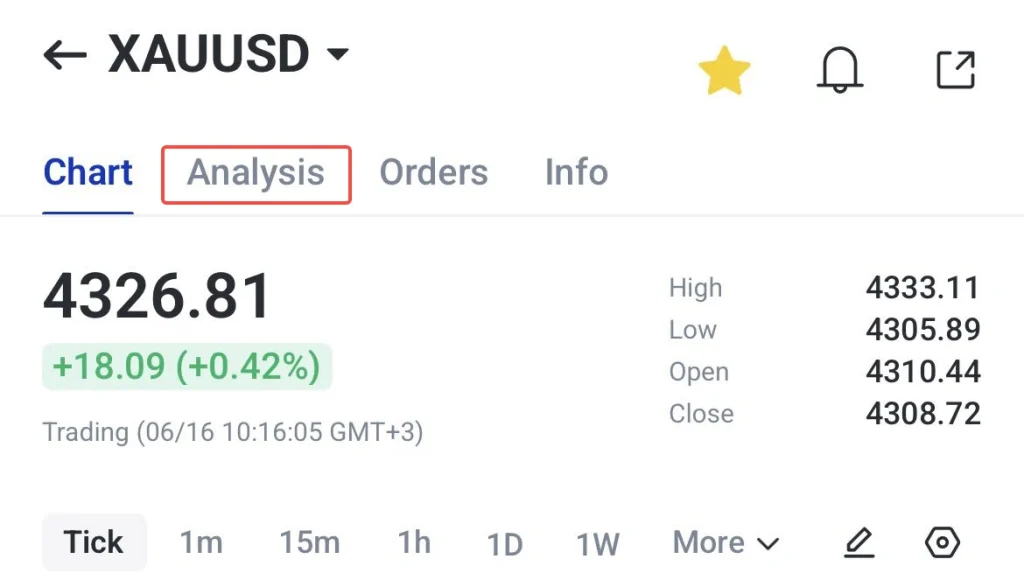
3. Choose a relevant analysis report or news update for the instrument you are reviewing.
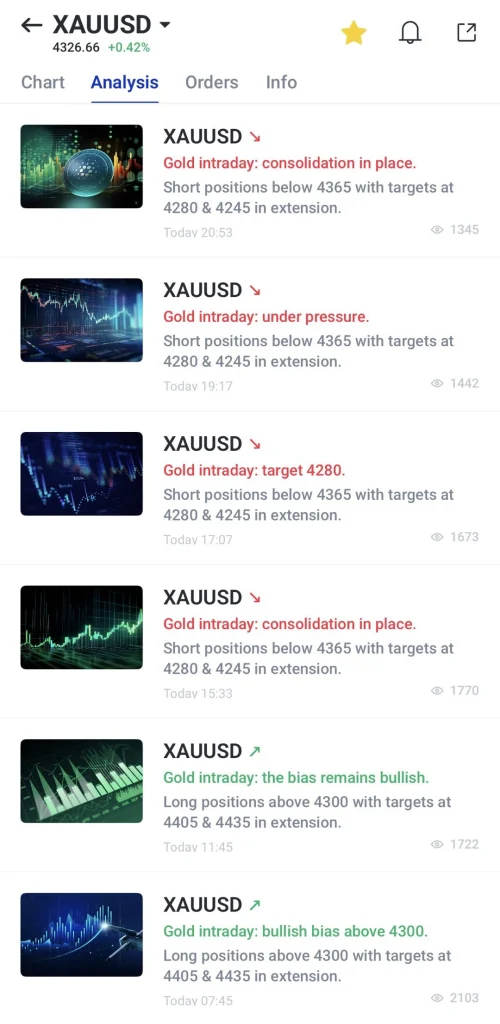
4. Review the chart, price levels, market view, and key notes provided in the report.
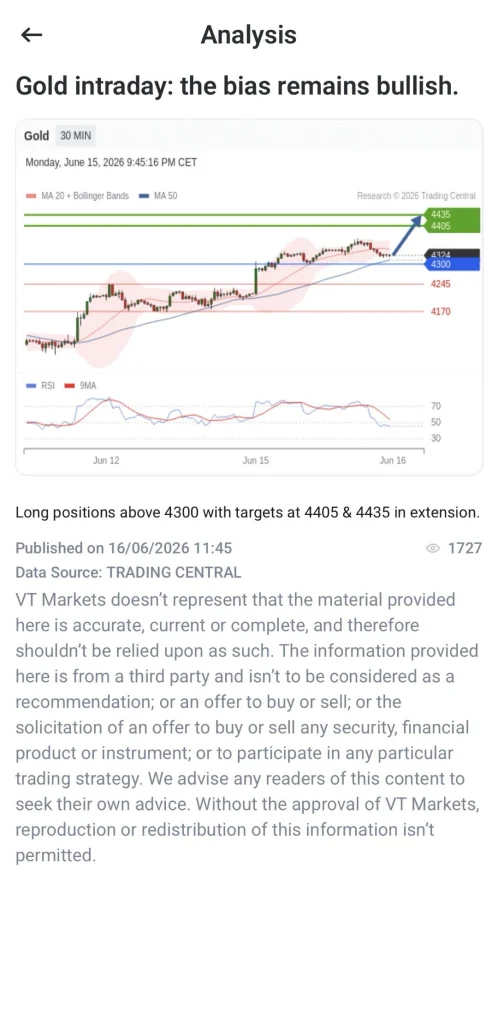
5. Use the analysis as an additional reference when planning trades or managing existing positions.
Technical Indicators
Many gold traders use technical indicators to help identify trends, momentum, volatility, and potential entry or exit points. These tools can provide additional insight when analysing XAUUSD price movements.
Some of the most commonly used indicators include the Relative Strength Index (RSI), Moving Average Convergence Divergence (MACD), Bollinger Bands, and Moving Averages. Traders often combine these indicators with support and resistance analysis to build a more complete view of market conditions.
For beginners, it is often best to start with one or two indicators before exploring more advanced combinations.
How to use technical indicators on the VT Markets app:
1. Select a gold-related instrument and open the chart window.
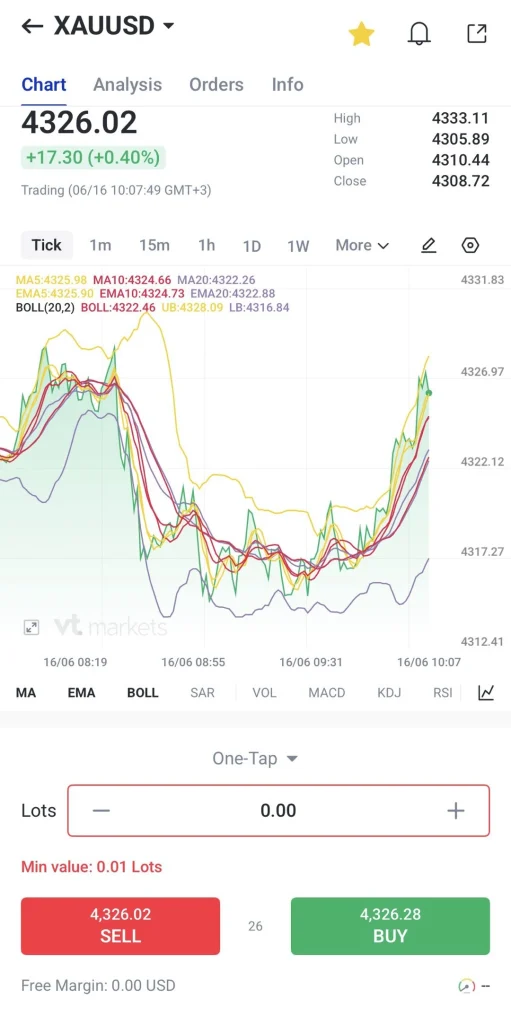
2. Click the button, tap the chart mode and choose Indicators
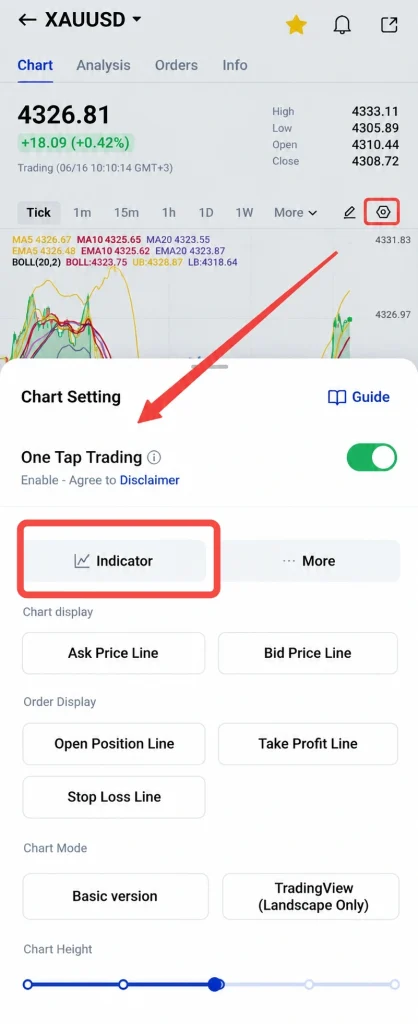
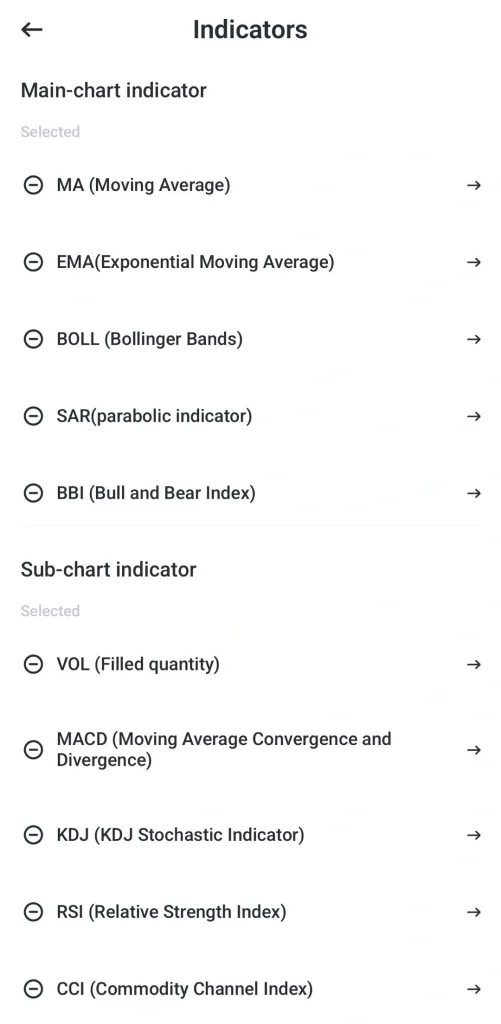
3. Choose the indicators you want to apply, such as RSI, MACD, Bollinger Bands, or moving averages.
4. Adjust the settings, such as the period length, line colour, or line width.
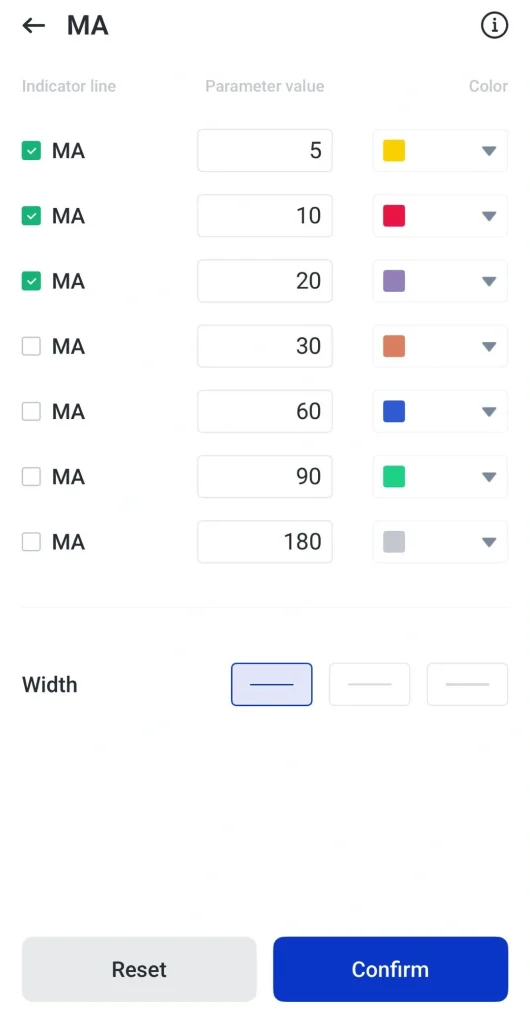
5. Click confirm and review the indicators together with price action to support your trading analysis.
Getting started with VT Markets App
Getting started with the VT Markets app is simple. Follow these steps to create an account, explore the platform, and begin your trading journey.
Download the VT Markets App
The app is available on iOS via the App Store and on Android via Play store. Download the app, create an account, and complete the identity verification process by following the on-screen instructions.
Start with a Demo Account
Before trading with real money, consider starting with a demo account. A demo account is funded with virtual funds, allowing you to explore the platform and practise trading without risking your own capital.
This can help you learn how to place trades, use charts, monitor markets, and become familiar with the app’s features at your own pace.
Upgrade to a Live Account
Once you feel comfortable using the platform, you can open a live account and start trading with real funds.
Many beginners choose to start with smaller trade sizes while they continue building their knowledge and confidence. VT Markets offers different account types to suit different trading needs and experience levels.
Fund Your Account
Once your live account is ready, the next step is to add funds. VT Markets supports a range of payment methods. Below are the list:
| Payment Method | How it works |
|---|---|
| Bank Transfer | Deposit funds directly from your bank account to your trading account. |
| Credit / Debit Card | Fund your account using Visa or Mastercard for faster processing. |
| E-wallets | Use supported digital payment services for convenient and quick deposits (availability may vary by region). |
| VT Wallet | Manage and transfer supported cryptocurrencies within the VT Markets ecosystem for added flexibility. |
Personalise Your Trading Workspace
Once your account is ready, you can personalise the app to suit your preferences. Create a watchlist of markets you want to follow, set price alerts, and customise your charts to make important information easier to find.
Taking a few minutes to organise your app can help you navigate the markets more efficiently and stay focused on the assets that matter most to you.
Explore a more flexible way to trade gold with XAUUSD247.
Access gold price movements 24/7 beyond traditional trading hours with XAUUSD247 through VT Markets.

Start trading gold with VT Markets today.
Frequently Asked Questions
Why VT Markets app is the best for gold trading?
VT Markets combines advanced charting tools, real-time market access, and professional trading features for gold trading. It was recognised as the Best Gold Trading Platform 2026 and recorded more than USD 1.5 trillion in gold trading volume in January 2026.
What is XAUUSD?
XAUUSD is the symbol used to represent the price of one troy ounce of gold quoted in US dollars. It is one of the most widely traded gold instruments in global financial markets.
Can I trade gold on the VT Markets mobile app?
Yes. The VT Markets app allows traders to monitor gold prices, analyse charts, manage positions, and place trades directly from their mobile devices.
What tools does VT Markets provide for gold analysis?
The platform includes TradingView integration, technical indicators, multi-timeframe analysis, Economic Calendar alerts, and Trading Central research to support gold market analysis.
Can beginners trade gold on VT Markets?
Yes. Traders can start with a demo account to practise trading gold using virtual funds before opening a live account. The platform also provides user-friendly tools and educational resources to support new traders.
Which platforms can I use to trade gold with VT Markets?
Gold trading is available through the VT Markets mobile app, MetaTrader 4 (MT4), MetaTrader 5 (MT5), TradingView, and WebTrader allowing traders to access the market across desktop and mobile devices.
Is VT Markets regulated?
Yes. VT Markets is regulated by FSCA (South Africa), FSC (Mauritius), and CMA (UAE) as a Category 5 licence, ensuring compliance with financial regulations and oversight of client funds.
Is my money safe with VT Markets?
VT Markets maintains client funds in segregated accounts and follows compliance procedures such as AML and KYC requirements. Eligible clients may also have access to client fund insurance coverage, subject to applicable terms and conditions.