


Key Takeaways
- VT Markets Copy Trading allows users to follow selected Signal Providers and automatically replicate their eligible trades in their own Copy Trading accounts.
- Beginners can browse the Copy Leaderboard to discover Signal Providers, use Tourist Mode to explore available providers and strategies, and save preferred providers to Favourites.
- Before choosing a provider, users can review their details, including historical returns, portfolio allocation, trading statistics and risk indicators, to compare different trading approaches.
- Once they select a provider, users can customise how trades are copied through flexible copy settings, including Copy Mode, Used Margin Multiples and Risk Management options.
- The Copy Trading assets overview helps users track their account activity, with a breakdown of total equity, total PnL and available funds.
- Copy Trading does not guarantee profits. Users remain exposed to market risks and may lose some or all of their allocated capital.
Getting started in financial markets can feel overwhelming, especially for beginners who are still learning how trading works. Understanding market movements, identifying potential opportunities and developing a trading strategy all require time, practice and market knowledge.
VT Markets provides a Copy Trading platform with features designed to make the experience more accessible for beginners. It brings together useful tools and resources to help users navigate the platform, explore their options and manage their trading activities.
This guide explores what makes VT Markets a suitable choice for beginners, highlighting its key benefits, app features and how to get started.
What Is VT Markets Copy Trading?
VT Markets Copy Trading allows individuals, known as Copiers, to follow selected Signal Providers and automatically replicate their eligible trades in their own Copy Trading accounts using allocated funds.
Instead of making every trading decision independently, Copiers can choose traders whose trading approaches align with their preferences and have their eligible trades replicated automatically.
Trades are copied according to the Copier’s selected settings. However, results may differ from those of the Signal Provider due to differences in trade sizes, execution prices and market conditions.
Copy trading does not guarantee profits or eliminate trading risks. Copiers should understand how it works and monitor their accounts regularly.
New to copy trading? Read our Complete Beginner’s Guide to Copy Trading in 2026 to learn more about how it works, its potential benefits and the risks to consider before getting started.
Why Choose VT Markets Copy Trading
VT Markets offers several features to help beginners get started with copy trading and manage their activities more easily. Here are some key benefits.
1. Start Copy Trading from USD 10
VT Markets allows eligible users to start copying trades with as little as USD 10, subject to the selected Signal Provider’s requirements and applicable conditions.
This lower starting amount gives beginners an opportunity to explore copy trading with a smaller initial allocation.
2. Explore Over 1,000 Signal Providers
VT Markets offers access to over 1,000 Signal Providers with different trading strategies and approaches.
Users can compare providers by reviewing their historical performance, trading history and risk indicators to make more informed choices when selecting traders to follow. For more guidance, read our guide on How to Choose the Right Strategy Provider in Copy Trading.
3. Automate Trades with Flexible Copying Modes
Once users select a Signal Provider and confirm their settings, eligible trades are automatically replicated in their Copy Trading accounts without requiring manual order placement.
VT Markets also offers three copying modes: Equivalent Used Margin, Fixed Lot and Fixed Multiple, giving users flexibility in how copied trade sizes are calculated.
4. Access Micro-Lot Trading
VT Markets supports micro-lot trading with position sizes starting from 0.0001 lots, subject to applicable product and account conditions.
Smaller position sizes provide more flexibility when managing trade exposure, although losses remain possible.
5. Monitor and Manage Copying Activities
Users can review their copied positions, monitor account performance and stop copying a Signal Provider when needed, subject to platform procedures.
This allows Copiers to stay informed about their account activity and reassess their copying arrangements when necessary.
Key Copy Trading Features in the VT Markets App
Beyond the benefits of copy trading, the VT Markets App provides several tools and features to support users throughout their copy trading journey.
Copy Leaderboard
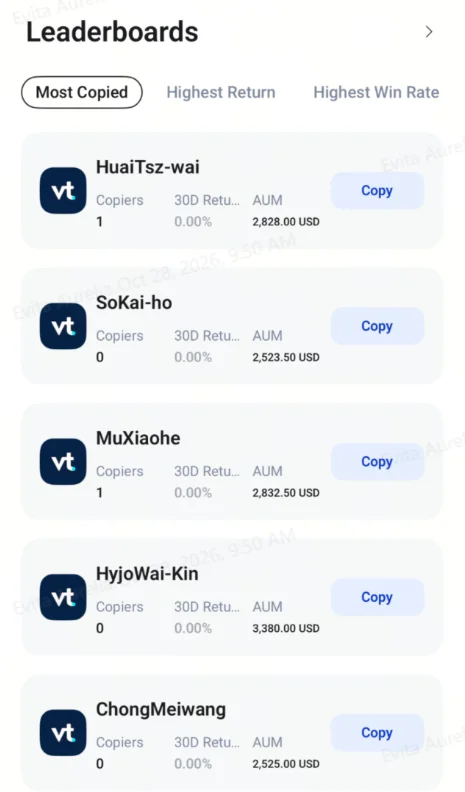
The Copy Leaderboard helps users discover Signal Providers through different ranking categories, including Most Copied, Highest Return and Highest Win Rate.
Users can browse the rankings to explore different traders, select a provider to view their profile and review additional trading information before deciding whether to copy their trades. This gives beginners a starting point when exploring the available Signal Providers.
Favourites
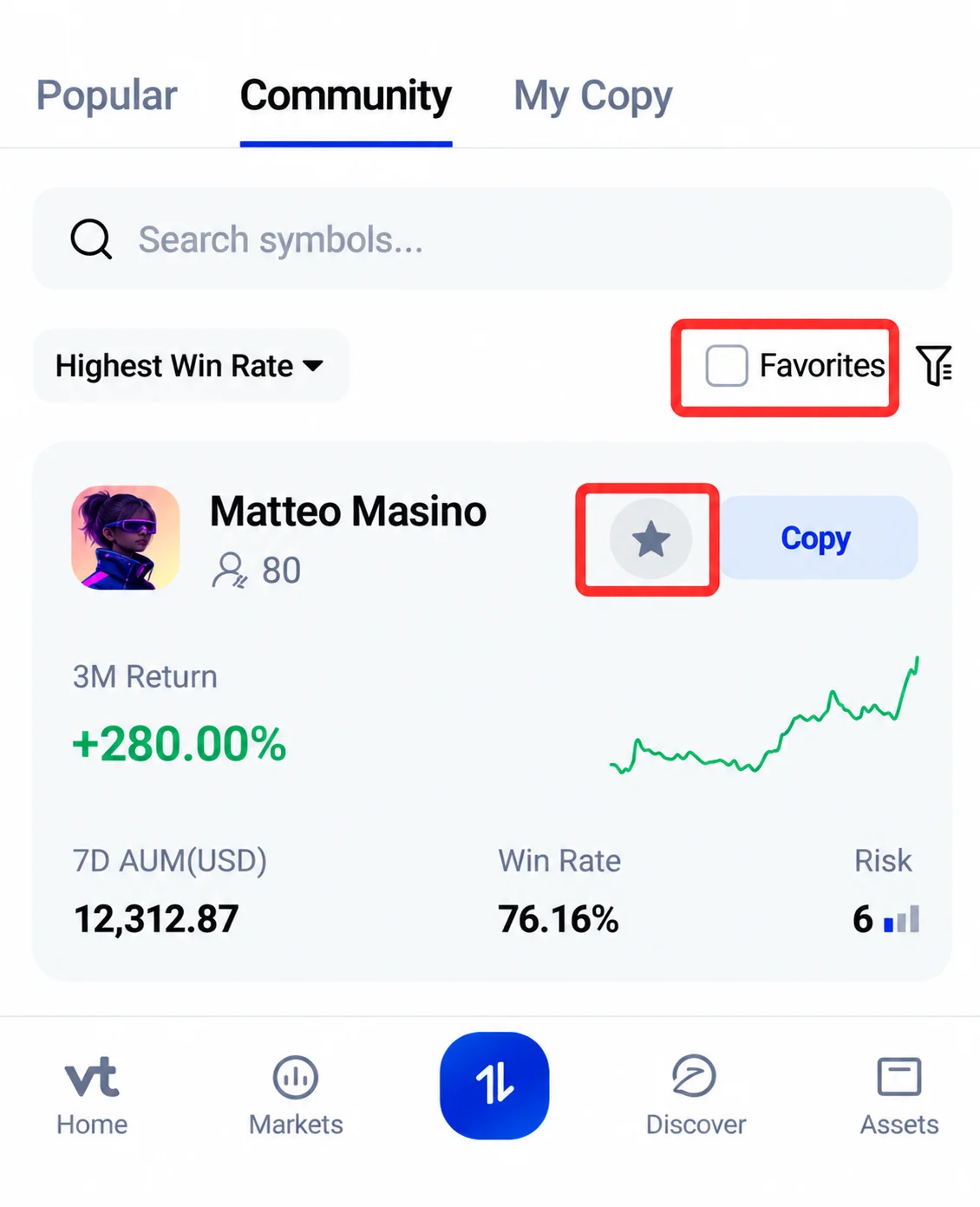
Found a Signal Provider you want to review later? The Favourites feature allows users to save selected providers for quick access.
Simply select the star icon on a provider’s profile to add them to the Favourites list. Users can then access their saved providers through the Favourites filter, making it easier to revisit and compare different traders before making a decision.
Tourist Mode
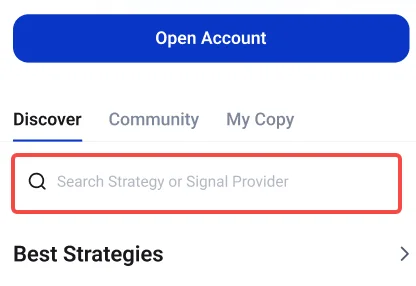
Tourist Mode allows users to explore the Copy Trading environment and browse available Signal Providers without logging in, where supported.
This gives beginners an opportunity to familiarise themselves with the platform, explore different providers and review their available information before deciding whether to get started.
Note: An eligible Copy Trading account is required to start copying trades.
Signal Provider Details
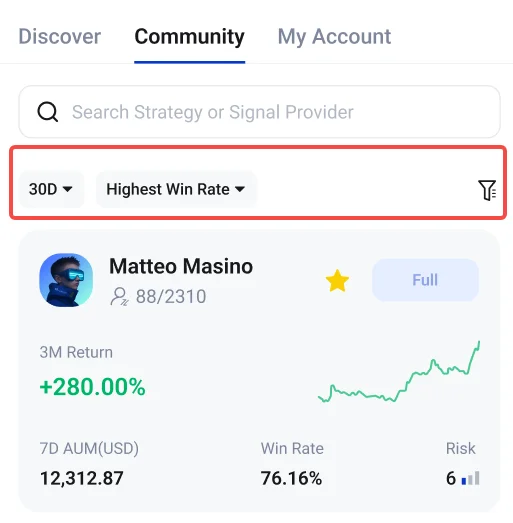
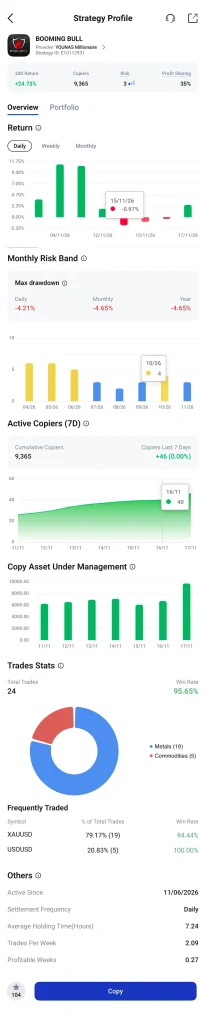
Before choosing a Signal Provider, users can visit their profile to learn more about their trading performance and activity.
The Signal Provider Details page provides information such as:
- Historical Returns: Review the provider’s past performance over available periods.
- Portfolio Allocation: See how the provider’s funds are distributed across different positions or assets.
- Active Copiers: View the number of users currently copying the provider.
- Assets Under Management: Review the total funds managed by the provider, where displayed.
- Trading Statistics: Explore available trading activity and performance metrics.
- Risk Indicators: Review indicators that provide additional insight into the provider’s trading risk.
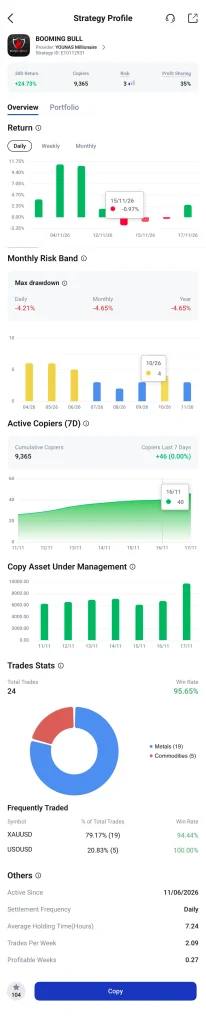
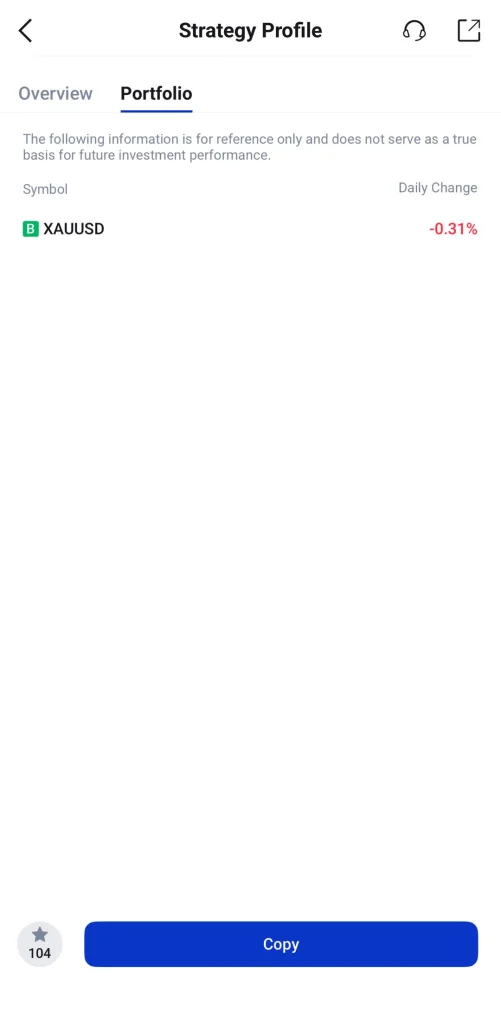
These details help users look beyond headline returns and compare providers based on their trading history, approach and risk profile. However, historical performance does not guarantee future results.
For a closer look at the metrics to consider, read our guide on How to Evaluate Copy Trading Providers: Key Metrics Every Trader Should Know.
Copy Settings
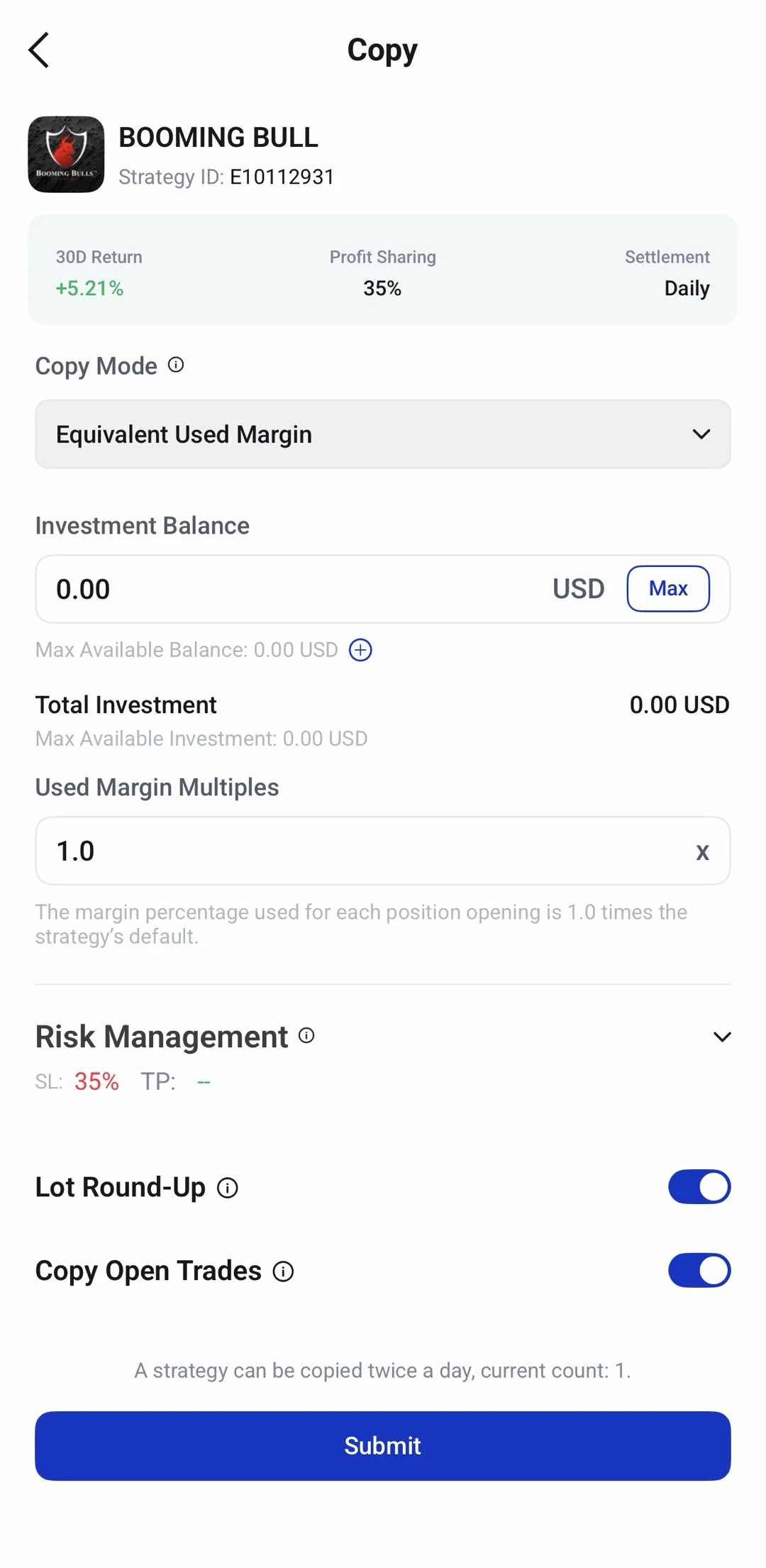
Once users select a Signal Provider, they can customise how trades are replicated through Copy Settings. These options help users adjust their copying arrangements based on their preferences and available funds.
Available settings include:
- Investment Allocation: Set the amount of funds allocated to copy a Signal Provider.
- Copy Mode: Select how copied position sizes are calculated.
- Used Margin Multiples: Adjust the margin used for copied positions relative to the provider’s default margin.
- Risk Management: Configure available options to manage copying activity.
- Lot Round-Up: Enable the applicable lot-size adjustment option.
- Copy Open Trades: Choose whether eligible existing provider positions are included when starting to copy.
The Used Margin Multiples setting ranges from 0.1 to 50 times the Signal Provider’s default margin. A lower multiple generally results in smaller copied positions, while a higher multiple may increase position sizes and overall exposure.
Users should review each setting carefully before confirming their copying arrangements, as these choices can affect trade sizes and potential losses.
Copy Trading Assets Overview
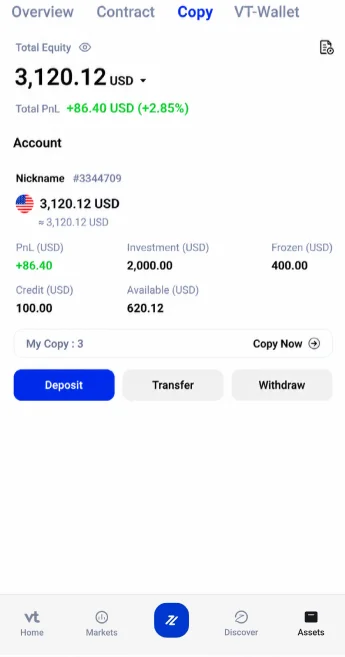
The Copy Trading account overview gives users a central place to review their account value, profit and loss, and available funds.
It displays key account information, including:
- Total Equity: The current overall value of the Copy Trading account.
- Total PnL: The account’s displayed profit or loss.
- Investment: Funds allocated to Copy Trading.
- Frozen: Funds currently marked as frozen in the account.
- Credit: Credit amount displayed in the account.
- Available: Funds shown as available for use.
Users can also access their active copied strategies under My Copy, select Copy Now to explore additional strategies, and use Deposit, Transfer and Withdraw options to manage their funds.
Having these details in one place makes it easier to review account activity and keep track of how funds are allocated.
Before choosing a Signal Provider or setting up your copy trading account, it is worth understanding some common pitfalls. Read our 5 Common Mistakes to Avoid When Copy Trading to learn what to watch out for and how to approach copy trading more carefully.
How to Start Copy Trading in the VT Markets App
Follow the steps below to set up your account and begin copying trades.
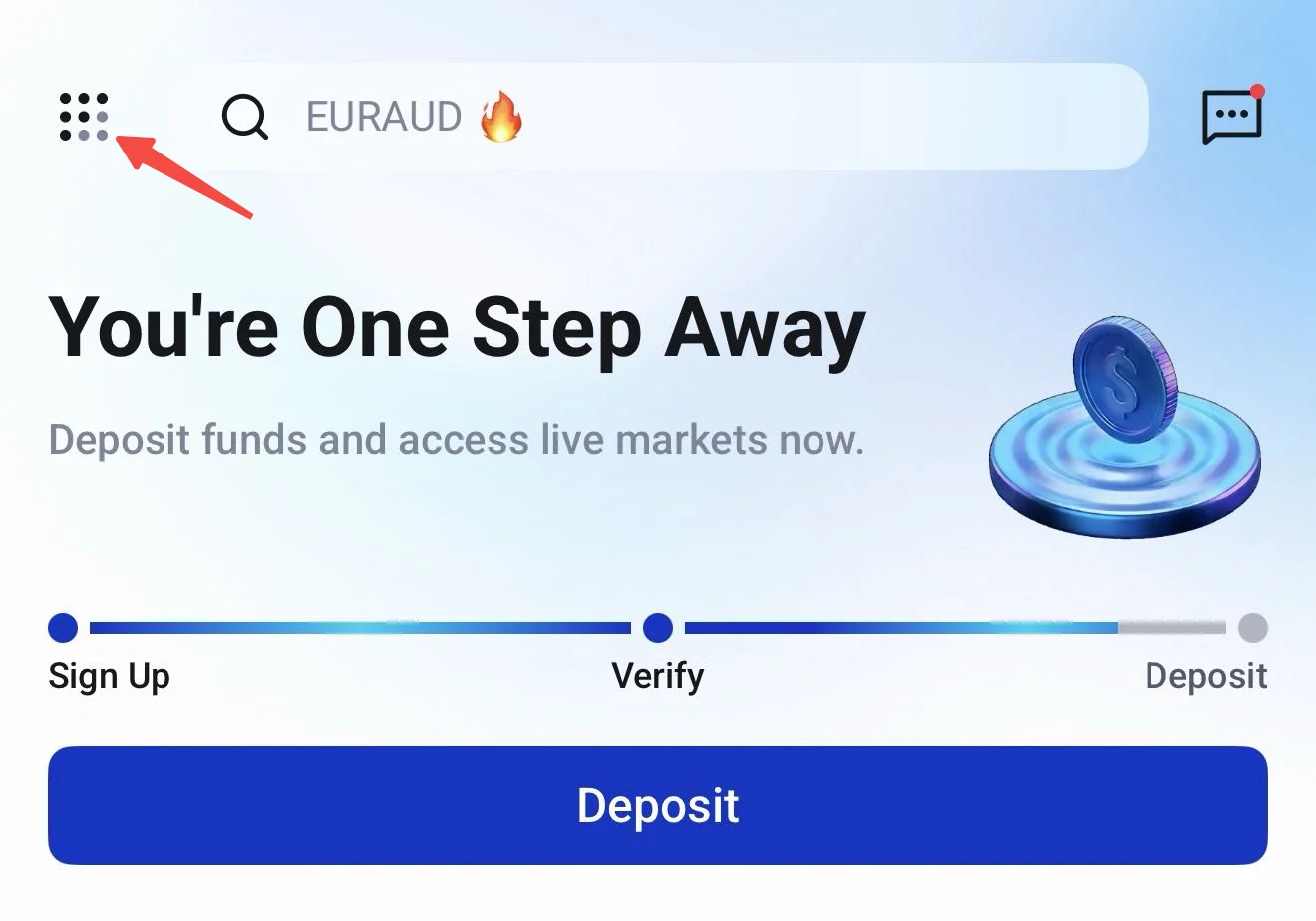
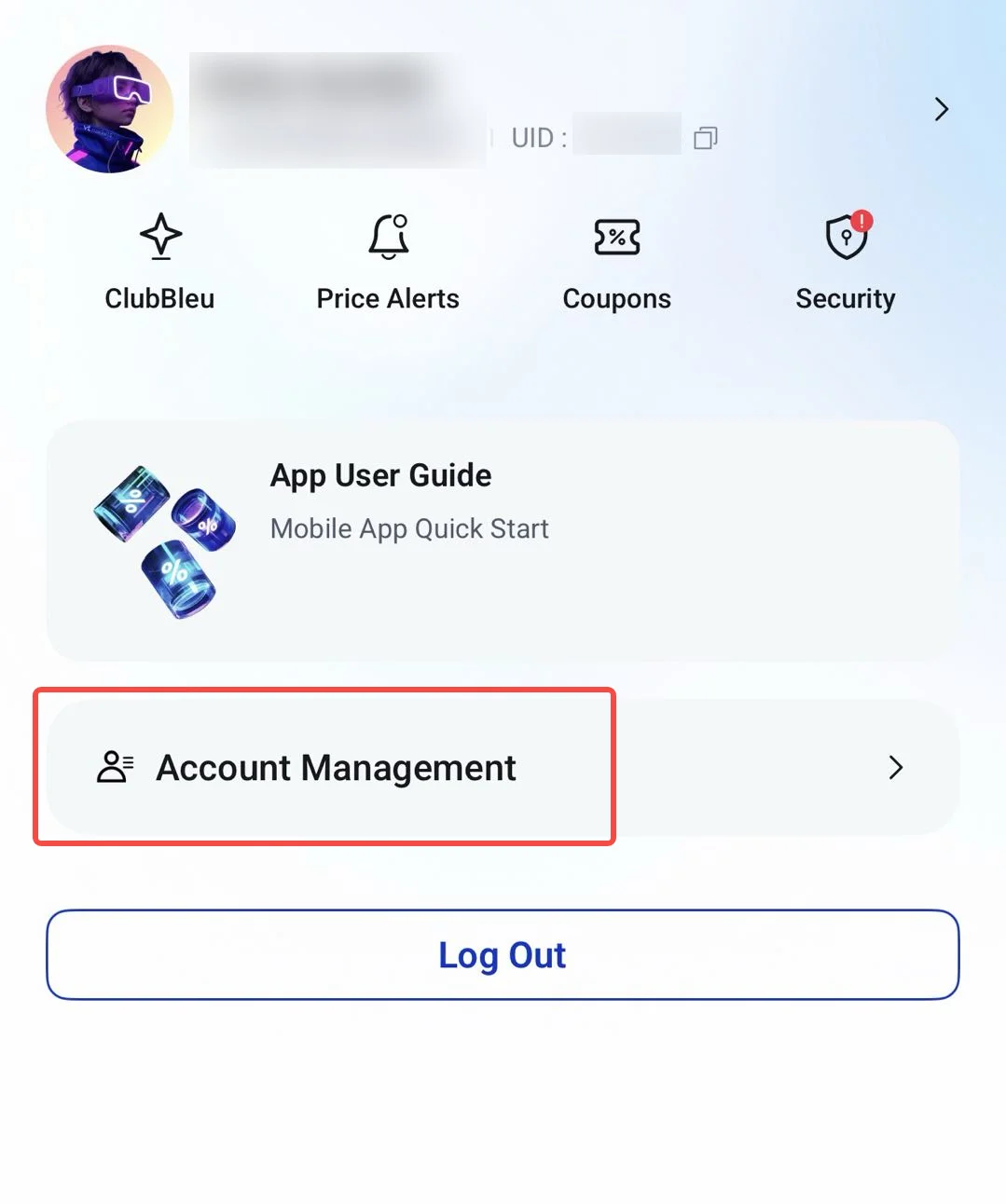
Step 1: Open the VT Markets App
Log in to the VT Markets App and navigate to Settings → Account Management.
Step 2: Open a Copy Trading Account
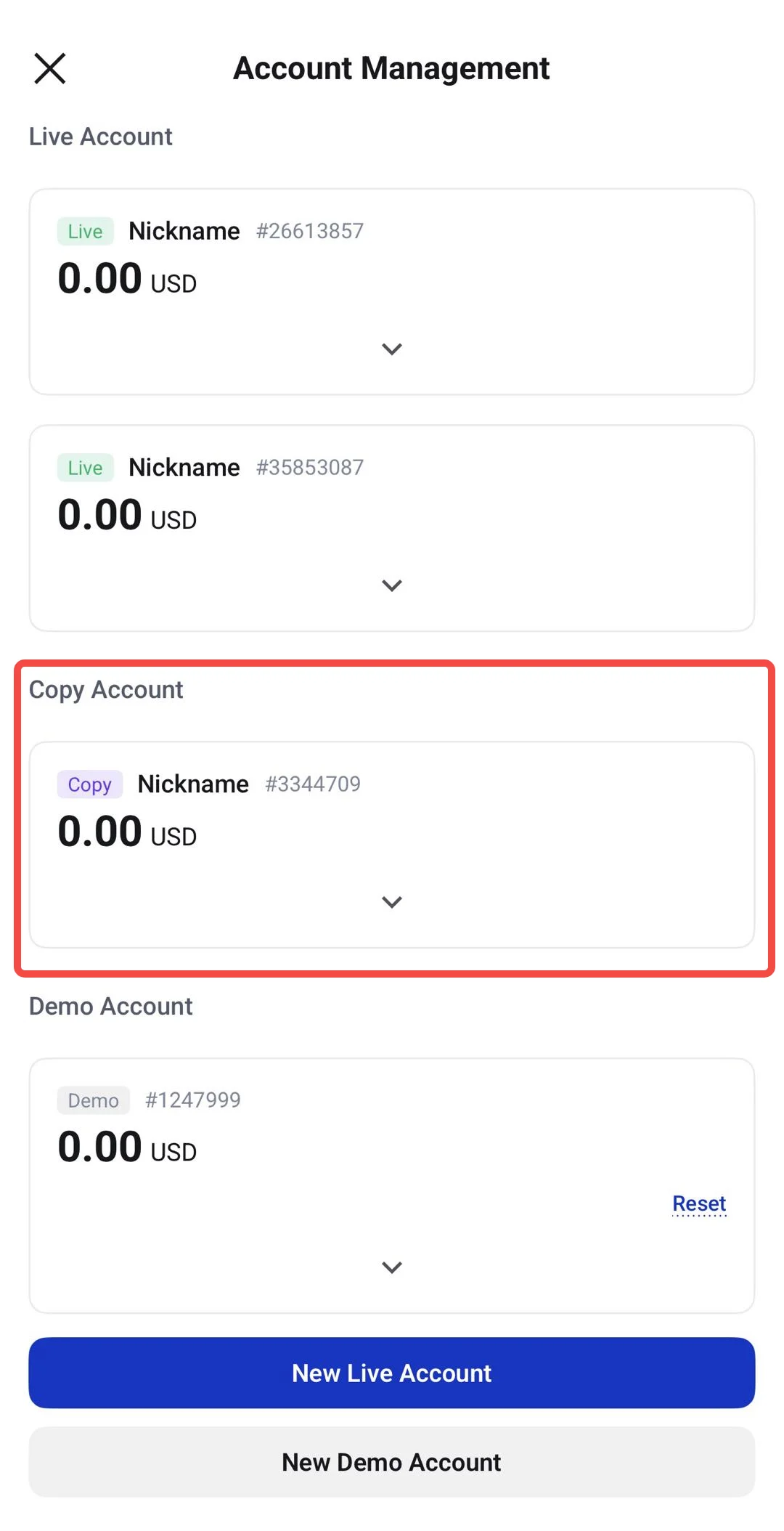
- If you do not have a Copy Trading account, create a new live account and select Copy Trading as the account type.
- If you already have a Copy Trading account, switch from your existing live account to your Copy Trading account to continue.
For detailed instructions, read our guide: How to Download and Register an Account on the VT Markets App.
Step 3: Explore Signal Providers
Navigate to the Copy Trading section and browse the Copy Leaderboard.
Explore different ranking categories, such as Most Copied, Highest Return and Highest Win Rate, to discover available Signal Providers.
Step 4: Review a Signal Provider
Select a provider to view their profile and additional trading information.
Review their historical performance, trading history, portfolio allocation and available risk indicators. Compare these details with your trading preferences and risk tolerance before deciding whether to follow their strategy.
Step 5: Set Your Copying Preferences
Choose the amount you want to allocate and configure your available Copy Settings.
Review your selected Copy Mode, Used Margin Multiples and other applicable options to understand how copied positions will be calculated.
Step 6: Start Copying Trades
Once you have reviewed your selected Signal Provider and copying preferences, click Submit to confirm your arrangement.
Eligible trades from the selected provider will then be replicated in your Copy Trading account according to your settings and applicable platform conditions.
Step 7: Monitor Your Account
After starting, regularly review your Copy Trading account overview and copied positions.
Monitor Total Equity, Total PnL and your account fund breakdown. You can also review your active strategies and adjust your copying preferences or stop copying when needed, subject to the platform’s procedures.
Copy trading carries a risk of loss, so regular account monitoring remains important.
Take Your First Step into Copy Trading
Exploring the financial markets doesn’t mean you have to develop your own trading strategies from the start. With VT Markets Copy Trading, you can explore different Signal Providers, review their trading performance and customise how trades are copied to suit your preferences.
Discover the available tools and features in the VT Markets App and explore how Copy Trading can fit into your trading journey.
Start Copy Trading with VT Markets today
Frequently Asked Questions
What is VT Markets Copy Trading?
VT Markets Copy Trading allows eligible users to follow selected Signal Providers and automatically replicate their eligible trades in their own Copy Trading accounts. Users can explore provider profiles and review available trading information before deciding whom to follow.
How do I start Copy Trading in the VT Markets App?
Log in to the VT Markets App, navigate to Account Management and open or switch to an eligible Copy Trading account. Browse the available Signal Providers, review their profiles, configure your copying preferences and select Submit to proceed.
How do I choose a Signal Provider?
You can compare available information such as historical performance, trading history, portfolio allocation and risk indicators. Consider the provider’s trading approach and your own risk tolerance rather than relying on returns or leaderboard rankings alone.
Can I adjust the settings for copied trades?
Yes. VT Markets provides several copying options, including Copy Mode, Used Margin Multiples and Risk Management settings, subject to availability. These settings influence how copied positions are calculated and managed, so review the in-app guidance before making changes.
Can I save Signal Providers to review later?
Yes. You can add providers to your Favourites list by selecting the star icon on their profiles. You can then use the Favourites filter to access your saved providers more easily.
Can I stop copying a Signal Provider?
Yes. You can stop copying a provider, subject to the platform’s procedures and settings. Before stopping, check how your existing positions will be handled, as stopping the copying relationship may not automatically close all open trades.
Is VT Markets Copy Trading suitable for beginners?
Copy trading may help beginners explore different trading approaches without having to make every trading decision independently. VT Markets provides features such as Tourist Mode, Signal Provider Details and flexible Copy Settings to support the process. However, users should understand the risks involved, evaluate providers carefully and monitor their accounts.
Can I make a profit through Copy Trading?
Profit is not guaranteed. Results depend on factors such as market conditions, the Signal Provider’s strategy, execution prices and account settings. Copy trading can result in losses, and users may lose some or all of their allocated capital.