


Key Takeaways
- VT Markets uses GMT+2 in winter and GMT+3 in summer to stay perfectly aligned with global markets.
- The platforms work seamlessly with trading bots such as Expert Advisors (EAs) designed for standard industry time zones.
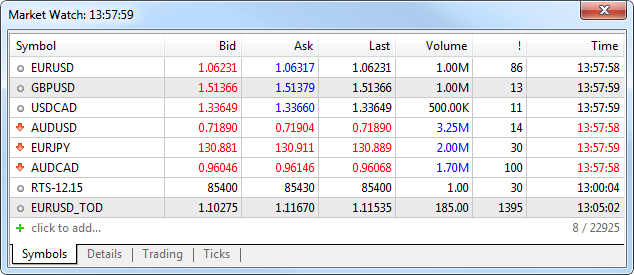
- You can always see the live VT Markets server time in the Market Watch window on your MT4 or MT5 platform.
- VT Markets chart prices match the data used by major global banks, giving you institutional-grade accuracy.
- VT Markets provides five full trading days per week and removes the “Sunday Candle” to keep your charts clean.
Understanding server time serves as the backbone of accurate charting and synchronisation with global liquidity. Whether you are using MetaTrader 4 (MT4) or MetaTrader 5 (MT5), aligning your strategy with the correct GMT offset is vital for precision and technical consistency.
What is the VT Markets Server Time and GMT Offset?
VT Markets server time is GMT+2 during winter and GMT+3 during daylight saving time.
Server Time is the official internal clock of your MT4 or MT5 platform, while the GMT Offset is the specific time zone setting (either +2 or +3) that aligns that clock with the global markets.
VT Markets uses these settings to ensure your “Daily Close” matches the New York 5:00 PM EST close. This is the industry “Gold Standard” because it gives you exactly five 24-hour candles per week and removes the “Sunday Candle,” which often messes up technical indicators and charts on other platforms.
Quick Reference: GMT Offset & Settings
The following table summarises the essential time settings for your trading terminal.
| Feature | Setting / Detail |
| Standard Time | GMT+2 |
| Daylight Savings (Summer) | GMT+3 |
| Daily Close Alignment | 00:00 Server Time = 5:00 PM New York (EST/EDT) |
| Supported Platforms | MetaTrader 4 (MT4) & MetaTrader 5 (MT5) |
| Default Setting | Applied automatically to all client terminals |
Why Server Time Matters for Your Strategy
Server time isn’t just a technical detail; it is a cornerstone of efficient trading that directly impacts your execution.
- Alignment with Global Markets: Since the server matches New York closely, trading days start and end in sync with major financial hubs. This creates uniform candlestick charts, which are crucial for reliable technical analysis.
- Precision for Scalpers & Day Traders: For time-sensitive strategies, accurate server time is vital. It ensures precise execution and reduces the risk of execution errors caused by misaligned market hours.
- Simplified Data Interpretation: With all data following a standardised GMT offset, traders can easily compare historical patterns and charts without the complexity of manual time-zone calculations.
- Hassle-Free Operation: All VT Markets client terminals follow the same server time by default. This fosters a uniform trading experience, allowing you to focus on strategy rather than troubleshooting time discrepancies.
Benefits of VT Markets’ Server Time for Traders
The GMT+2 / GMT+3 configuration is considered the “Gold Standard” for institutional trading. Here is how this setup directly improves your trading environment:
| Feature | Advantage | Why it Matters |
| No Weekend Gaps | Eliminates “Sunday Candles”. | Ensures a clean 5-day trading week, preventing distorted technical indicators and gap errors. |
| Institutional Sync | Matches New York Closing Prices. | Your charts align perfectly with the data used by major global banks and liquidity providers. |
| EA Compatibility | Native GMT Offset support. | Prevents execution errors in automated systems, as most Expert Advisors are hard-coded for this offset. |
| Market Overlaps | Simplified Session Tracking. | Easier to identify high-liquidity periods (London/New York overlaps) without manual time calculations. |
How to Check Your Live Server Time on MT4 and MT5
You can verify the current trading time directly within your terminal using two primary methods:
- Market Watch Window: Open your MT4 or MT5 terminal and navigate to the View -> Market Watch window in the top left. The digital clock displayed there represents the live server time.
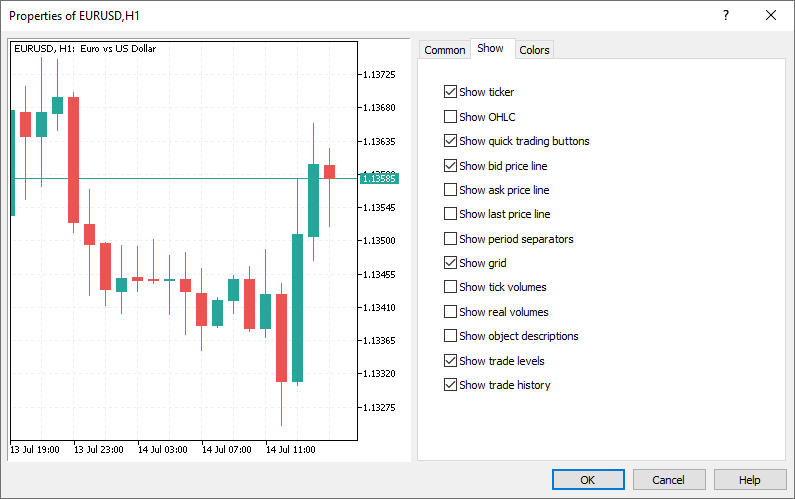
- Chart Time-Stamp: View the bottom horizontal axis of any open price chart. The time stamp of the most recent candle reflects the current server time.
Should You Change the Default Server Time?
While you can use custom indicators to overlay your local time on charts, it is not recommended. Changing the default display can cause discrepancies in candlestick patterns and indicator calculations (like a 200-day Moving Average). For the highest accuracy and consistency, it is best to adapt your trading schedule to the server clock.
Best Practices for Using VT Markets’ Server Time
To maximise your efficiency on MT4 and MT5, follow these professional guidelines:
- Monitor the Rollover: Pay close attention to 00:00 server time. This is when “swaps” (overnight interest) are applied and spreads may temporarily widen.
- Verify During Daylight Saving Time (DST) Shifts: Check your “Market Watch” window during March and November when the US and UK shift their clocks to ensure your session timings are still accurate.
- Use Server Time for Journaling: When recording trades, use the platform’s server time. This makes it much easier to review the specific candle or price action that triggered your entry later.
Frequently Asked Questions
Q1: Does Server Time Affect Trading Spreads?
The server time itself does not change the spread, but the “Daily Rollover” at 00:00 server time coincides with the period of lowest global liquidity. Because the New York market has closed and the Asian session is just starting, traders will often see spreads temporarily widen for a few minutes as liquidity providers reset for the new trading day.
Q2: Why Is There No “Sunday Candle” on VT Markets Charts?
VT Markets eliminates the Sunday candle by aligning its server time with the New York close at 5:00 PM EST. This creates five clean 24-hour trading sessions per week, which prevents the price gaps and indicator distortions often found on platforms that use different time zones.
Q3: Do I Need to Adjust My Expert Advisor (EA) for Daylight Savings?
VT Markets automatically adjusts its server time between GMT+2 and GMT+3 during Daylight Saving periods. While many Expert Advisors are designed to adapt to these changes and no manual adjustments are necessary, not all EAs handle time adjustments automatically. Traders should check their EA settings carefully to ensure the correct GMT offset is being used to avoid execution errors.
Q4: How Does Server Time Impact My Overnight Swap Charges?
Swaps are calculated and applied at 00:00 server time, marking the transition to the next trading day. Any position held open past this specific time will trigger a swap credit or debit. Understanding this timing is essential for managing the costs of carrying trades overnight.
Q5: What Is the Best Way to Track the London and New York Opens?
The most accurate method is to reference the “Market Watch” clock in your terminal. During the summer (GMT+3), the London session typically opens at 10:00 AM server time, and the New York session opens at 3:00 PM server time. Always verify these times against the live server clock for precision.
Q6: Can I Display My Local Time Zone Alongside Server Time?
You can change the time zone to reflect your local or desktop time zone, however this is not recommended. If you are interested in making these changes, there are custom indicators such as local time scale overlay to allow for this time zone change reflection.
Disclaimer: Regional restrictions may apply. Product specifications, trading conditions, and platform features are subject to VT Markets’ Terms and Conditions.