


Key Takeaways
- You can deposit funds through the VT Markets Client Portal or the VT Markets App.
- Deposit methods may include local bank transfer, international bank transfer, credit or debit card, e-wallets, and cryptocurrency, depending on your region and account eligibility.
- The minimum deposit is generally 50 in your account base currency, although some payment methods may set their own limits.
- Most digital deposits are processed within 30 to 60 minutes.
- International bank transfers may take 3 to 7 business days, depending on the bank and payment route.
- VT Markets generally does not charge deposit handling fees, but banks or third-party payment providers may apply separate charges.
- Deposits should usually be made from a payment method registered under the same name as your VT Markets account.
Funding your VT Markets account is an essential step before you can place live trades or maintain sufficient margin for open positions. You can make a deposit through the VT Markets Client Portal or the VT Markets App, with available payment methods depending on your region and account status.
This guide covers the deposit methods available, what to check before adding funds, how to complete a deposit, and what to do if a transaction is delayed or unsuccessful.
Deposit Methods Available on VT Markets
The payment methods available in your account may vary depending on your country, account type, and payment provider availability.
Common deposit methods may include:
- Local bank transfer
- International bank transfer
- Credit card
- Debit card
- Skrill
- Neteller
- UnionPay
- Mobile payment methods or e-wallets
- VT-Wallet
- Cryptocurrency, such as USDT, SOL, XRP, BTC, ETH, and USDC
Note: Some funding options are only available in selected regions. Always refer to the payment methods displayed in your Client Portal or VT Markets App for the most accurate options available to you.
What to Check Before Making a Deposit
Before you submit a deposit request, make sure your payment details are correct and your funding source meets VT Markets’ requirements. This can help reduce failed payments, processing delays, or additional account checks.
The table below shows the key items to review before making a deposit.
| What to Check | Why It Matters |
| Payment method ownership | The payment method should be registered under your own name. Third-party deposits are generally not accepted. |
| Account details | Your personal details should match the information registered with your VT Markets account. |
| Supported payment method | The selected deposit method must be available in your region and supported for your account. |
| Minimum deposit amount | Your deposit amount should meet the minimum requirement for your account and selected payment method. |
| Bank, card, wallet, or crypto network | Make sure your payment provider or crypto network supports the transaction before submitting the request. |
| Deposit instructions | Follow the exact instructions shown in the Client Portal or VT Markets App to avoid delays or failed payments. |
Note: Third-party deposits are generally not accepted. This means the name on the payment method should match the name on the VT Markets trading account.
How to Deposit Funds With VT Markets
Follow these steps to make a deposit:
1. Log in to the VT Markets Client Portal or open the VT Markets App.
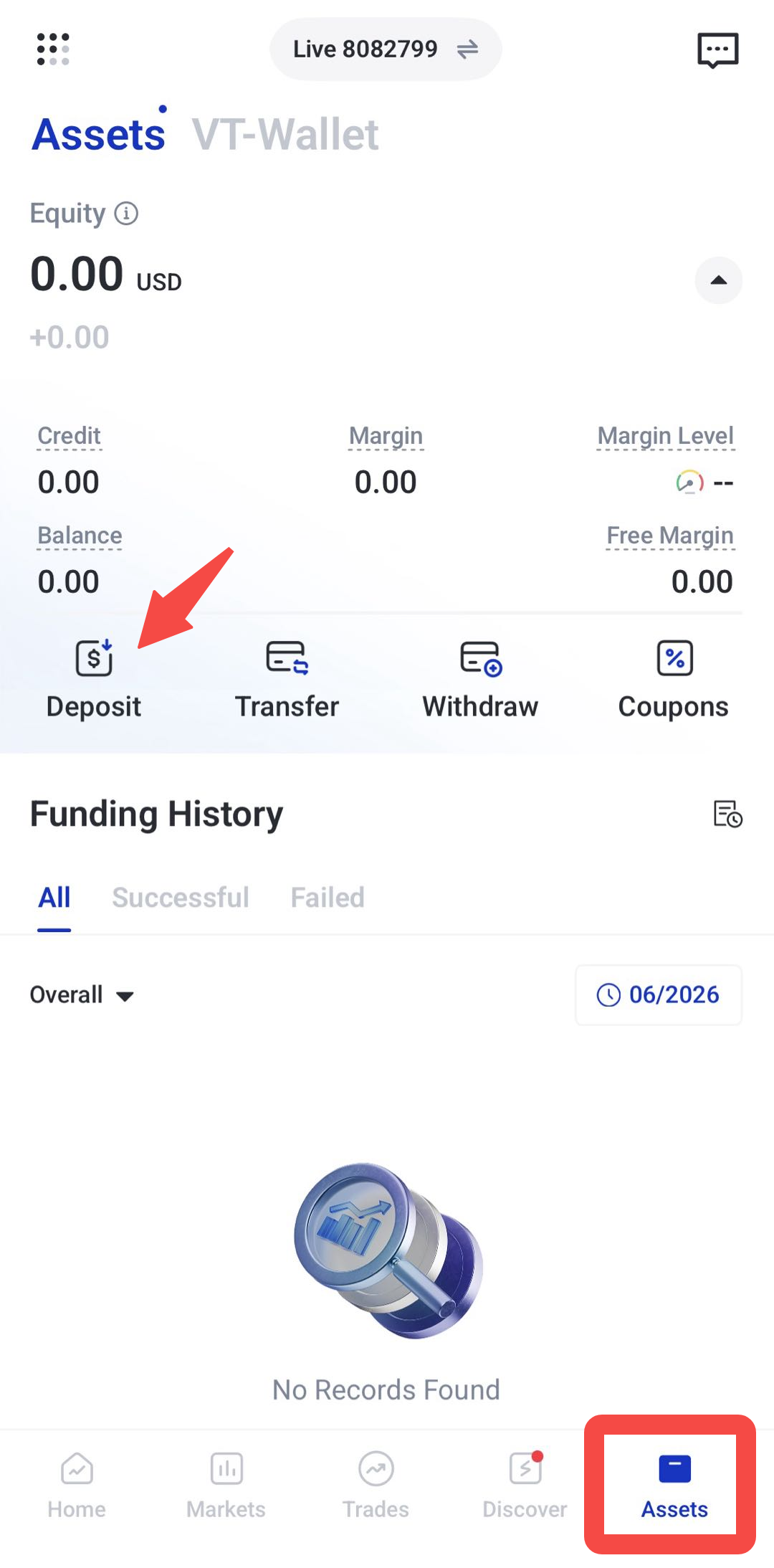
2. Go to the Assets section.
3. Select Deposit
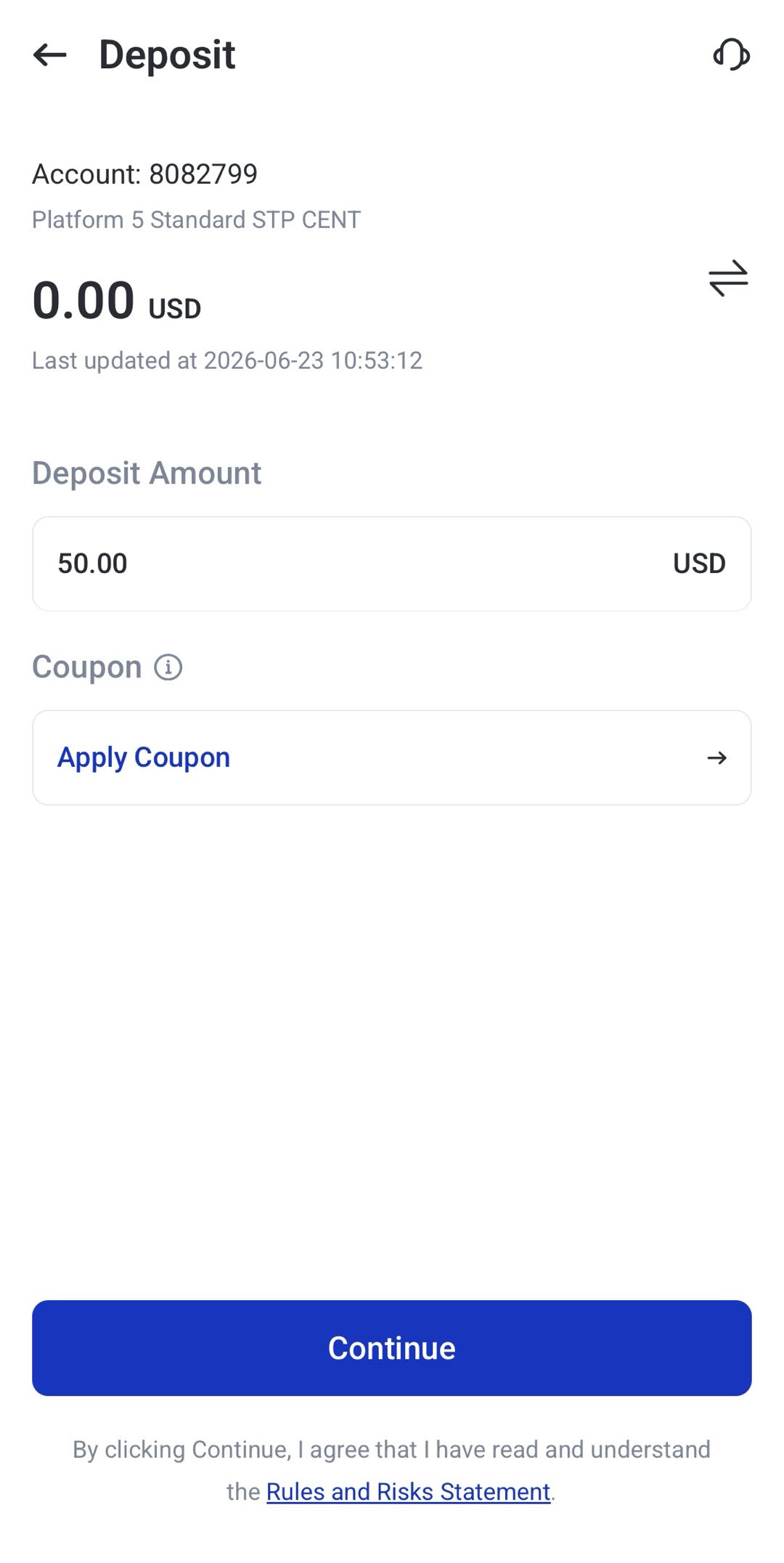
4. Enter the deposit amount.
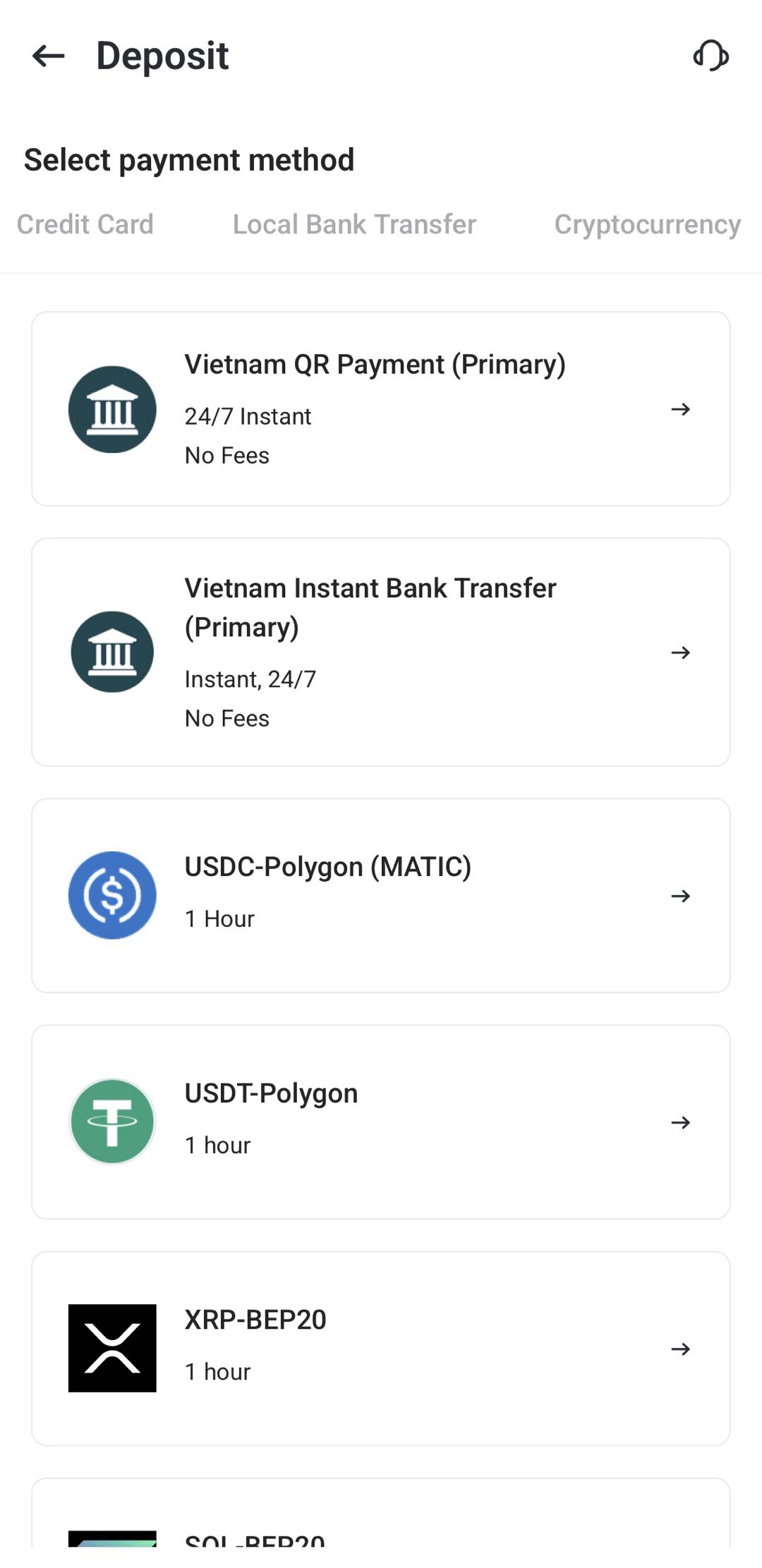
5. Choose your preferred payment method, such as credit card, local bank transfer, e-wallet, or cryptocurrency.
6. Review the payment details carefully and click Pay Now.
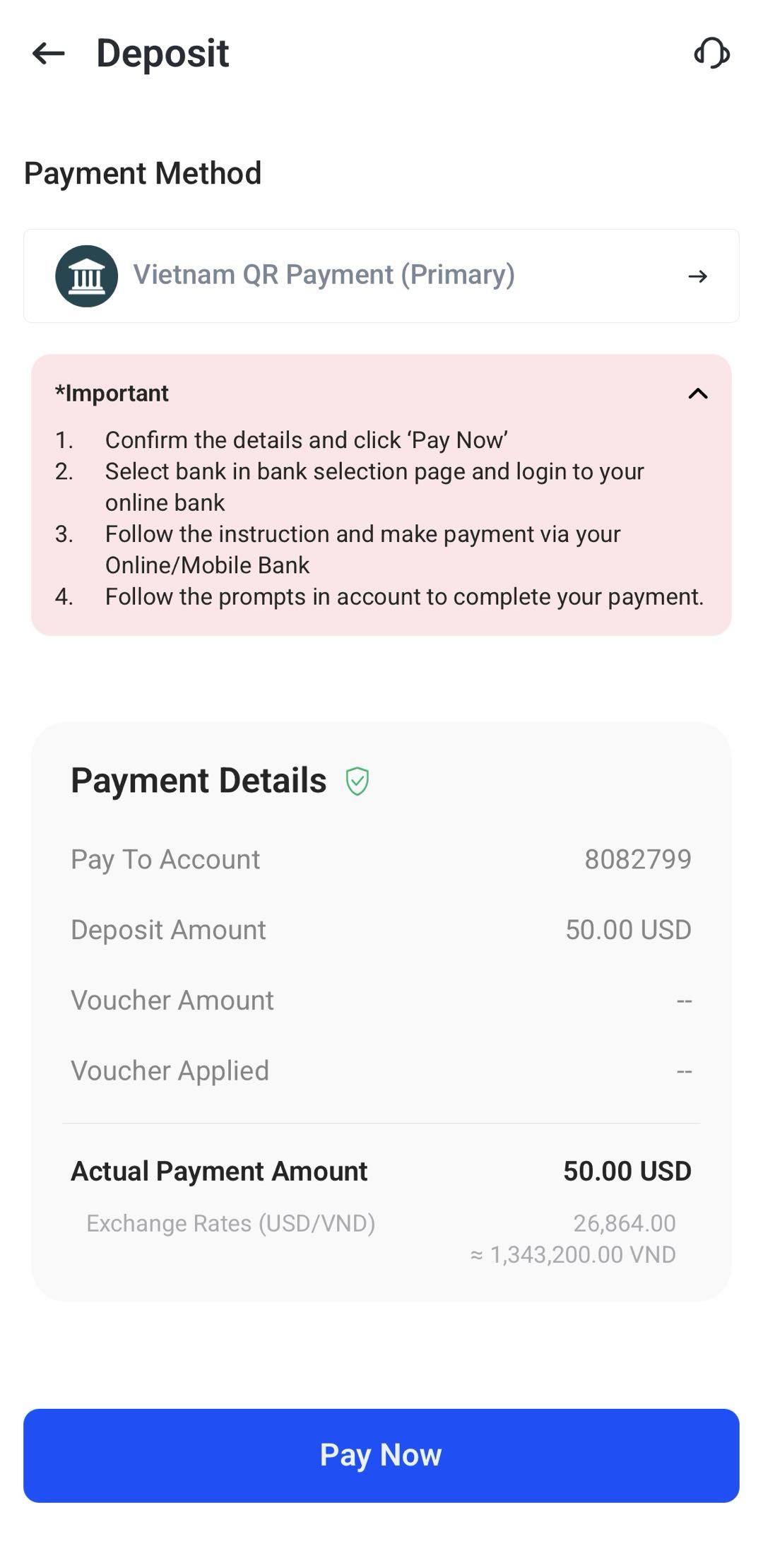
7. Follow the gateway or transfer instructions shown on the screen.
8. Check the status under assets > Transaction History.
Deposit Processing Times
The processing times depend on the payment method used.
| Deposit Method | Estimated Processing Time |
|---|---|
| Digital deposits (card payments, selected e-wallets, and supported cryptocurrency payments) | Usually within 30–60 minutes |
| Local bank transfers | May take longer depending on the bank |
| International bank transfers | 3–7 business days |
Processing times may also be affected by weekends, public holidays, incorrect payment details, bank checks, payment provider review, or additional compliance checks.
Why Your Deposit May Be Delayed or Unsuccessful
A deposit may not be completed immediately if the payment details are incorrect or if the payment provider needs more time to process the transaction.
Common reasons include:
- Incorrect card, bank, wallet, or crypto details
- Insufficient balance
- Unsupported card or bank type
- Failed 3D Secure verification
- Payment timeout
- Amount mismatch
- Incorrect transfer notes
- Unsupported cryptocurrency network
- Bank or payment provider delays
- Additional compliance review
- Incomplete account information
If your deposit has passed the usual processing timeframe, check your transaction history first. You may also need to prepare supporting documents for review.
You may be asked to provide:
- Your MT4 or MT5 trading account number
- Payment receipt or transfer confirmation
- Transaction ID, payment ID, or TXID/HASH for crypto deposits
- Recent bank statement
- Proof that the card, wallet, or payment method belongs to you
Providing the correct documents can help the support team review your deposit more efficiently.
How to Check Your Deposit Status
You can check your deposit progress through the Client Portal.
Go to Assets > Funding History, then review the relevant transaction.
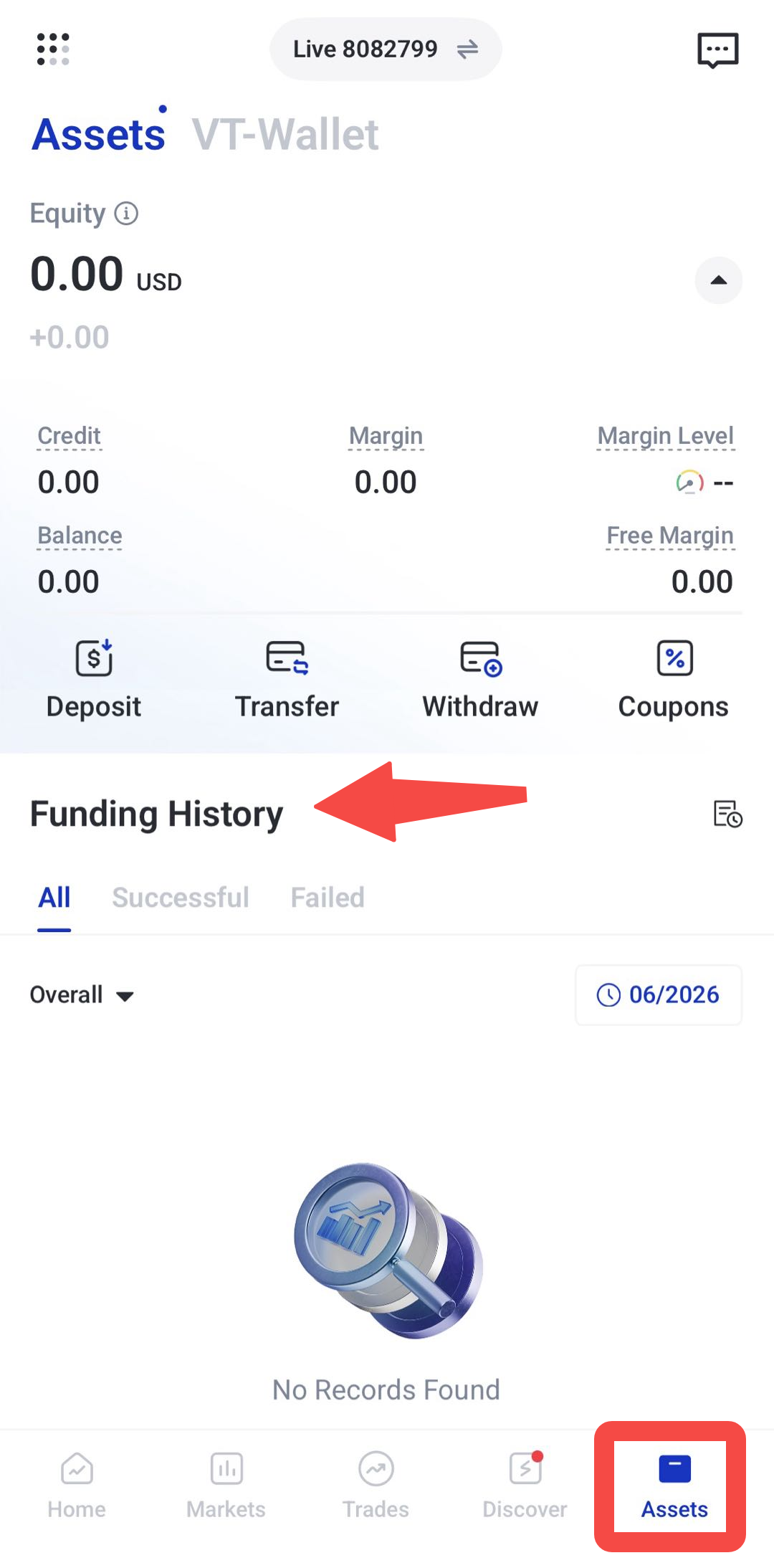
When checking your deposit status, look at:
- Transaction type
- Date and time submitted
- Deposit amount
- Payment method used
- Current transaction status
Need Help With a Deposit?
If your deposit has not appeared in your trading account after the expected processing time, check your transaction history first. If the issue persists, contact VT Markets support and provide your trading account number, payment receipt, and any available transaction reference from your bank, wallet, or payment provider.
For more information about deposits, visit the VT Markets Help Centre: https://get.vtmarkets.help/hc/en-us
Frequently Asked Questions
What deposit methods does VT Markets accept?
VT Markets may support local bank transfer, international bank transfer, credit card, debit card, Skrill, Neteller, UnionPay, mobile payment methods, and cryptocurrency. The available options may vary depending on your region and account eligibility.
What do I need before depositing funds?
Before making a deposit, make sure your payment method is under your own name, your account details are correct, and your selected payment method is available in your region. You should also check the minimum deposit requirement for your account and payment method.
Can I deposit before completing verification?
In some cases, deposits may be allowed before full verification is completed. However, withdrawals are typically restricted until the account has been fully verified. To avoid delays later, it is best to complete verification as early as possible.
What is the minimum deposit amount on VT Markets?
The minimum deposit is generally 50 in your account base currency. Some payment methods may have different minimum amounts or transaction limits.
Does VT Markets charge deposit fees?
VT Markets generally does not charge deposit handling fees. However, banks, card issuers, e-wallet providers, or payment processors may apply their own fees.
Why was my deposit unsuccessful?
A deposit may fail because of incorrect payment details, insufficient balance, unsupported payment method, failed 3D Secure verification, payment timeout, amount mismatch, incorrect transfer notes, or an unsupported crypto network.
Can I cancel a deposit?
Once a deposit has been successfully processed, it generally cannot be cancelled or reversed.
Are third-party deposits allowed?
No. Deposits should generally be made using a payment method registered under the same name as the trading account holder. This is required for Anti-Money Laundering compliance and account security.
Disclaimer: Regional restrictions may apply. Product specifications, deposit methods, processing times, and platform features are subject to VT Markets’ Terms and Conditions.