





Key Takeaways
- The VT Markets AI Connector allows users to look up instruments, contract specifications, and indicative prices from inside Claude or ChatGPT.
- Both connectors are free to use, and no VT Markets account or sign-in is required.
- It cannot access your trading account, place trades, or provide investment advice or trading signals.
- Prices are indicative and are not executable. Always check current quotes and trading conditions on your VT Markets platform before placing a trade.
What is the VT Markets AI Connector?
The VT Markets AI Connector lets you ask simple questions and get fast market information without leaving your AI chat. Whether it’s to find the symbol for gold, check an instrument’s minimum trade size, or look up its latest available indicative price, you can start with a simple question. Users can connect it to Claude or install the plugin in ChatGPT to get started for free.
Why Use the VT Markets AI Connector?
- No Switching Apps: Get instrument information without leaving your chat.
- Simple Questions, Fast Answers: Ask in plain language, with no menus or filters.
- No Account Needed: No VT Markets account or sign-in required.
- Free to Use: VT Markets does not charge a connector fee, though your AI platform’s subscription fees, usage limits, and access requirements still apply.
Before You Start
You will need:
- Access to Claude or ChatGPT with the VT Markets connector or plugin available.
- Permission to install and use it if you are in a managed workspace.
Note: No VT Markets trading account, trading password, or API key are required.
Key Features of the VT Markets AI Connector
The connector offers 3 key tools. All are read-only: they retrieve information without accessing or changing your trading account.
- Find an Instrument (search_instruments)
Search by name, ticker or description to check whether VT Markets offers an instrument.
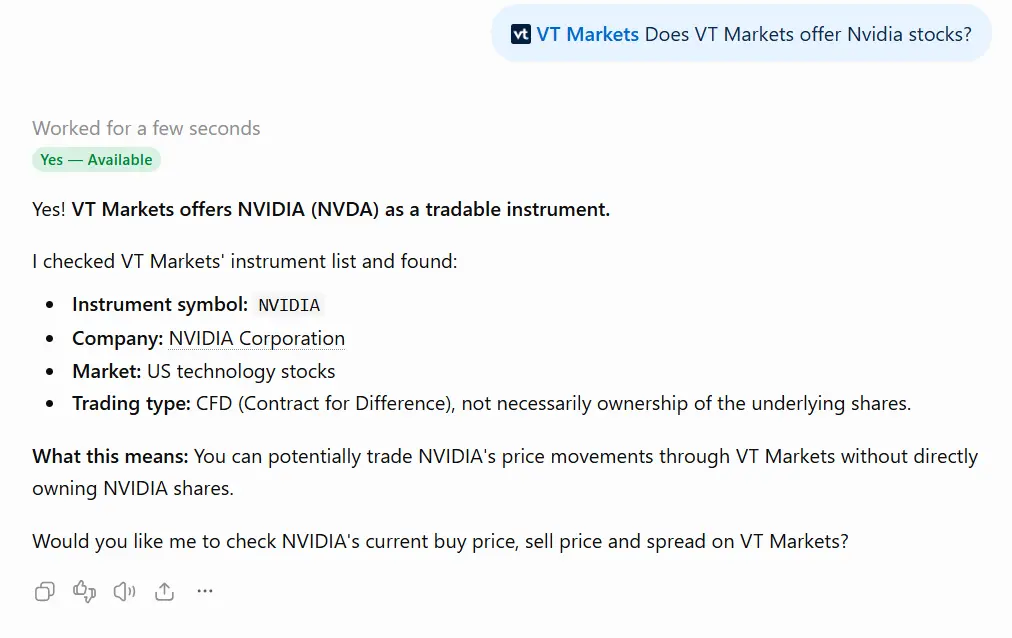
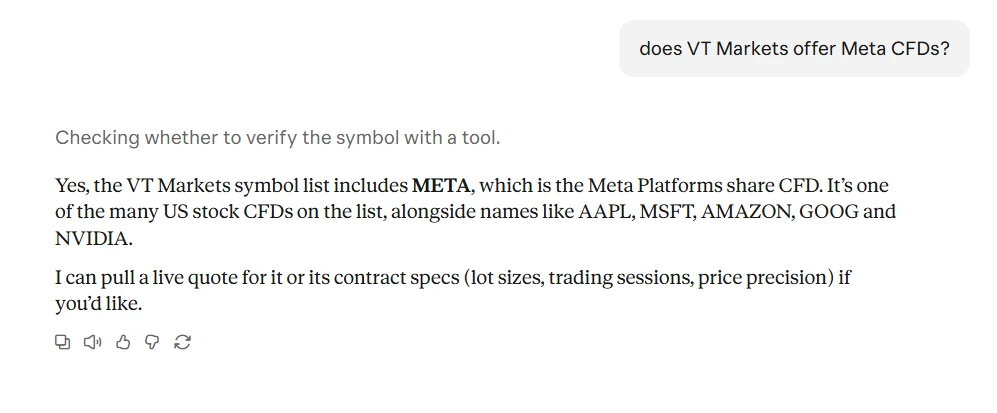
Note: An instrument appearing in search results does not confirm that it is available for your particular account. Availability may vary by region, VT Markets entity, account type, and platform.
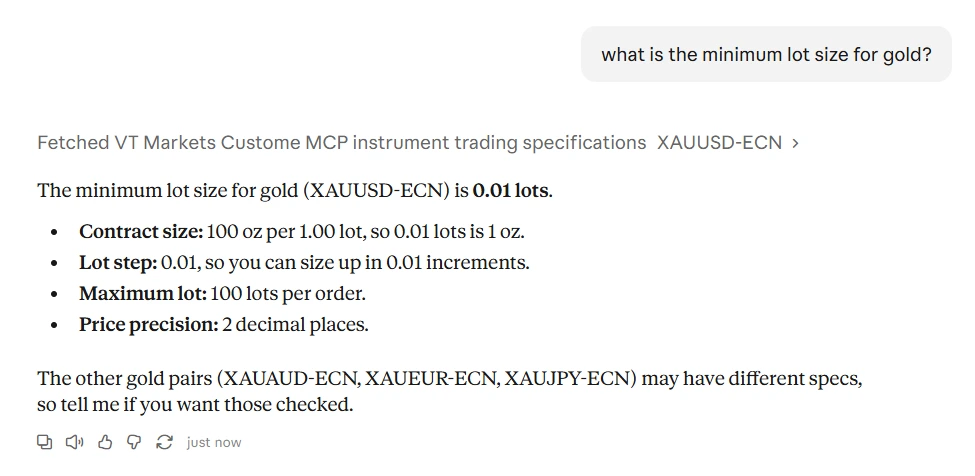
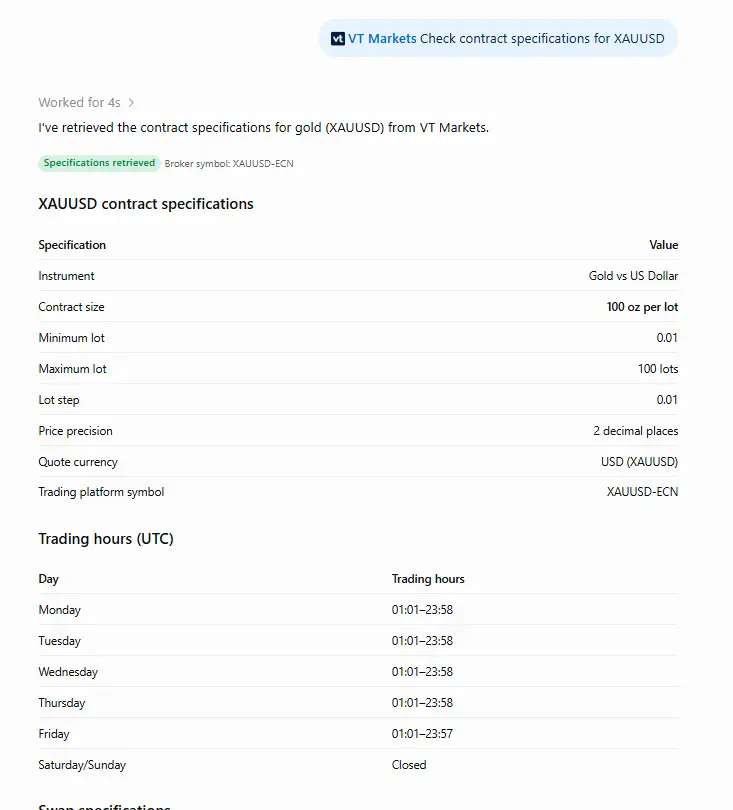
- Check Contract Specifications (get_instrument_details)
View the details of an instrument, including:
- Contract size
- Minimum and maximum lot sizes
- Lot step (the increment by which you can adjust your trade size)
- Quote currency
- Price precision (the number of decimal places used to display prices)
- Trading sessions
- Swap convention
Note: Margin requirements are not included. Check your VT Markets trading platform for the margin applicable to your account and intended trade.
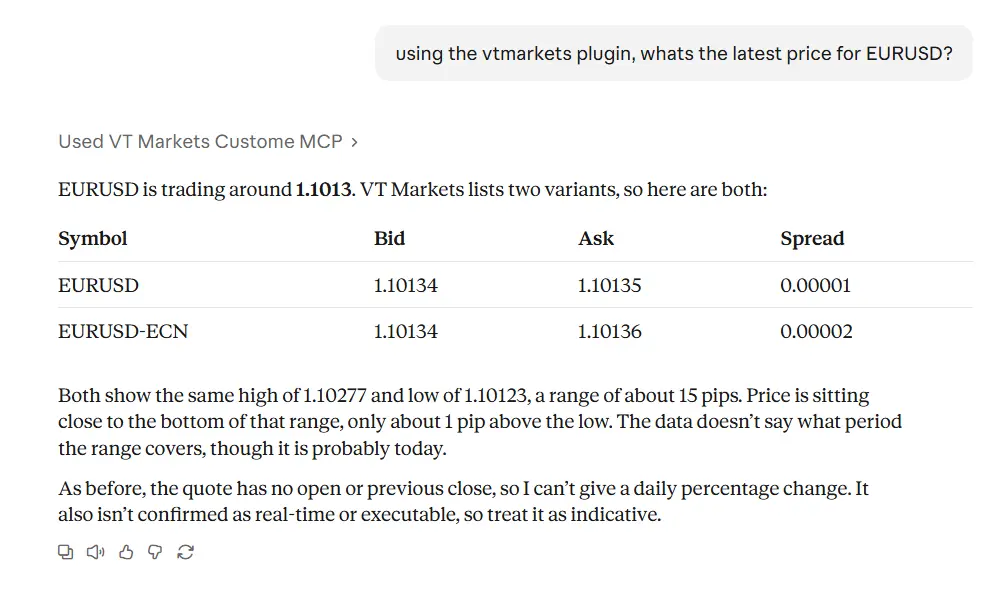
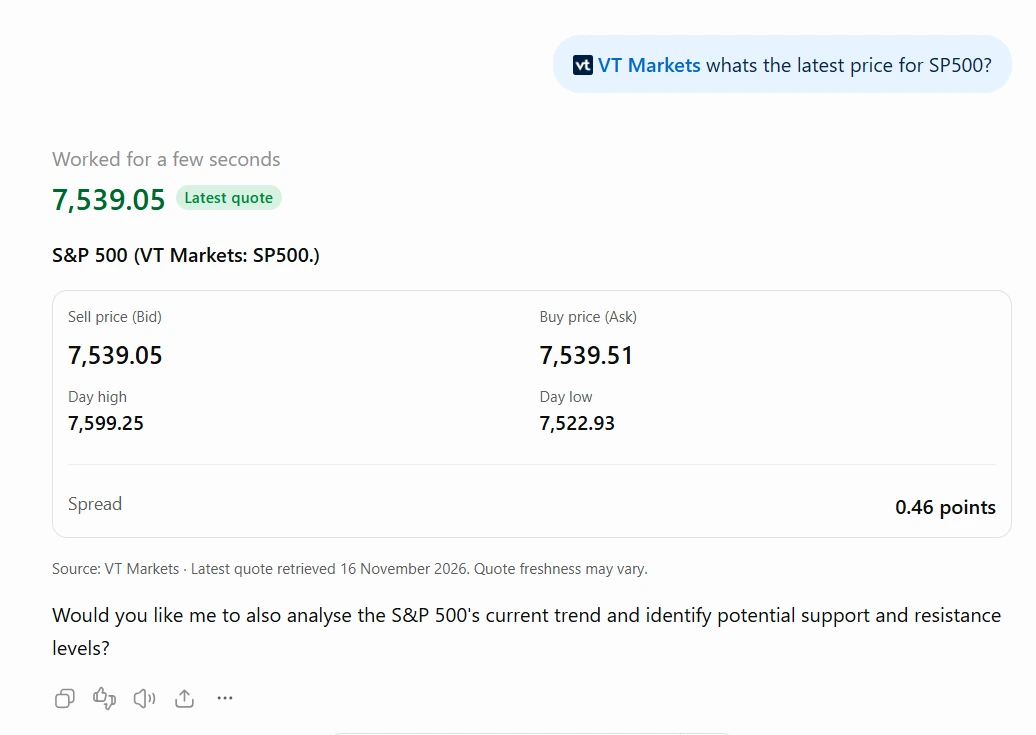
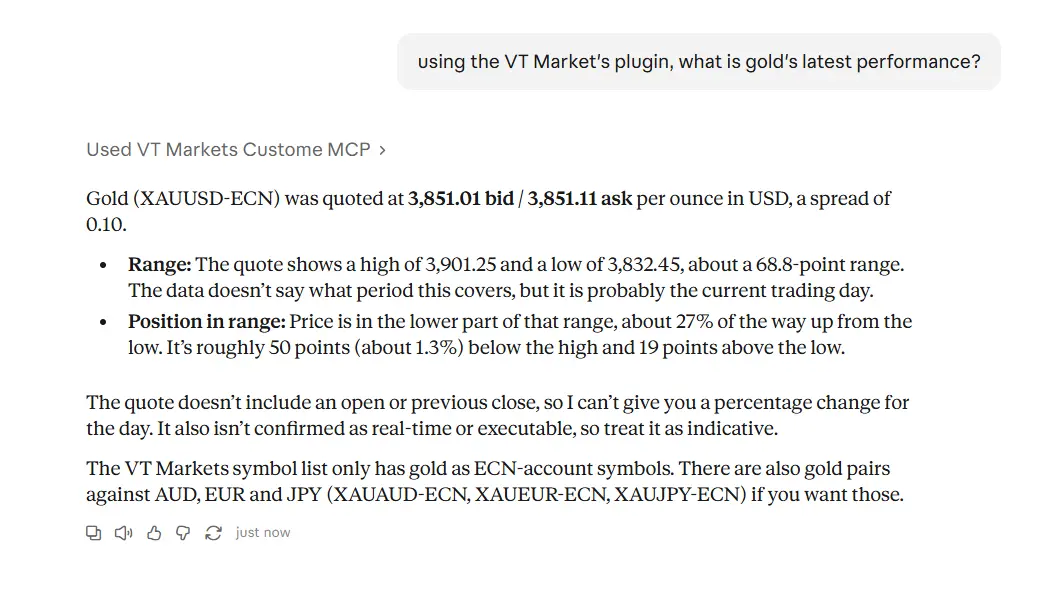
- Get the Latest Indicative Price (get_price_history)
Access the latest available indicative price for forex, gold, stocks, crypto, indices, ETFs, bonds and other instruments tradable with VT Markets.
Use these prices as a reference for your research. Prices may be delayed and should not be treated as a live trading feed or a guaranteed execution price. For executable quotes, check your VT Markets trading platform.
How to Connect to Claude and ChatGPT
Claude
- In a chat, click + (or type
/), hover over Connectors, and browse the directory.
- Select VT Markets, then Connect. No VT Markets sign-in is required.
- Start a new chat and ask Claude to use VT Markets.
On Team and Enterprise plans, an Owner or Primary Owner may need to enable connectors for your organisation first.
New to connectors? See Claude’s guide, Use connectors to extend Claude’s capabilities.
ChatGPT
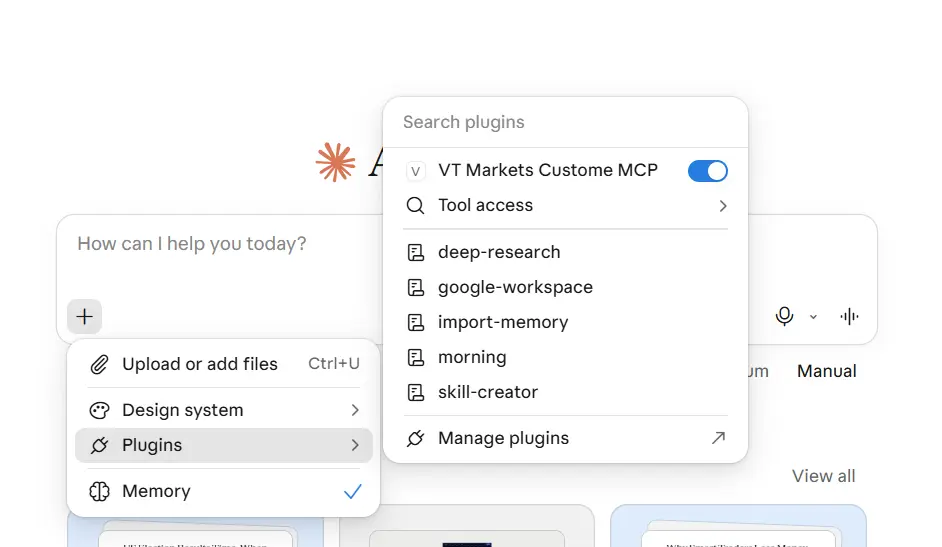
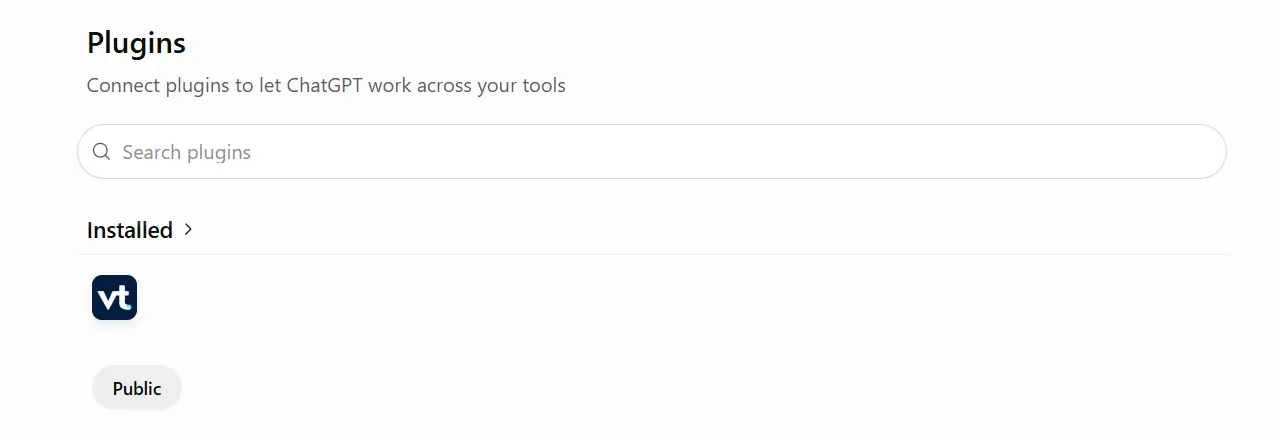
- Open Plugins in the ChatGPT sidebar and search for VT Markets.
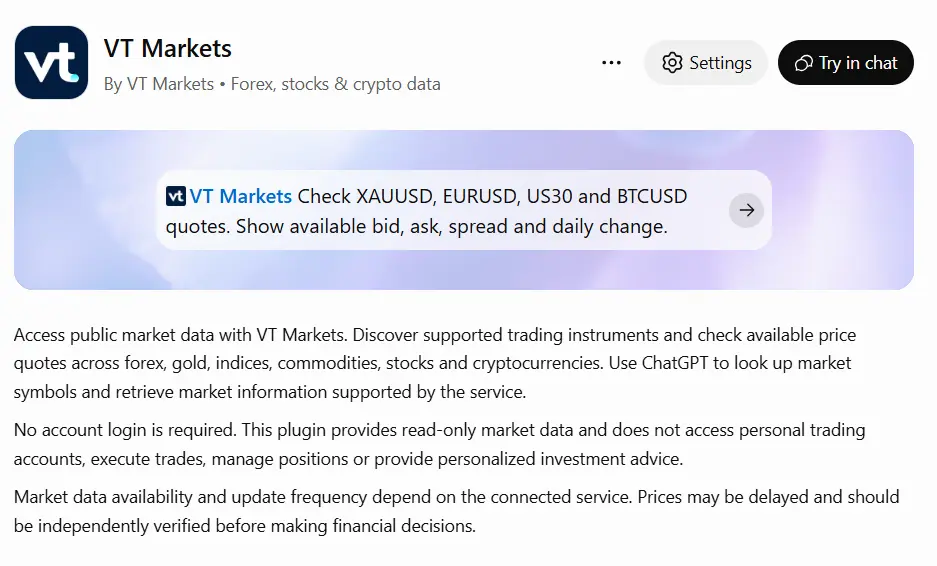
- Open the listing and select Install plugin. No VT Markets sign-in is required.
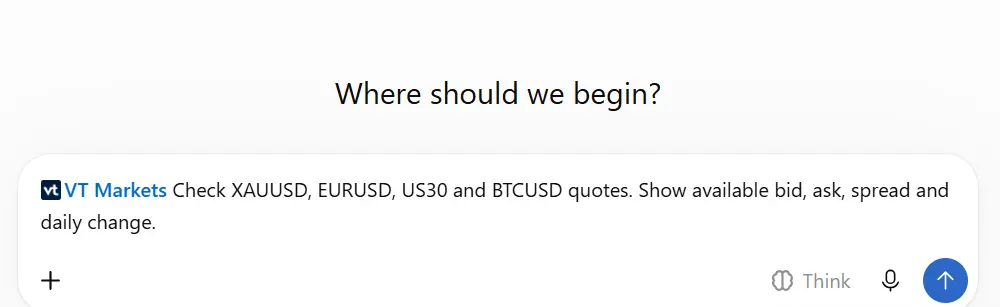
- Start a new chat and ask ChatGPT to use VT Markets.
Plugin availability depends on your plan, region, workspace settings, and role. If you cannot install the plugin in a managed workspace, contact your workspace administrator.
New to Plugins? See Plugins in ChatGPT.
Common Prompts
Mention VT Markets in your request so your assistant knows which source to use.
| What You Want to Know | Try Asking | What to Expect |
| Find an instrument | “Does VT Markets offer Nikkei 225, Nvidia, and natural gas?” | Confirmation of whether VT Markets offers each instrument, plus its trading symbol and asset class. |
| Contract specifications | “What’s the contract size, lot step, and swap for XAUUSD?” | The available contract specifications. You can also ask for quote currency, price precision and trading sessions. Margin requirements are not included. |
| Latest indicative price | “What is XAUUSD trading at right now?” | The latest indicative price available through the connector. It may be delayed and can differ from the executable quote on your trading platform. |
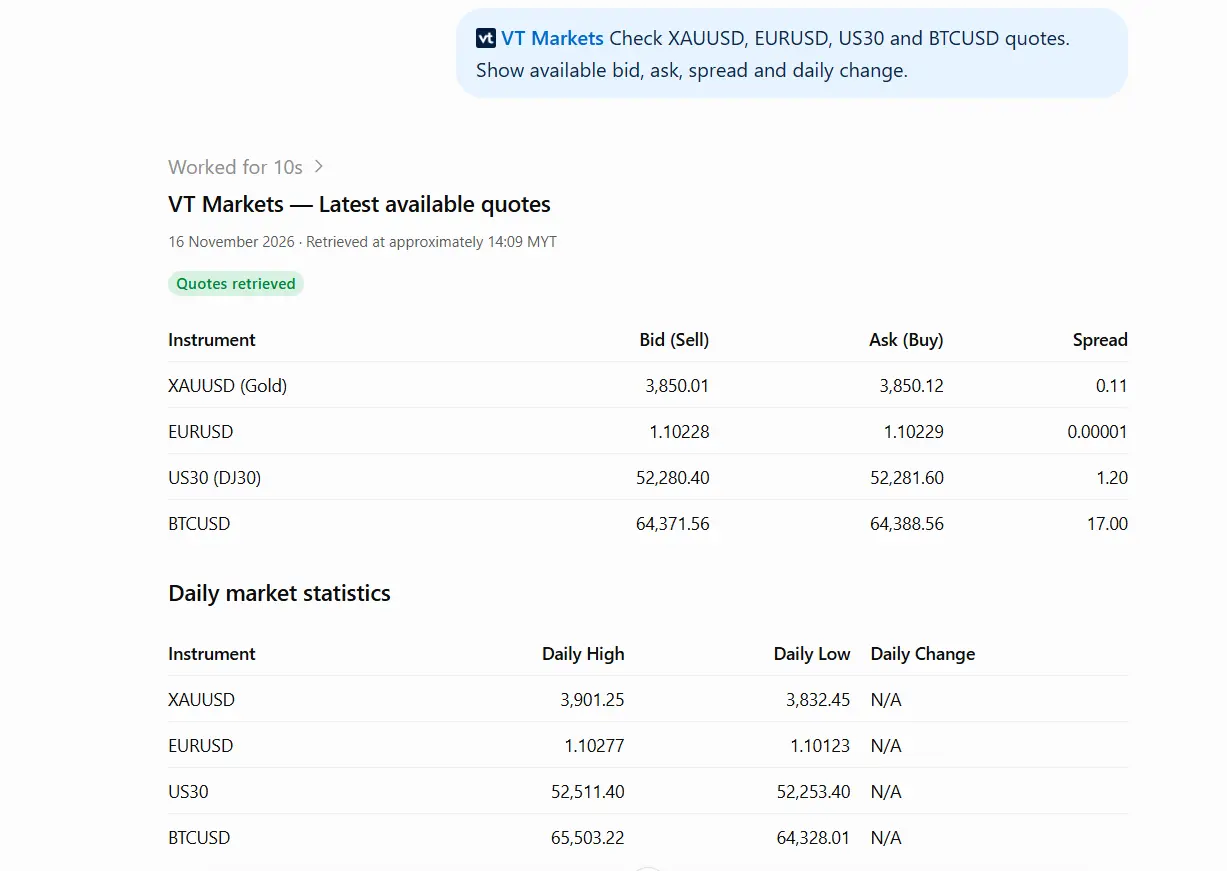
If you don’t know a symbol, start with the instrument’s name. Once your assistant finds the match, use the exact VT Markets symbol in follow-up questions.
Troubleshooting Issues
| Issue | What to do |
| I cannot find VT Markets in the directory. | Check that it is available for your platform, plan, region, and workspace. In a managed workspace, ask your administrator about access. |
| It is installed, but the assistant is not using it. | Select or enable VT Markets in the conversation where available, then repeat your request and explicitly ask the assistant to use VT Markets. |
| No matching instrument is found. | Try the full instrument name or a different search term. Once you find a match, use its exact VT Markets symbol. |
| Several instruments match my request. | Ask the assistant to list the symbols and descriptions, then specify which one you want. |
| A specification or price is unavailable. | Ask the assistant to identify which information is unavailable. Retry later or check your trading platform rather than relying on an estimated value. |
| The price differs from my trading platform. | Check the symbol and timestamp where available. Connector prices are indicative and may be delayed; use your trading platform to check current quotes before trading. |
| A tool returns an error or does not respond. | Try again shortly. If the issue continues, contact VT Markets support using the official support channel. |
If the issue persists, kindly contact our Support team at info@vtmarkets.com and include the following information:
- The AI assistant you use: Claude or ChatGPT
- Your prompt or request
- The error message and tool name, if available
- A screenshot with personal or confidential information removed
Try Your First Prompt On Claude or ChatGPT
Connect VT Markets to your AI assistant and start with a simple question.
Try the plug in for Claude and ChatGPT today.
Frequently Asked Questions
What is the VT Markets AI Connector?
It is a free connector that lets Claude and ChatGPT answer questions about VT Markets instruments, contract specifications and indicative prices.
Do I need a VT Markets account?
No. No VT Markets account or sign-in is required. You only need access to Claude or ChatGPT with the relevant connector or plugin available.
Is the connector free?
Yes. The VT Markets connector is free to use. However, AI platform subscription fees and usage limits may still apply.
Can it access my account or place trades?
No. The connector only retrieves instrument information, contract specifications and indicative prices. It cannot access your trading account or execute trades.
Does it provide investment advice or trading signals?
No. It provides information to support your research, not investment advice or trading signals.
Why does the price differ from my trading platform?
Connector prices are indicative and may be delayed. Your VT Markets trading platform displays executable quotes, so always check the platform before placing a trade.
Can I check margin requirements?
No. Margin requirements are not included in the connector’s contract specification results.
Disclaimer:
VT Markets doesn’t represent that the material provided here is accurate, current or complete, and therefore shouldn’t be relied upon as such. The information provided here is from a third party and isn’t to be considered as a recommendation; or an offer to buy or sell; or the solicitation of an offer to buy or sell any security, financial product or instrument; or to participate in any particular trading strategy. We advise any readers of this content to seek their own advice. Without the approval of VT Markets, reproduction or redistribution of this information isn’t permitted.
AI-generated content is for informational purposes only and does not constitute financial or investment advice. Please make decisions at your own discretion.



