Key Takeaways
- Market orders are used when traders want to buy or sell immediately at the current available market price.
- Limit orders allow traders to set a preferred price before the order is executed.
- Stop orders are used when traders want an order to trigger only after the market reaches a selected price.
- Stop limit orders combine a stop price and a limit price for more controlled pending order execution.
- Traders can review leverage, trade volume, margin information, and TP/SL settings before placing an order.
- Understanding order types can help traders plan entries, exits, and risk levels more clearly.
Choosing the right order type is an important part of trade planning. Different order types allow traders to decide whether they want to enter the market immediately, wait for a better price, or trade only after price reaches a specific level.
On the VT Markets app, traders can select different order types from the trade ticket before placing an order. This guide explains how market, limit, stop, and stop limit orders work, when traders may use them, and how to use them on the VT Markets app.
What Are Order Types in Trading?
An order type is an instruction given to the trading platform. It tells the platform how and when to open or close a trade.
Some orders are executed immediately. Others remain pending until the market reaches the selected price. This gives traders more control over how they enter and manage trades.
The table below shows the main order types covered in this guide.
| Order Type | Main Purpose | Common Use |
|---|---|---|
| Market Order | Opens or closes a trade immediately | When traders want fast execution |
| Limit Order | Sets a preferred price before execution | When traders want to enter at a better price |
| Stop Order | Triggers when price reaches a selected level | When traders want to trade breakouts or momentum |
| Stop Limit Order | Uses a stop price and a limit price | When traders want more control over pending order execution |
How Order Types Help With Trade Planning
Order types can help traders plan their trades before entering the market. Instead of reacting to price movement without a clear plan, traders can decide their entry, exit, and risk levels in advance.
Order types may help traders:
- Set clear entry points.
- Plan exits before placing a trade.
- Manage risk with stop-loss levels.
- Set profit targets with take-profit levels.
- Avoid impulsive trading decisions.
- Follow a trading strategy more consistently.
For example, a trader may use a limit order to wait for a better entry price, add a stop-loss to manage downside risk, and add a take-profit level to close the trade if the market reaches a target price.
This creates a more structured approach to trading.
How to Use Order Types on the VT Markets App
Traders can select order types directly from the trade ticket on the VT Markets app. The steps below show the general process.
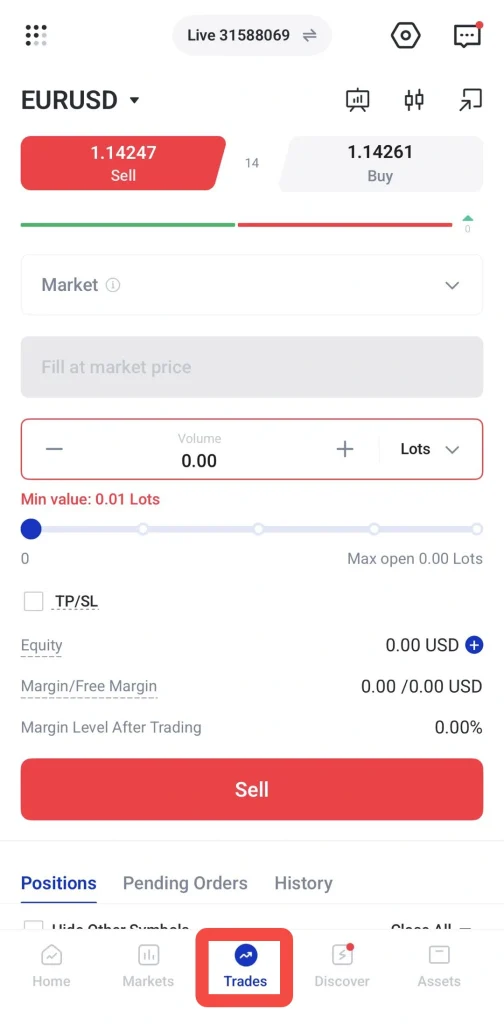
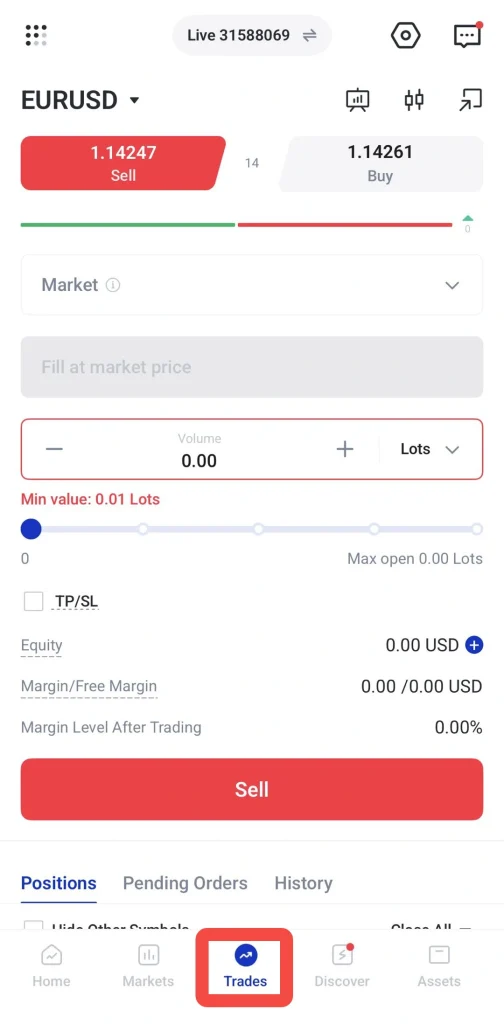
Step 1: Go to the Trades Tab
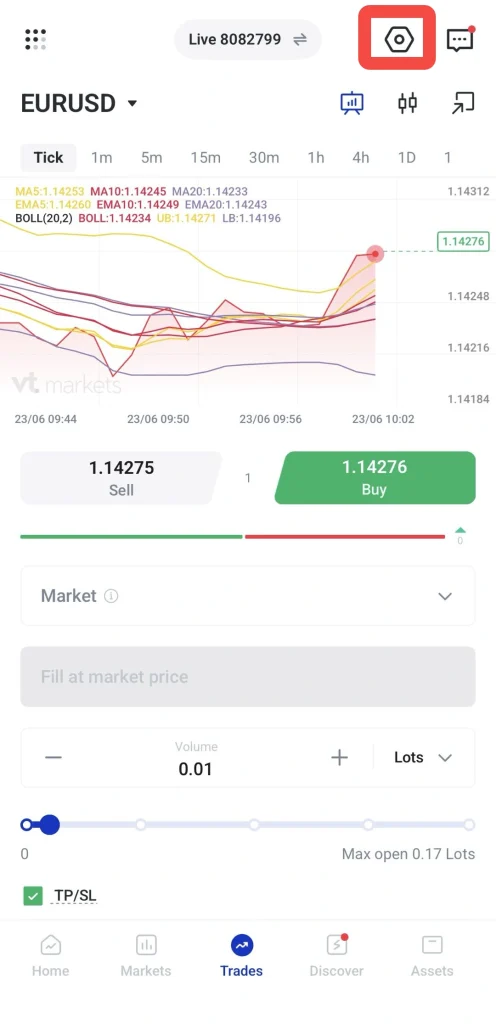
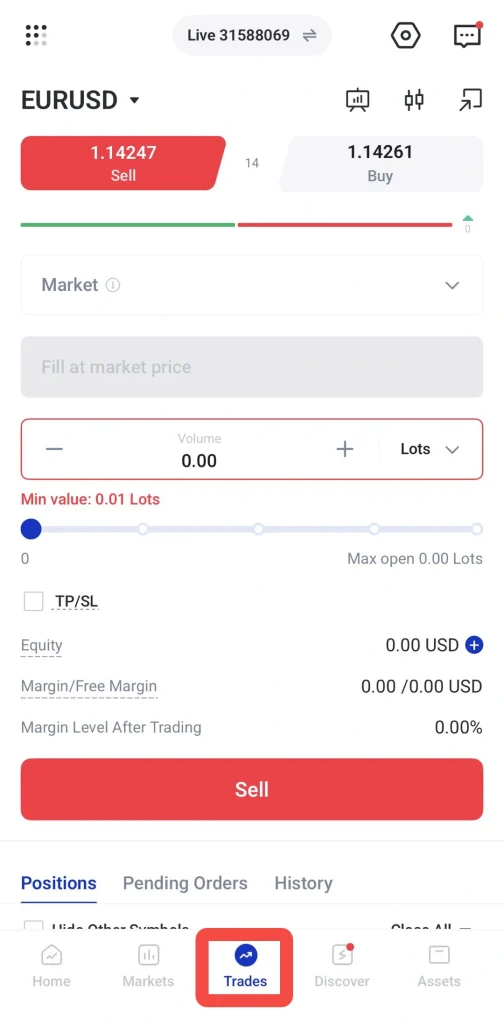
Open the VT Markets app and tap Trades from the bottom menu.
This will take you to the trading screen, where you can view the current instrument, live buy and sell prices, order settings, positions, pending orders, and trading history.
Step 2: Choose the Instrument You Want to Trade
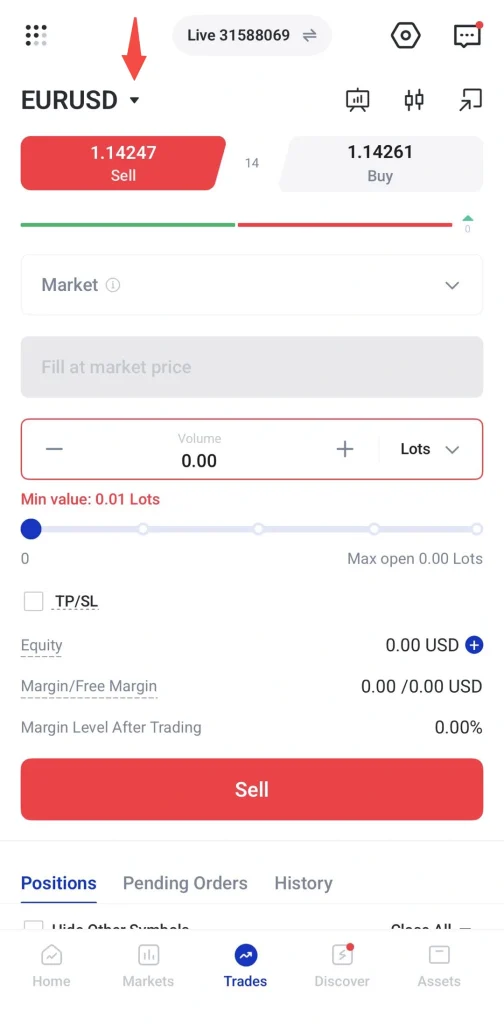
Tap the instrument name at the top of the trading screen (🔻)
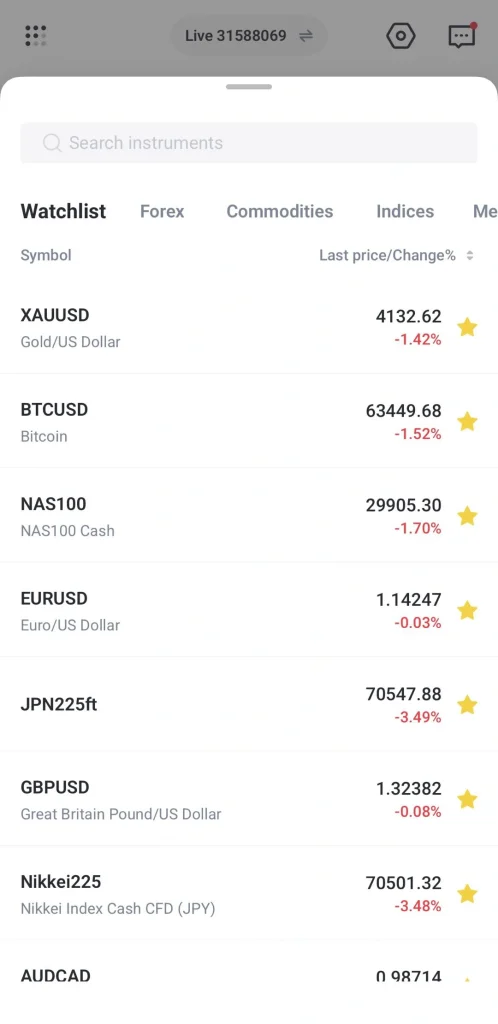
A list of instruments will appear. You can search for an instrument or browse by category, such as forex, commodities, or indices.
Tap the instrument you want to trade.
Step 3: Select the Order Type
After selecting an instrument, tap the order type field. This is where you can choose between order types such as:
- Market
- Limit
- Stop
- Stop Limit
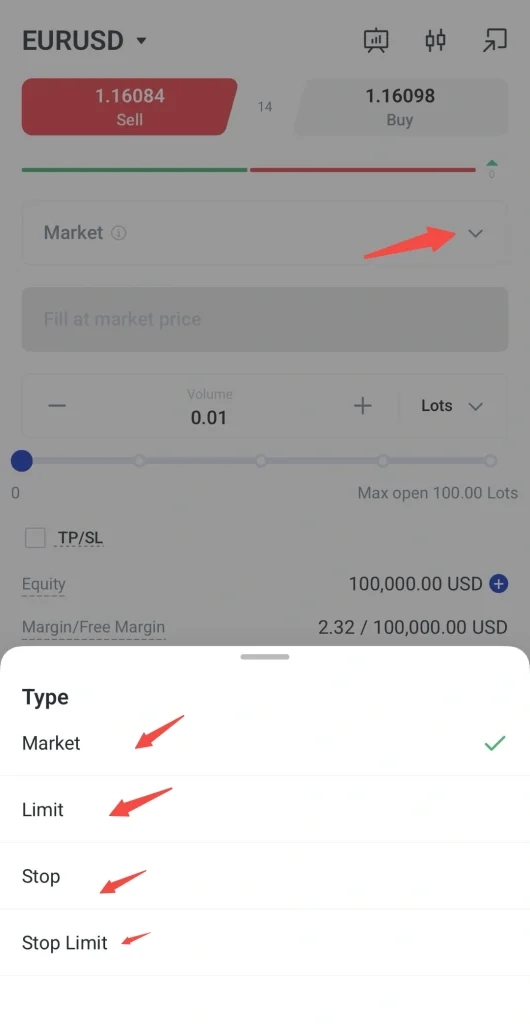
The fields shown on the trade ticket will change depending on the order type selected. For example, a market order does not require a selected entry price, while limit, stop, and stop limit orders require price levels.
Step 4: Review or Adjust Leverage
Before placing a trade, traders may review the leverage applied to their trading account.
Leverage allows traders to control a larger position with a smaller amount of capital. However, it can also increase both potential profits and potential losses. Traders should review leverage carefully and make sure it matches their risk tolerance.
To review or adjust leverage on the VT Markets app:
1. Tap the settings icon on the top right of the trading screen.
2. Select Leverage from Trade Settings.
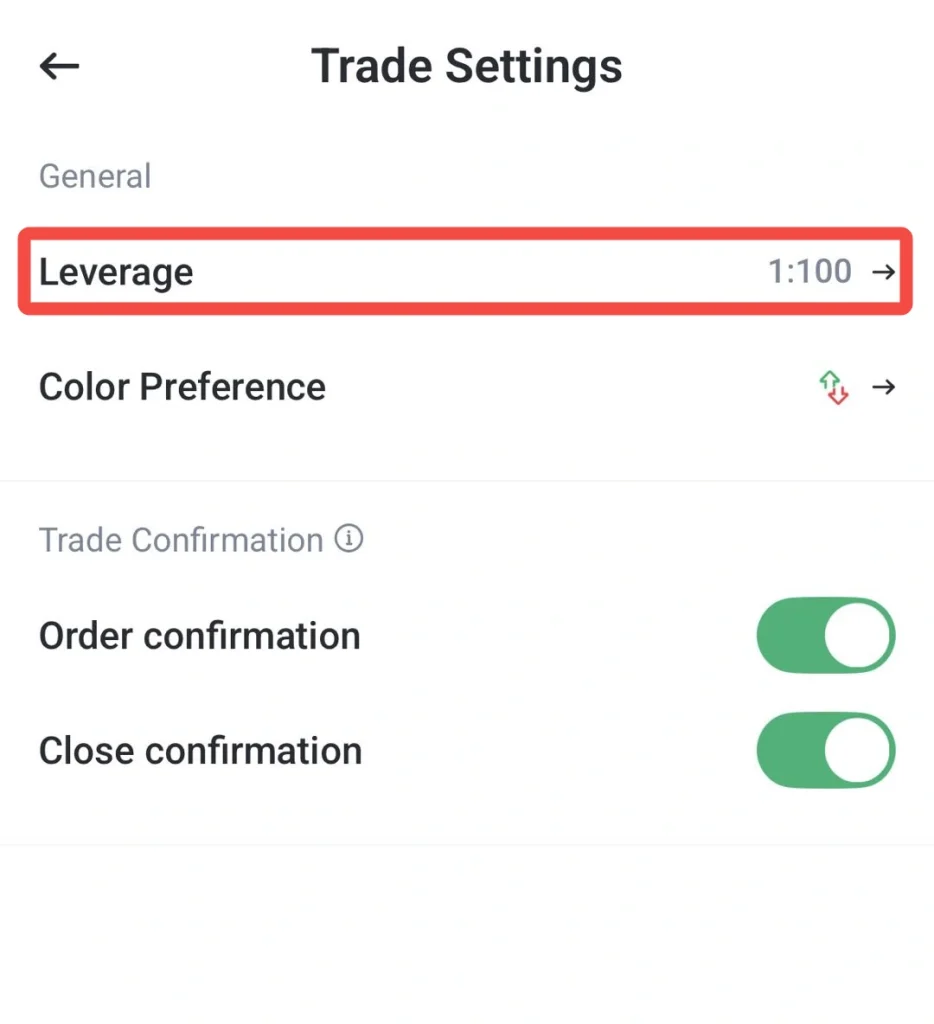
3. On the Leverage page, check your Current Leverage.
4. Tap Leverage Change to view the available leverage options.
5. Select the leverage level based on your trading preference and risk tolerance.
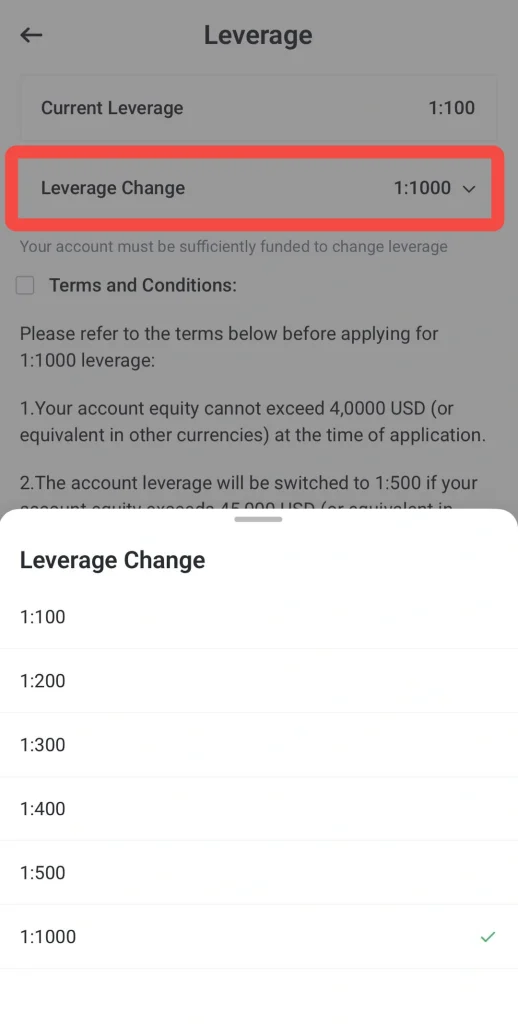
6. Read the terms and conditions carefully.
7. Tick the Terms and Conditions checkbox.
8. Tap Confirm to submit the leverage change request.
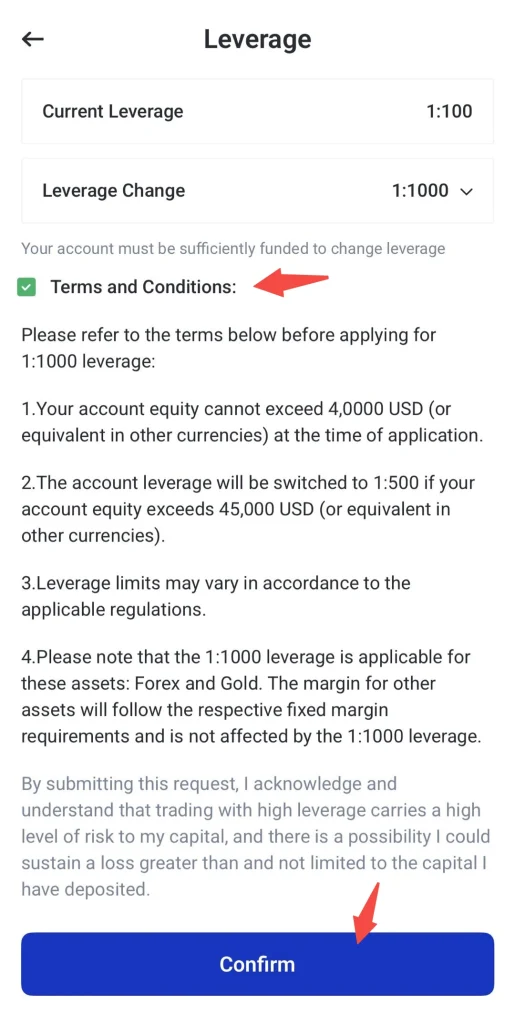
Note: Leverage options may vary depending on the account type, instrument, equity level, and applicable trading conditions. Some leverage changes may also require the account to be sufficiently funded or meet specific requirements before the request can be submitted.
Step 5: Enter the Trade Volume
Enter the trade volume in lots. You can adjust the volume using the minus and plus buttons.
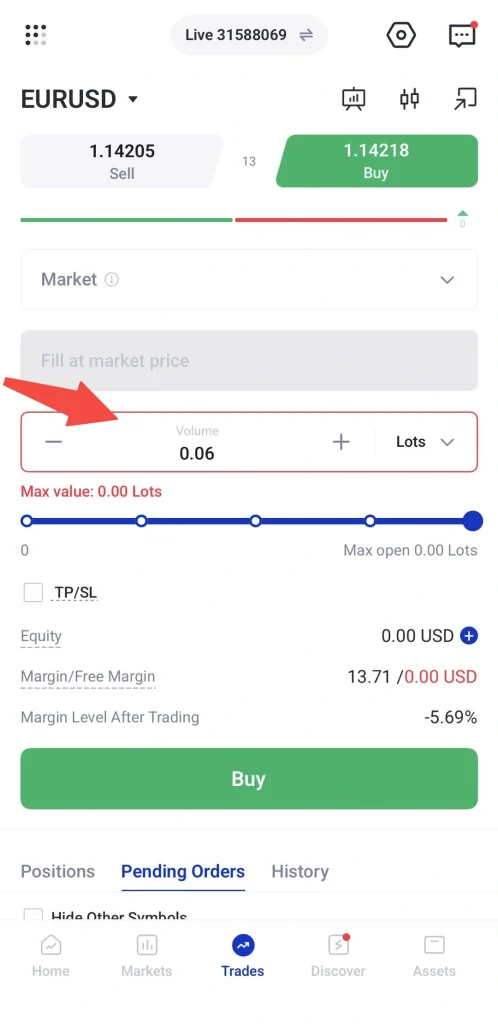
Trade volume affects the size of the position and the margin required to open the trade. Before placing an order, review the account information shown on the trade ticket, such as equity, margin, free margin, and margin level after trading.
Step 6: Add Take profit/Stop loss If Needed
Traders can tick TP/SL to add take-profit and stop-loss levels before placing the order.
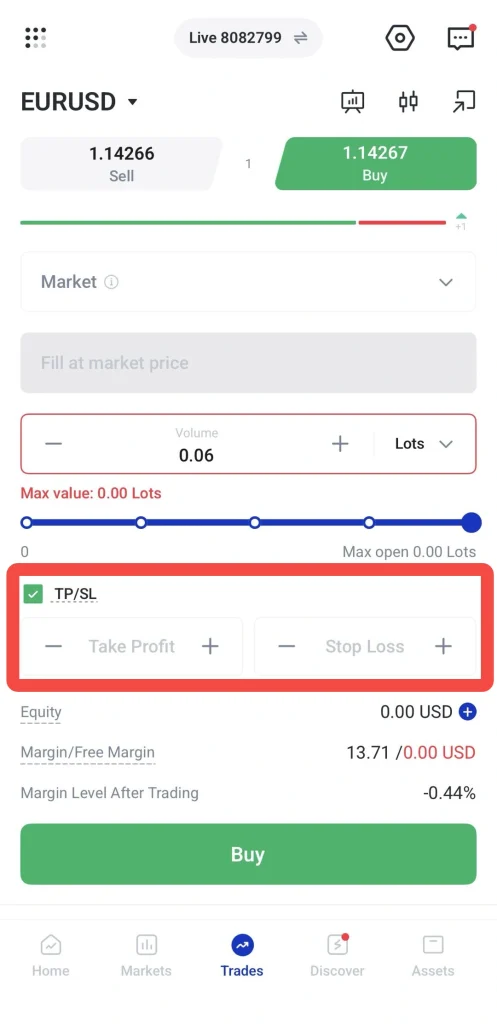
A take-profit order is used to close a trade when the market reaches a selected profit target. A stop-loss order is used to close a trade when the market reaches a selected loss level.
Using TP/SL can help traders plan their exit levels before entering a trade.
Step 7: Tap Buy or Sell
Once the order type, price level, leverage, trade volume, and TP/SL settings are ready, tap Buy or Sell.
What Is a Market Order?
A market order is an instruction to buy or sell immediately at the current available market price.
This order type is commonly used when traders want to enter or exit a position quickly. Once the order is submitted, the platform attempts to execute it based on the best available price at that time.
How Market Orders Work on the VT Markets App
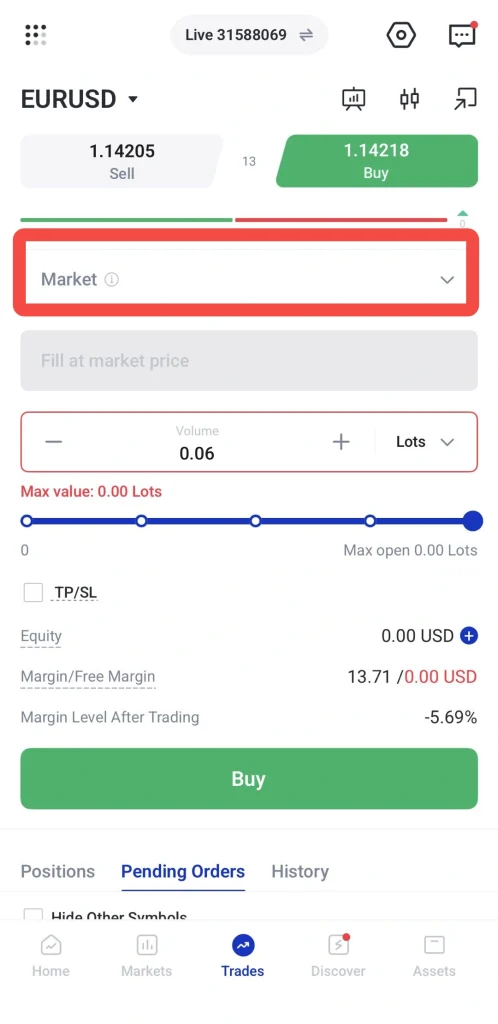
After selecting an instrument on the VT Markets app, choose Market as the order type.
Because a market order is filled at the current available market price, the price field will show that the order is filled at market price.
Traders only need to enter the trade volume, add TP/SL if needed, and tap Buy or Sell.
When Traders May Use Market Orders
Traders may use market orders when:
- They want to enter the market immediately.
- They want to close a position quickly.
- They are trading during active market conditions.
- Speed is more important than entering at a specific price.
Market orders are useful for quick execution. However, the final execution price may differ from the price shown on screen during fast-moving markets. This is known as slippage.
What Is a Limit Order?
A limit order is an instruction to buy or sell at a selected price or better.
This order type is used when traders do not want to enter the market immediately. Instead, they choose the price level they prefer and wait for the market to reach it.
How Limit Orders Work
A buy limit order is usually placed below the current market price. Traders may use it when they expect price to fall to a certain level before rising again.
A sell limit order is usually placed above the current market price. Traders may use it when they expect price to rise to a certain level before falling again.
The table below shows how limit orders are commonly used.
| Limit Order Type | Where It Is Placed | Example Use |
|---|---|---|
| Buy Limit | Below the current market price | To buy after a price pullback |
| Sell Limit | Above the current market price | To sell after a price rebound |
How to Place a Limit Order on the VT Markets App
To place a limit order on the VT Markets app:
1. Go to Trades.
2. Select the instrument you want to trade.
3. Choose Limit as the order type.
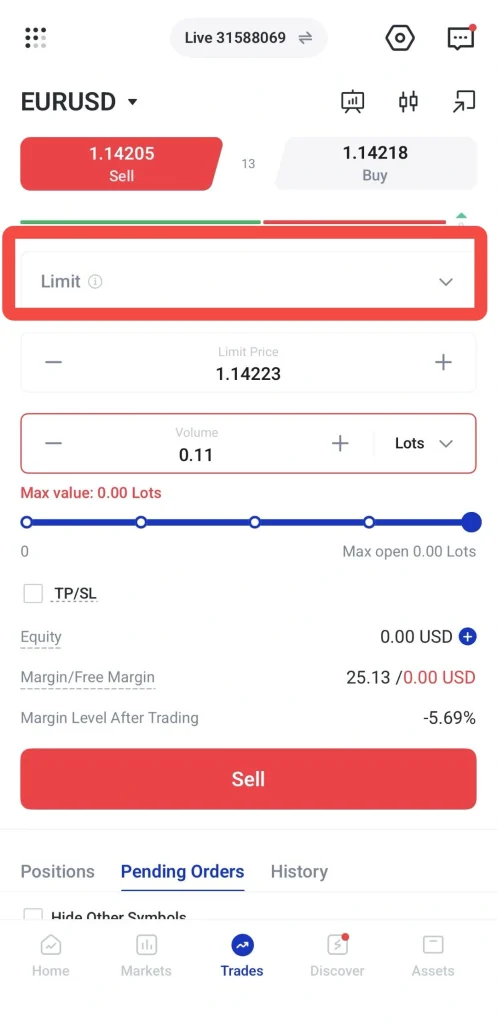
4. Enter the limit price, trade volume and TP/SL if needed.
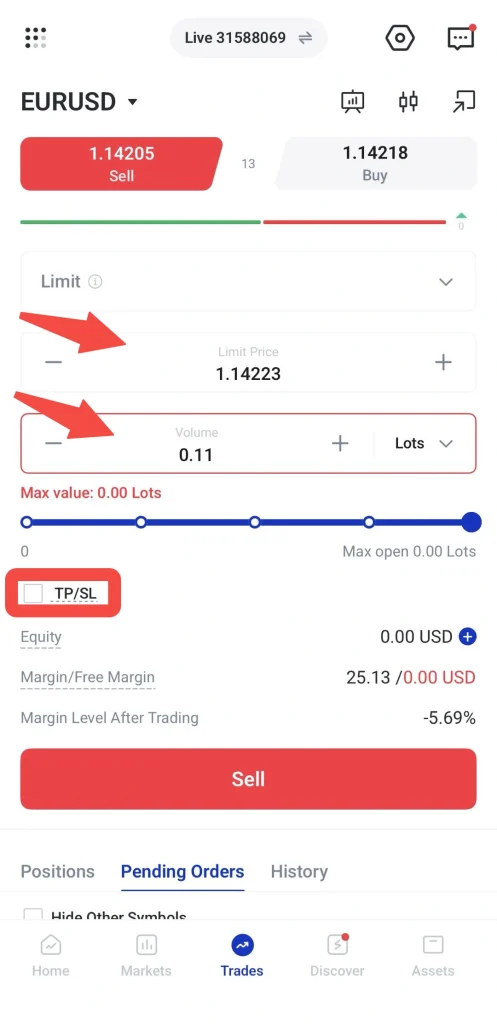
5. Tap Buy or Sell.
The order will remain pending until the market reaches the selected limit price. If the market does not reach that price, the order may not be executed.
When Traders May Use Limit Orders
Traders may use limit orders when:
- They want to enter at a specific price.
- They are waiting for a pullback.
- They want more control over their entry level.
- They do not want to monitor the market constantly.
- They want to avoid entering during short-term price spikes.
Limit orders can support more disciplined trade planning. However, the trade may not be filled if the market does not reach the selected price.
What Is a Stop Order
A stop order is an instruction to buy or sell only after the market reaches a selected stop price.
This order type is often used when traders want price confirmation before entering the market. It is commonly used in breakout or momentum-based strategies.
How Stop Orders Work
A buy stop order is usually placed above the current market price. Traders may use it when they expect price to continue rising after breaking above a certain level.
A sell stop order is usually placed below the current market price. Traders may use it when they expect price to continue falling after breaking below a certain level.
The table below shows how stop orders are commonly used.
| Stop Order Type | Where It Is Placed | Example Use |
|---|---|---|
| Buy Stop | Above the current market price | To enter after an upside breakout |
| Sell Stop | Below the current market price | To enter after a downside breakout |
How to Place a Stop Order on the VT Markets App
To place a stop order on the VT Markets app:
1. Go to Trades.
2. Select the instrument you want to trade.
3. Choose Stop as the order type.
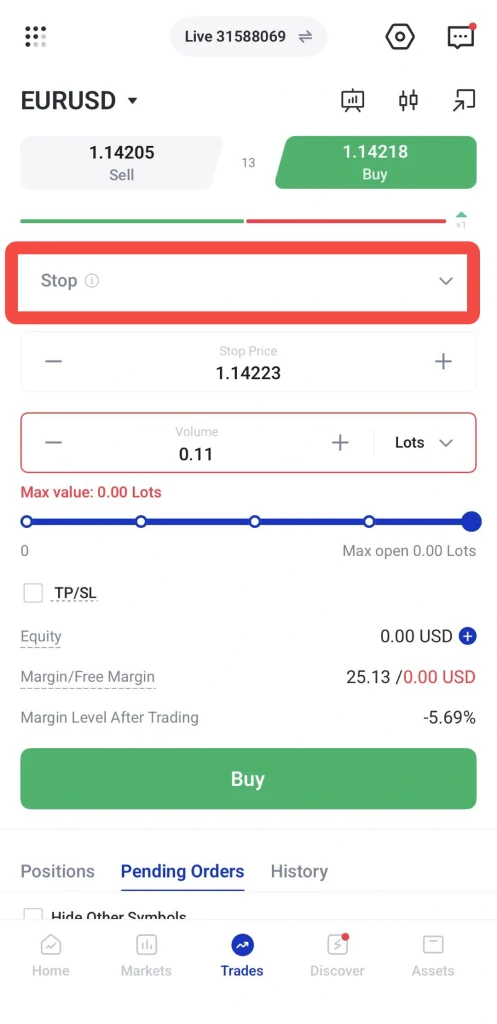
4. Enter the stop price, trade volume and TP/SL if needed.
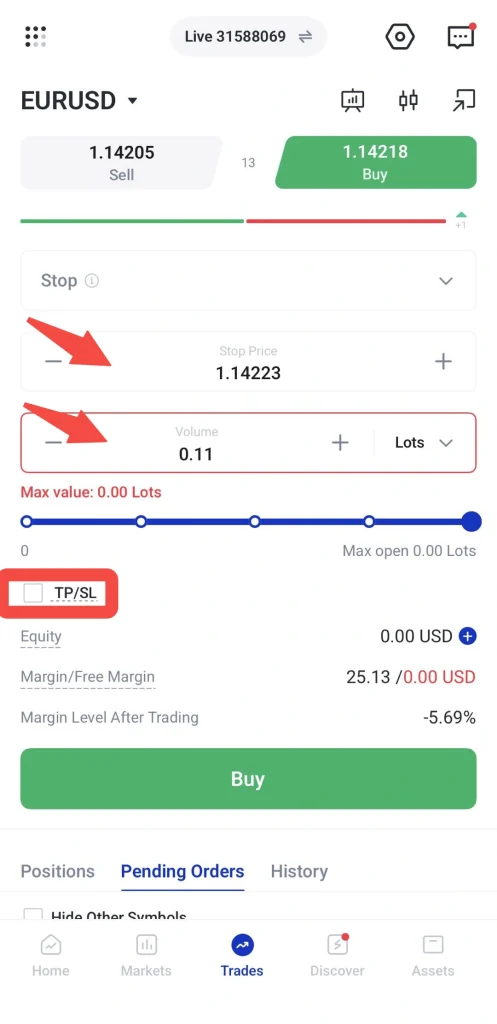
5. Tap Buy or Sell.
The order will remain pending until the market reaches the selected stop price. Once triggered, it becomes an active order based on the order conditions.
When Traders May Use Stop Orders
Traders may use stop orders when:
- They want to trade a breakout.
- They want to enter after price confirms a direction.
- They are using a momentum-based strategy.
- They want to avoid entering too early.
- They want to plan trades around key price levels.
Stop orders can help traders wait for confirmation. However, in volatile markets, price may trigger the order and then reverse quickly.
What Is a Stop Limit Order?
A stop limit order combines a stop price and a limit price.
The stop price acts as the trigger. Once the market reaches the stop price, a limit order is placed at the selected limit price.
This order type gives traders more control over the price at which the order may be filled. However, because the order becomes a limit order after being triggered, it may not be executed if the market moves too quickly beyond the limit price.
How to Place a Stop Limit Order on the VT Markets App
To place a stop limit order on the VT Markets app:
1. Go to Trades.
2. Select the instrument you want to trade.
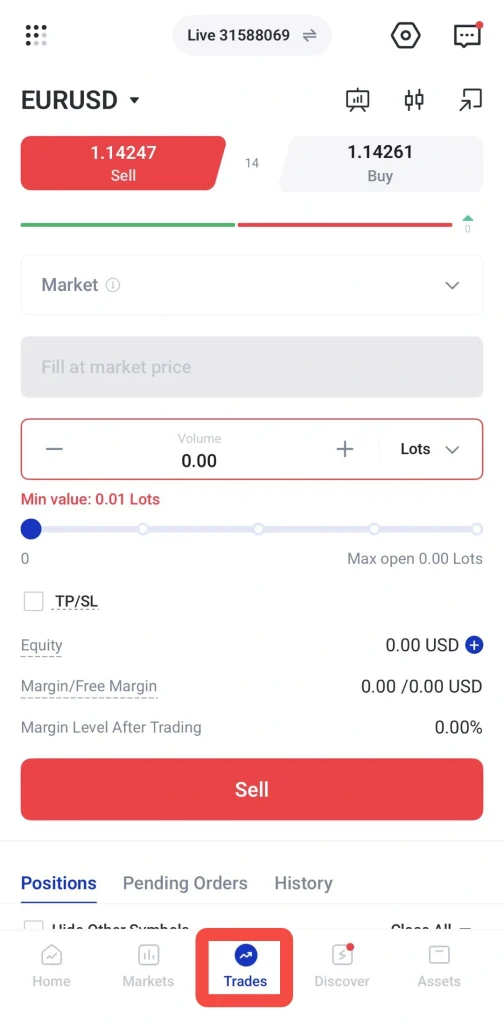
3. Choose Stop Limit as the order type.
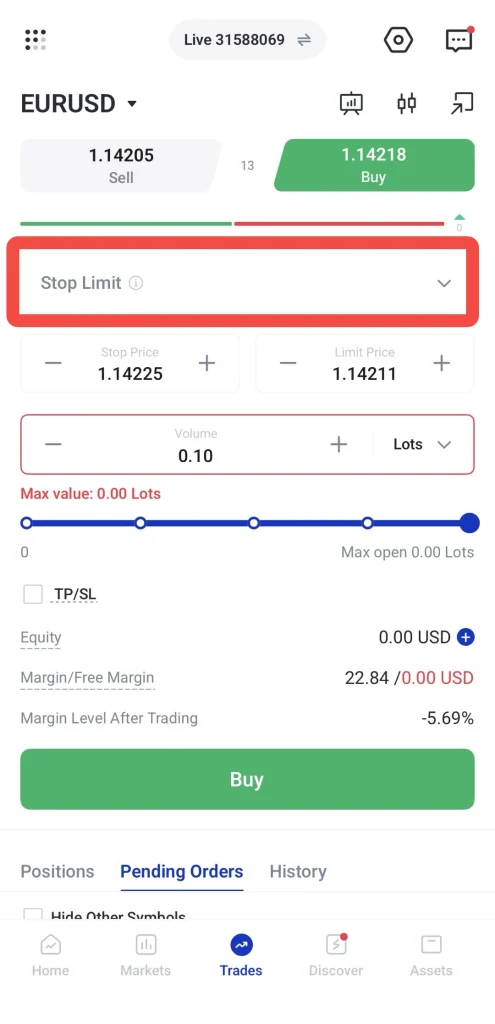
4. Enter the stop price, limit price , trade volume and TP/SL if needed.
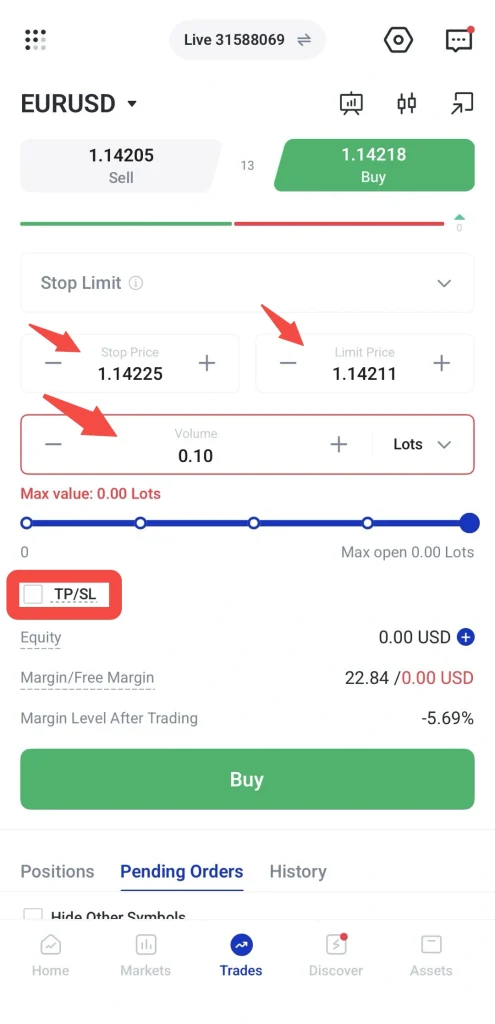
5. Tap Buy or Sell.
When Traders May Use Stop Limit Orders
Traders may use stop limit orders when:
- They want the order to trigger only after price reaches a specific level.
- They also want to control the execution price after the trigger.
- They want to avoid entering too far away from their preferred price.
- They are trading around breakout levels but want additional price control.
Stop limit orders can offer more precision, but they also carry the risk of not being filled.
Practise Order Types on a Demo Account
Traders who are new to order types may practise using them on a VT Markets demo account. A demo account allows traders to test market orders, limit orders, stop orders, and stop limit orders with virtual funds before trading in live market conditions.
This can help traders understand how pending orders are triggered, how market orders are executed, and how different order types behave during changing market conditions.
Frequently Asked Questions
What is the difference between a market order and a pending order?
A market order is executed immediately at the current available market price. A pending order is only triggered when the market reaches a selected price level. Limit, stop, and stop limit orders are examples of pending orders.
What is the difference between a limit order and a stop order?
A limit order is usually used when traders want to enter at a better price than the current market price. A stop order is usually used when traders want to enter only after the market reaches a selected trigger price.
What is a stop limit order?
A stop limit order combines a stop price and a limit price. Once the stop price is reached, a limit order is placed at the selected limit price. This gives traders more control over the execution price, but the order may not always be filled.
Can a pending order fail to execute?
Yes. A pending order may not execute if the market does not reach the selected price. For stop limit orders, the order may also fail to fill if the market moves beyond the limit price too quickly.
Can market orders be affected by slippage?
Yes. Market orders can be affected by slippage, especially during volatile periods or low-liquidity conditions. This means the final execution price may differ from the price shown when the order was placed.
Can traders adjust leverage before placing an order?
Where available, traders may review or adjust leverage from Trade Settings before placing a trade. Leverage options may vary depending on the account type, instrument, equity level, and applicable trading conditions.
Should traders add TP/SL before placing an order?
Traders may add take-profit and stop-loss levels before placing an order to plan their exit levels in advance. A take-profit level helps set a target exit price, while a stop-loss level helps manage downside risk.
Which order type is suitable for beginners?
Beginners may practise market orders first to understand how trades are opened at the current available market price. They can then explore limit, stop, and stop limit orders to learn how pending orders work and how price levels can be used in trade planning.