Key Takeaways
- VT Markets Standard STP Account uses a Straight-Through Processing (STP) model with no dealing desk intervention.
- 100% Commission-Free trading with costs built into competitive spreads.
- Low Entry Barrier with a minimum deposit of only $50.
- High Leverage up to 500:1 available for maximised market exposure.
- Available on MetaTrader 4 (MT4), MetaTrader 5 (MT5), and the VT Markets mobile app.
Looking for a Simple and Transparent Way to Access Global Financial Markets?
The VT Markets Standard STP Account offers traders a straightforward trading environment with competitive spreads, fast execution, and no dealing desk intervention. Designed for traders who value simplicity and efficiency, this account type provides a straightforward cost structure with no separate commission fees.
In this guide, we break down the key features, benefits, and setup process for the Standard STP Account, helping you understand how it works and whether it suits your trading needs.
What is a Standard STP Account?
A Standard STP account uses a straight-through processing (STP) model, where client orders are automatically routed to external liquidity providers. Unlike traditional dealing desk models, trades are not manually processed internally.
This execution model aims to provide transparent pricing and efficient order execution, with trading costs incorporated into the spread rather than charged as a separate commission.
Who Is Suitable for the Standard STP Account?
The Standard STP account is the most popular choice for a wide range of traders because of its balanced cost structure. This is particularly well-suited for those who prefer not to calculate separate commission fees for every trade. Specifically, the Standard STP account is ideal for:
- Beginner traders who want a simple, “spread-only” cost model.
- Retail traders looking for an affordable $50 entry point.
- Swing traders who hold positions for multiple days.
- Mobile traders who need reliable execution on the go.
Standard STP Specifications
Below are the key specifications for the VT Markets Standard STP Account, designed to give you clear and easy access to the forex market with competitive conditions.
| Specifications | |
|---|---|
| Spreads | 1.2 pips |
| Minimum Deposit | $50 |
| Commission | $0 |
| Minimum Trading Size | 0.01 lot |
| Base Currencies | AUD, USD, HKD, GBP, EUR, CAD |
| Leverage* | 500:1 |
| Swap-Free Option | Yes |
*Specifications vary by region.
Key Features and Benefits of the Standard STP Account
The following table highlights why traders choose the VT Markets Standard STP model:
| Feature/Benefit | Description |
|---|---|
| Direct Market Access | Your orders are filled by top-tier liquidity providers, reducing the chance of price manipulation. |
| Zero Commissions | Enjoy a clean trading experience where the only cost is the spread, making accounting simple. |
| High Leverage | Access up to 500:1 leverage, allowing you to control larger positions with a smaller capital outlay. |
| Wide Asset Range | Trade 1000+ instruments, including forex, gold, oil, indices, and global shares. |
| Flexible Platforms | Fully compatible with MetaTrader 4, MetaTrader 5, and the VT Markets App for iOS and Android. |
Understanding the Different VT Markets STP Account Types
VT Markets offers several STP (Straight-Through Processing) account variations designed to meet different trading needs and preferences. While all STP accounts share the same core execution model — where trades are routed directly to liquidity providers without dealing desk intervention — they differ in areas such as swap conditions, balance denomination, and intended trading experience.
For example, Standard STP accounts are designed for traders who prefer a traditional trading environment with balances displayed in standard currency units. Cent accounts, on the other hand, display balances in cents, allowing traders to practise position sizing and risk management with smaller effective trade sizes. Additionally, swap-free options are available for traders who require accounts without overnight interest charges.
The table below compares the key features of each VT Markets STP account type, helping you understand the differences and choose the account structure that best suits your trading style and requirements.
| Feature | Standard STP Account | Standard STP Swap-Free Account | Cent Account STP | Cent Account STP Swap-Free |
|---|---|---|---|---|
| Pricing Model | Spread-only | Spread-only | Spread-only | Spread-only |
| Commission | No commission | No commission | No commission | No commission |
| Minimum Deposit | From $50 | From $50 | From $50 | From $50 |
| Account Currency | AUD, USD, HKD, GBP, EUR, CAD | AUD, USD, HKD, GBP, EUR, CAD | USC (US cents) | USC (US cents) |
| Swap Charges | Yes, applied overnight | No swap charges | Yes, applied overnight | No swap charges |
| Best For | Retail traders seeking simple spread-only pricing | Traders requiring swap-free trading conditions | Beginners practising position sizing with smaller contract sizes | Beginners who require swap-free conditions |
Step-by-Step Guide to Opening a VT Markets Standard STP Account
Opening a standard STP account with VT Markets is fast and straightforward. Follow these simple steps to get started:
Step 1: Access the Account Opening Page
- Visit the official VT Markets homepage: www.vtmarkets.com/
- Click on the Trade Now button located at the top of the page.

Step 2: Fill Out the Registration Form
Provide the following details to set up your account:
- Country of Residence: Choose your country from the dropdown menu.
- Registration method: Enter your email address or phone number.
- Password: Create a strong password using these requirements:
- 8–16 characters
- At least one uppercase letter (A-Z)
- At least one lowercase letter (a-z)
- At least one number (0-9)
- At least one special character (!@#$%^&*.)
- Referrer ID (optional): If referred by someone, enter their ID here.
- Confirm Eligibility: Tick the box confirming you are not a U.S. resident.
- Click Create Account to proceed.

Step 3: Verify Your Email Address/ Phone Number
If you register using a phone number, you will be asked to link your email address after registration.
Enter your email address and tap Send OTP.

Enter your login password and tap Send OTP again for security verification.
You will receive an OTP sent to your linked email address and key in the OTP to complete the verification process.

Step 4: Continue to Account Verification
After completing the registration process, you will be directed to the Home page.
Tap Verify Identity to start the identity verification process.

Then click start verification.

Step 5: Confirm Your Country of Residence
Confirm your country of residence by choosing All other countries except the one(s) below.
Then tap Continue.

Step 6: Fill Up Your Personal Details
Fill up your personal details including:
- Name
- Date of Birth
- Nationality
Once done, tap continue.

Step 7: Select your issuing country and document type
Next, choose the country that issued your document.
Then, select the type of document you would like to use for verification. This may include options such as an identity card, passport, or driving licence, depending on your region and availability.

Step 8: Upload Your Verification Document
Follow the on-screen instructions to upload your chosen document.
For example, if you select passport, make sure the image is clear and all details are visible before clicking Continue.

Step 9 : Wait for Document Review
After submitting your document, VT Markets will review your information and uploaded files.
The review process may take some time. During this stage, your account status may show that it is under review or being processed.

Step 10: Reupload Documents If Required
If your verification is not approved, you may be asked to reupload your document or provide a different document type.
To reduce the chance of rejection, make sure:
- Your document image is clear
- All corners of the document are visible
- The details match the information entered in the app
- The document is valid and not expired
- There is no glare, blur, or obstruction

Once the updated document is resubmitted, your account will return to the review stage.
Step 11: Open trading account
Once your identity verification is completed, you can proceed to open a trading account.
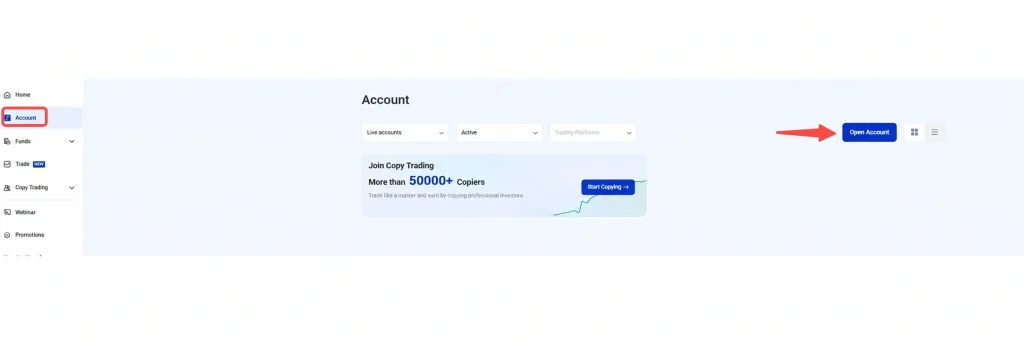
Go to the Account section from the left navigation bar, then click Open Account to create a new trading account.
Step 12: Select Your Trading Platform
Next, choose the trading platform you would like to use.
Depending on availability, you may be able to select from options such as:
- MetaTrader 4 (MT4)
- MetaTrader 5 (MT5)
- Copy Trading
Choose the platform that best suits how you plan to trade.

Step 13: Choose Your Account Type
After selecting your platform, choose Standard STP
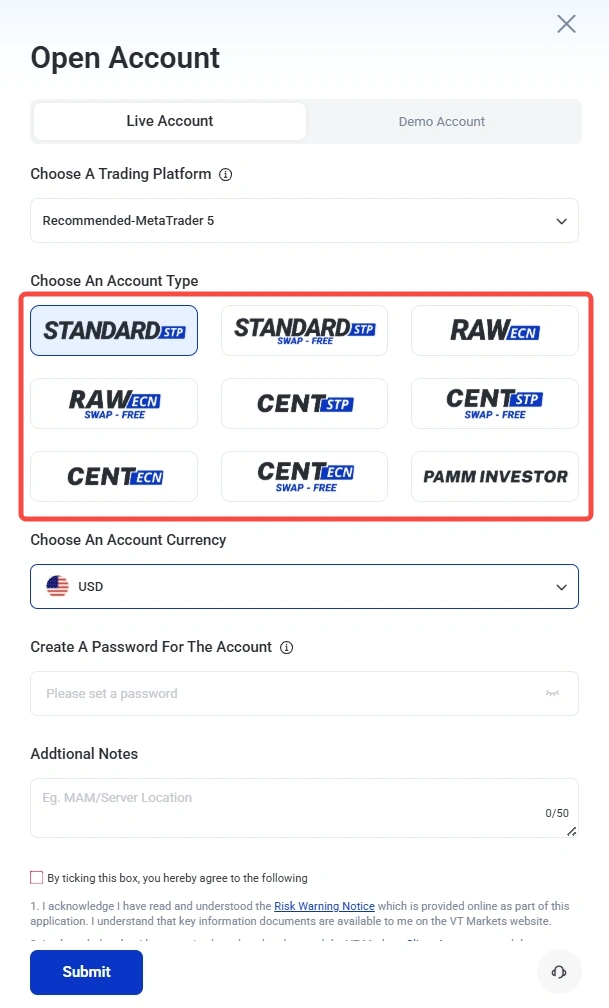
For more information about account types, you may refer to the following guides:
- The Complete Guide to the VT Markets Raw ECN Account
- What is a Swap-Free Account?
- What Is a Trading Cent Account — and Why Many Beginners Start Here
Step 14: Select Your Preferred Account Currency
Next, choose your preferred account currency.
This will be the currency used for your trading account balance, deposits, withdrawals, and account calculations where applicable.
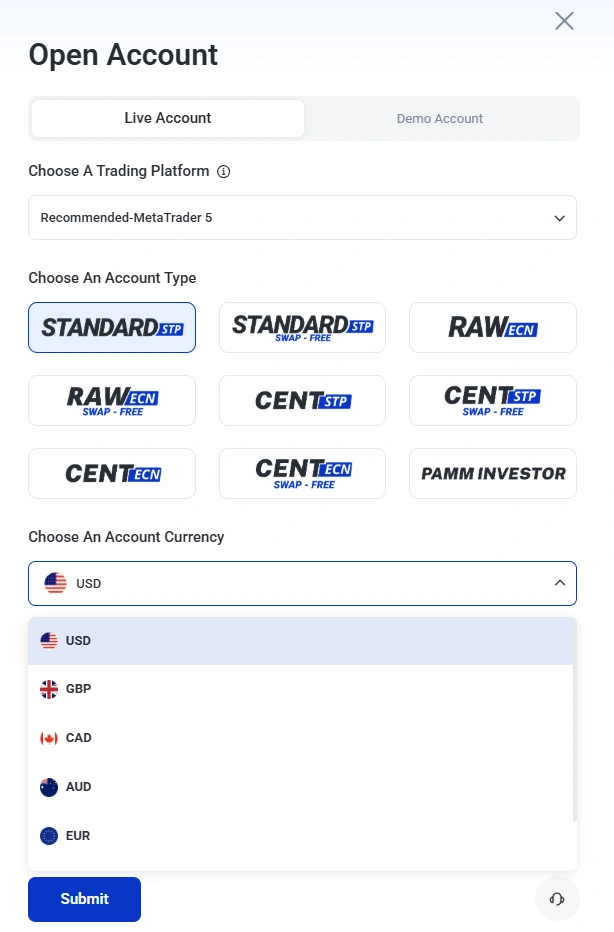
Note: The most common currency is USD. It is recommended to select the currency based on the product traded, or your country of residence for lower conversion costs
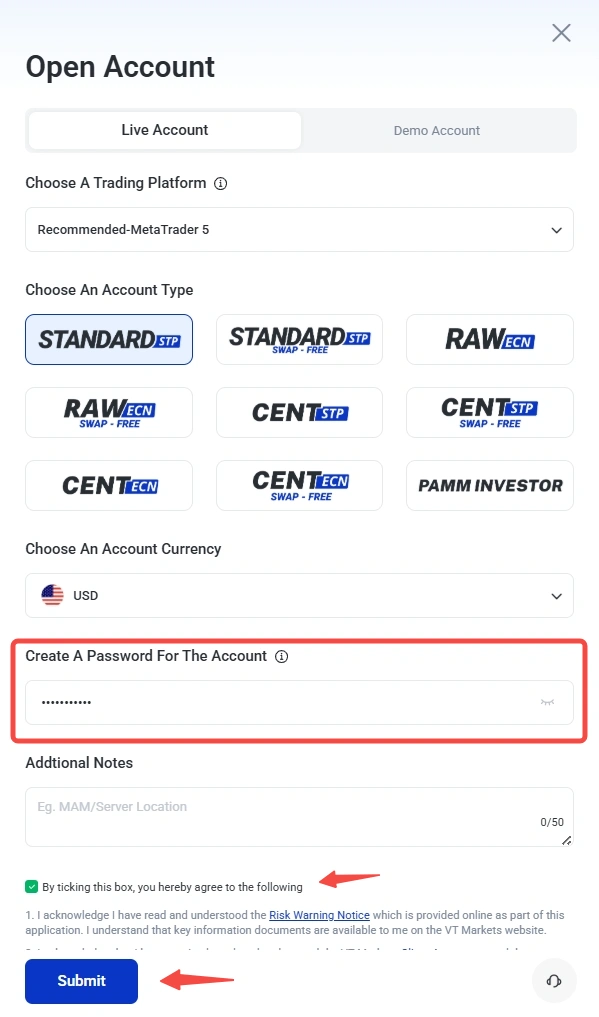
Step 15: Create Account Password
Set up your account password, tick the checkbox to agree to the Terms and Conditions, then click Submit to continue.
Step 16: Account Created
Once your account is created, you can view your account details under the Account section.
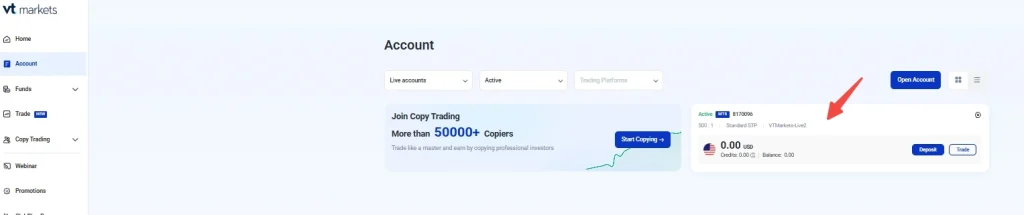
Step 17: Complete Residence Verification
To unlock all features including withdrawal, you are required to complete residence verification.
- Go to Profile > Verification.
- Tap Verify Now
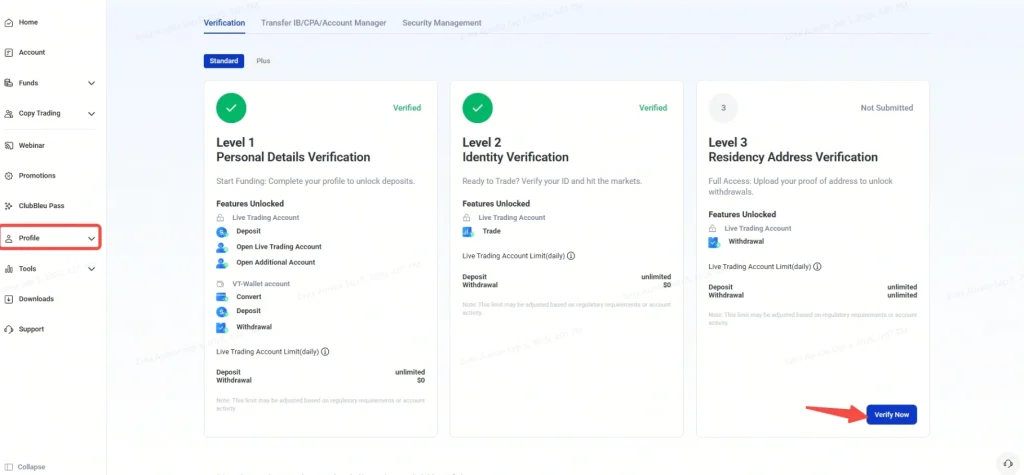
You will be redirected to the verification page, then click Start Verification to continue.

Step 18: Confirm Your Country of Residence
Next, confirm your country of residence.
If you are not a resident of the United States, select All other countries except the one(s) below and click Continue.

Step 19: Review Your Personal Information
Please review your personal information again . This may include your country, first name, last name, and middle name, where applicable.
Make sure the details are accurate and match the document you will use for verification.
Click Continue once the information is complete.

Step 20: Upload Your Proof of Address
Next, upload a document that shows your residential address.
Accepted document types may include:
- Valid ID document with address details
- Bank documents issued within the last 6 months
- Utility bills issued within the last 6 months
- Government-issued documents issued within the last 6 months
Supported file formats may include JPG, PNG, HEIC, WEBP, or PDF, subject to the file size limit shown in the app.
Make sure the document clearly shows your name, address, and issue date where required before submitting it.

Step 21: Wait for Residence Verification Review
After submitting your proof of address, VT Markets will review your information.
The review process may take some time. During this stage, you may see a verification screen while the check is being completed.

Step 22: Reupload Documents If Required
If your verification is not approved, you may be asked to reupload your document or provide a different document type.
To reduce the chance of rejection, make sure:
- Your document image is clear
- All corners of the document are visible
- The details match the information entered in the app
- The document is valid and not expired
- There is no glare, blur, or obstruction
Once the updated document is submitted, your account will return to the review stage.

Once completed, you can proceed with making a withdrawal from your account.
For Existing Clients: Opening an Additional STP Account
As outlined above, VT Markets offers Standard STP accounts in different variations. To open a new Standard STP account, simply log in to your login portal and select “Open Live Accounts” to create a new, separate Standard STP account.
Here’s the step by step guide:
1. Navigate to the Live Accounts tab. Click the “Open Account” button located at the top right corner.

2. Under Account Configuration, select your preferred platform:
- MetaTrader 5 (MT5) – Popular choice, supports more instruments and advanced features
- MetaTrader 4 (MT4) – Classic trading platform
- Copy Trading – For following strategy providers
3. Under Choose account type, you will see several account categories. Look specifically for the icons with “STP”.
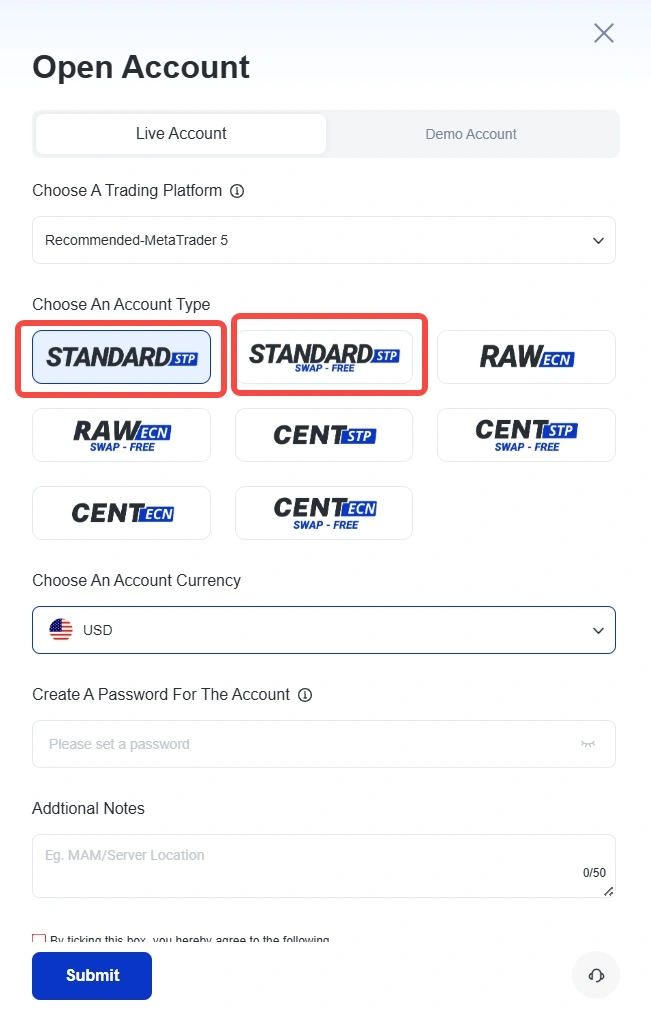
4. Select account currency.
Note: The most common currency is USD. It is recommended to select the currency based on the product traded, or your country of residence for lower conversion costs.
5. Click Submit. We will process your application as soon as possible.
6. Once the account has been approved, you will receive an email confirmation and will be able to view it on the Client Portal.
7. Start adding funds and trading.
Frequently Asked Questions
Is the VT Markets Standard STP Account Suitable for Scalping?
Yes. The VT Markets Standard STP account supports scalping strategies because there are no restrictions on trading styles such as scalping, hedging, or algorithmic trading.
However, some high-frequency scalpers prefer Raw ECN accounts, which offer tighter raw spreads with a separate commission structure. The Standard STP account instead includes trading costs within the spread, making it simpler for traders who prefer a spread-only pricing model.
Can I Open a VT Markets STP Account With a Demo Account?
Yes. You can open a VT Markets Standard STP Demo Account to practise trading without financial risk.
A demo account uses virtual funds while replicating real market conditions, including live pricing, spreads, and execution speeds. This allows traders to test strategies, learn the platform, and understand how the STP account works before depositing real funds.
Are There Any Hidden Fees on the VT Markets Standard STP Account?
No. The VT Markets Standard STP account uses a spread-only pricing model, meaning trading costs are included in the bid-ask spread rather than charged as a separate commission. This structure allows traders to see their trading costs directly through the spread. Other operational fees, such as overnight swap charges, may apply when positions are held past the trading day rollover.
Can I Open Both Standard STP and Raw ECN Accounts?
Yes. Traders can open both Standard STP and Raw ECN accounts directly on the VT Markets App or the VT Markets Client Portal. Simply choose between the desired account type and transfer funds before opening a trade.
Does the VT Markets Standard STP Account Offer Trading Bonuses or Promotions?
From time to time, VT Markets may offer promotional campaigns or trading rewards that apply to Standard STP account holders. These promotions vary depending on the region and regulatory entity. Traders should check the official VT Markets promotions page or the Client Portal for the latest offers and eligibility requirements.
What Is the Minimum Deposit for the VT Markets Standard STP Account?
The minimum deposit for a VT Markets Standard STP account starts from $50, making it accessible for retail traders who want to start trading with a relatively small amount of capital.
The minimum deposit requirement may vary depending on the payment method or regional entity.
What Platforms Can I Use With the VT Markets Standard STP Account?
The VT Markets Standard STP account is available on MetaTrader 4 (MT4), MetaTrader 5 (MT5), and the VT Markets mobile trading app.
These platforms provide advanced charting tools, automated trading support, and real-time market access across forex, commodities, indices, shares, and cryptocurrencies.
Disclaimer: Regional restrictions may apply. Product specifications, trading conditions, and platform features are subject to VT Markets’ Terms and Conditions.